
You are here:
Process Payments and Issue Refunds in Revenue Management
Complete your cash journey by making payments for posted invoices and issuing refunds when needed. Settle open invoice balances in a timely manner and accurately report cash flow by collecting and applying payments. Refund your customers if they change or cancel products or services that they paid for.
Required Editions
| Available in: Lightning Experience |
| Available in: Enterprise, Unlimited, and Developer Editions with Revenue Cloud |
| The Salesforce Payments feature is available with the Revenue Cloud Billing license, with a cost per transaction model for both native and Bring Your Own payment gateways. Contact your Salesforce account executive for more information. |
| If you purchased the Revenue Cloud Billing license on or before July 2025, contact your Salesforce account executive to add the Salesforce Payments feature to your existing license. |
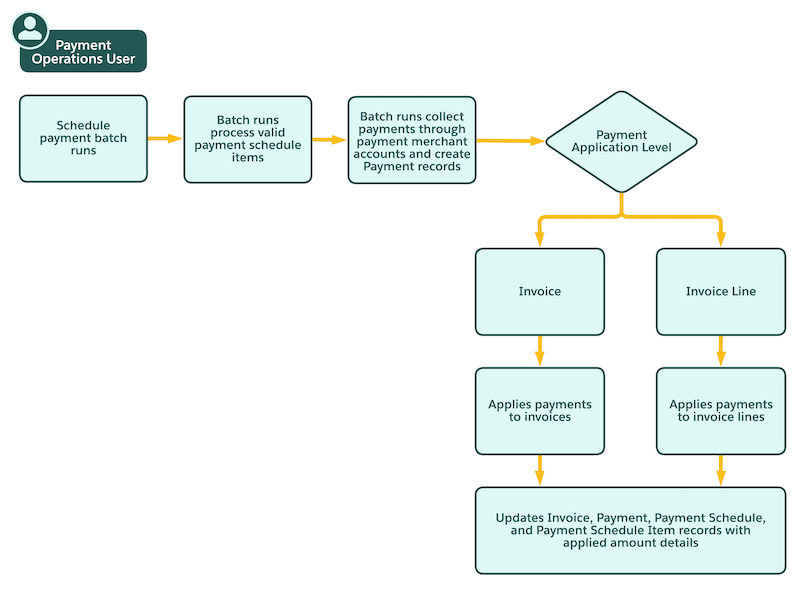
This flowchart shows how a user with the Payment Operations User permission set can use Payments in Revenue Management.
- Payments Data Model in Revenue Management
The Payments data model depicts the objects and their relationships to manage the processing of customer payments including a timely collection of these payments and their application to appropriate invoices, and issuing refunds when needed. - Configure Saved Payment Methods for Revenue Management
Collect one-time or scheduled recurring payments by securely saving the payment methods of your customers, rather than manually entering payment method details each time a payment is processed. Save various payment methods from native or third-party payment gateways, and set a default saved payment method for each account. - Migrate Tokenized Saved Payment Methods
Expand your payment ecosystem by bringing in externally tokenized payment methods into your Salesforce org. Bring in external payment method tokens generated by using buyer-facing portals or the Self-Service Billing portal, and save them as payment methods in your Salesforce org. These externally saved payment methods are immediately available for use in payments batch processing. - Payment Schedules and Payment Schedule Items
Payment schedules contain information about a set of payments that a customer wants to pay at different times for a certain record. A payment schedule contains one or more payment schedule items, where each item represents one payment to be processed. - Schedule Payment Batch Runs to Process Payments
Set up a payment scheduler with specific filters to automatically process payments for your transactions. Payment batch runs process existing payment schedules and payment schedule items to collect the corresponding payments, and then apply them to invoices based on the payment application level. - Payment Batch Run Overview
At the start time of the payment scheduler, payment batch runs start processing payment schedule items based on the defined criteria. - Retry Failed Payments
Billing supports automated retries of failed payments, helping you capture more revenue and reduce manual collections work. When you enable the automatic retry of failed payments in your org, you can define and apply a payment retry strategy for all failed payments. You can define payment retry rules based on error categories such as insufficient funds or payment processing issues. For greater control and flexibility, you can define retry rules based on specific payment gateways and gateway-specific error codes. For each error category, you can configure the retry intervals that determine how frequently Billing can attempt to reprocess the failed payment. Additionally, you can set the maximum number of retry attempts, after which Billing either tries an alternate payment method or marks the payment request as failed. - Issue Refunds and Settle Balances
During subscription changes such as a quantity reduction or cancellation, Billing generates a negative invoice which then gets converted to a credit memo. This action triggers the refund orchestration process, where Billing automatically initiates the refund to the original payment method. - Send Level 2 and Level 3 Payment Data via Your Payment Gateways
Include level 2 and level 3 payment metadata in the payment requests that you make via payment gateways. Level 2 data includes transaction-level details such as tax amount and invoice reference number, while level 3 data includes detailed information such as product code, quantity, and unit price. Billing sends this data directly to third-party payment gateways through Apex adapter classes. - Process Payments and Issue Refunds by Using APIs
Use a suite of APIs to process payments and issue refunds. Authorize and capture payments by using native payment gateways, reverse payment authorizations, tokenize payment methods, and save card details for processing recurring payments. Create and update payment schedulers, and allocate or unallocate payments. You can also process ad hoc payments, and refund your customers if they change or cancel products or services that they paid for.
Did this article solve your issue?
Let us know so we can improve!
