
You are here:
Example: Apply Rule-Based Credits and Payments
Explore an example to understand the setup of rule-based credits and payments in your Salesforce org, and how credit memos and payments are applied to posted invoices of the same account.
Required Editions
| Available in: Lightning Experience |
| Available in: Enterprise, Unlimited, and Developer Editions with the Revenue Cloud Billing license. Contact your Salesforce account executive for more information. |
Initial Setup
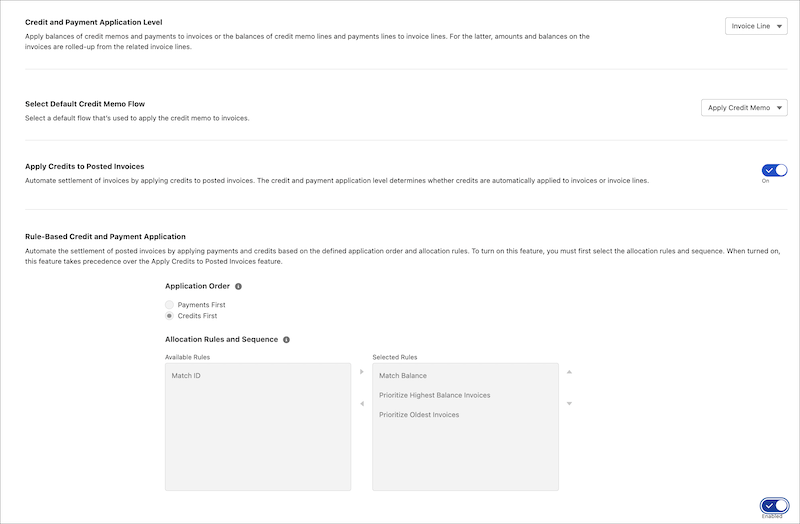
On the Billing Settings page, the Billing Admin makes these selections.
- Application Order: Credits First
- Allocation Rules and Sequence: Match Balance, Prioritize Highest Balance Invoices, and Prioritize Oldest Invoices
- Credit and Payment Application Level: Invoice Line
Then, the Billing Admin enables Rule-Based Credit and Payment Application.
Record Details
The Billing Operations user creates these records for their customer, Acme Corp.
- Credit Memo 1 with a balance amount of 100 USD.
- Credit Memo 2 with a balance amount of 75 USD.
- Payment 1 with a balance amount of 80 USD.
Invoice Generation
The Billing Operations user then schedules an invoice batch run to generate these invoices and invoice lines for Acme Corp.
| Invoice | Invoice Line | Balance Amount |
|---|---|---|
| Invoice 1 | Invoice Line 1 | 50 USD |
| Invoice Line 2 | 50 USD | |
| Invoice 2 | Invoice Line 1 | 150 USD |
| Invoice Line 2 | 50 USD |
Allocation of Rules and Sequence
When the invoices are posted, the selected rules are applied sequentially to reduce the outstanding balances on the invoices.
- Allocation Rule: Match Balance
- Credit Memo 1: Invoice 1 is found with a matching balance of 100 USD. Credit Memo 1 is applied to Invoice Line 1 and Invoice Line 2 of Invoice 1, settling the invoice.
- Credit Memo 2: No matching balance invoice is found for applying credits.
- Payment 1: No matching balance invoice is found for applying payments.
- Allocation Rule: Prioritize Highest Balance Invoices
- Credit Memo 2: Invoice 2 with a highest balance of 200 USD is found. Credit Memo 2
is applied to Invoice Line 1 of Invoice 2, that had a balance amount of 150 USD. After
applying the credit memo, the remaining balance on Invoice Line 1 is 75 USD.
Invoice 2 has a remaining balance of 125 USD.
- Payment 1:
 Note When the invoice with the highest balance is found, credit memos and payments are applied to it to settle the invoice or invoice line. After an invoice is settled, the invoice with the next highest balance is retrieved, and credit memo and payments are applied accordingly.
- Payment 1 is applied to Invoice Line 1 of Invoice 2 that has a balance amount of 75 USD. Invoice Line 1 is settled and Payment 1 shows a balance of 5 USD.
- The remaining payment balance of 5 USD is applied to the next highest balance line, that’s Invoice Line 2 of Invoice 2, with a balance amount of 50 USD. After applying the payment, Invoice Line 2 shows a balance amount of 45 USD.
- Credit Memo 2: Invoice 2 with a highest balance of 200 USD is found. Credit Memo 2
is applied to Invoice Line 1 of Invoice 2, that had a balance amount of 150 USD. After
applying the credit memo, the remaining balance on Invoice Line 1 is 75 USD.
Invoice Status
Here's the status of the invoice records after applying credits and payments.
- The credit and payment amounts on Credit Memo 1, Credit Memo 2, and Payment 1 are applied to Invoice 1 and Invoice 2.
- Invoice 1 is settled.
- Invoice 2 is partially settled with a remaining balance of 45 USD.
