Set up Payments to streamline the management of the entire payment lifecycle. By
establishing a secure connection with native and third-party payment providers, you can directly
process payments for customer transactions within your Salesforce environment.
Required Editions
Available in: Lightning Experience
Available in: Enterprise, Unlimited, and Developer Editions with
Revenue Cloud
The Salesforce Payments feature is available with the Revenue Cloud Billing license, with a cost per transaction model
for both native and Bring Your Own payment gateways. Contact your Salesforce account
executive for more information.
If you purchased the Revenue Cloud Billing license on or before July 2025, contact your
Salesforce account executive to add the Salesforce Payments feature to your existing
license.
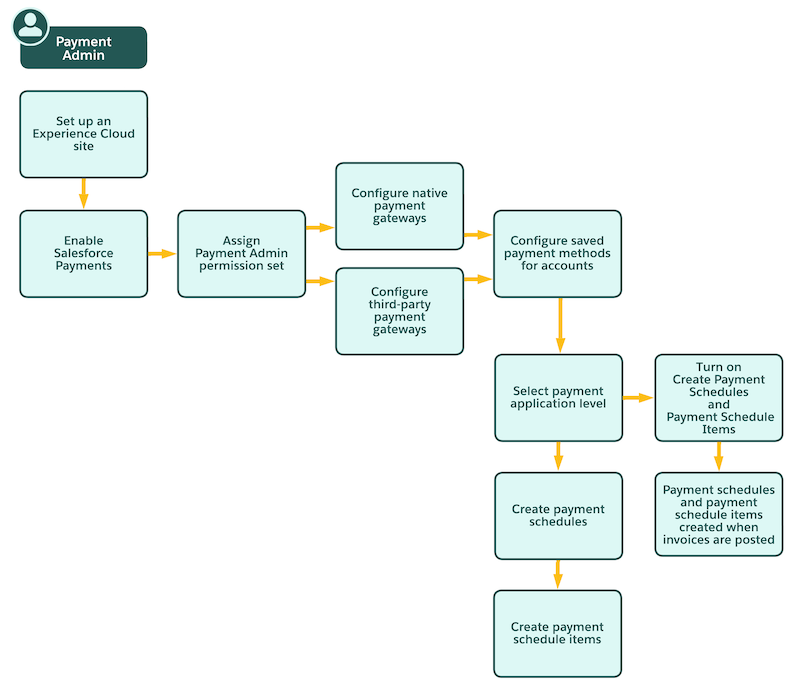
This flowchart shows how a user with the Payment Admin permission set can set up Payments in
Revenue Management.
Configure Salesforce Payments To use Salesforce Payments for financial transactions, set up an Experience Cloud site and enable Payments for your org. Then, use a guided setup to create a merchant account and payment methods.
Set Up Native Payment Gateways by Using Salesforce Payments Accept electronic payments from your customers on Stripe and Adyen payment gateways by using the Salesforce Payments native payment service. Create new Stripe merchant accounts or connect your existing Adyen merchant accounts by using Salesforce Payments.
Set Up Third-Party Payment Gateways Bring your own third-party payment gateways to process payments and issue refunds. Set up and add external payment gateways, and then connect them to Billing.
Set Up Payment Features in Billing Set up Billing to automatically create payment schedules and payment schedule items for posted invoices, share payment accounts, retry failed payments, pass payment metadata, issue refunds, apply credits and payments to settle the balances of invoices or invoice lines, and automate dunning orchestration.
Generate Pay Now Links for Business Accounts Collect invoice payments against the correct business account by generating Pay Now links. Your customers pay as a guest with their preferred payment method and can save it for future use.
Did this article solve your issue?
Let us know so we can improve!
Loading
Salesforce Help | Article
Cookie Consent Manager
Cookie Consent Manager
General Information
Required Cookies
Functional Cookies
Advertising Cookies
General Information
We use three kinds of cookies on our websites: required, functional, and advertising. You can choose whether functional and advertising cookies apply. Click on the different cookie categories to find out more about each category and to change the default settings.
Privacy Statement
Required Cookies
Always Active
Required cookies are necessary for basic website functionality. Some examples include: session cookies needed to transmit the website, authentication cookies, and security cookies.
Functional Cookies
Functional cookies enhance functions, performance, and services on the website. Some examples include: cookies used to analyze site traffic, cookies used for market research, and cookies used to display advertising that is not directed to a particular individual.
Advertising Cookies
Advertising cookies track activity across websites in order to understand a viewer’s interests, and direct them specific marketing. Some examples include: cookies used for remarketing, or interest-based advertising.