
You are here:
Configure Tax Calculation for Invoices
If you plan to use a partner app, your own engine, or calculate standard tax, create a tax engine provider and a tax engine. Then, create tax policies and treatments for each product.
Required Editions
| Available in: Lightning Experience |
| Available in: Enterprise, Unlimited, and Developer Editions with the Revenue Cloud Advanced license or the Revenue Cloud Billing license |
Determine the taxation needs for your products and implement the most appropriate solution amongst these:
- Integrate Appexchange apps of partners such as Vertex or Avalara with the Billing TaxEngineAdapter Apex interface.
- Integrate your own tax engine with the Billing TaxEngineAdapter Apex interface.
- Calculate standard taxes based on flat rates.
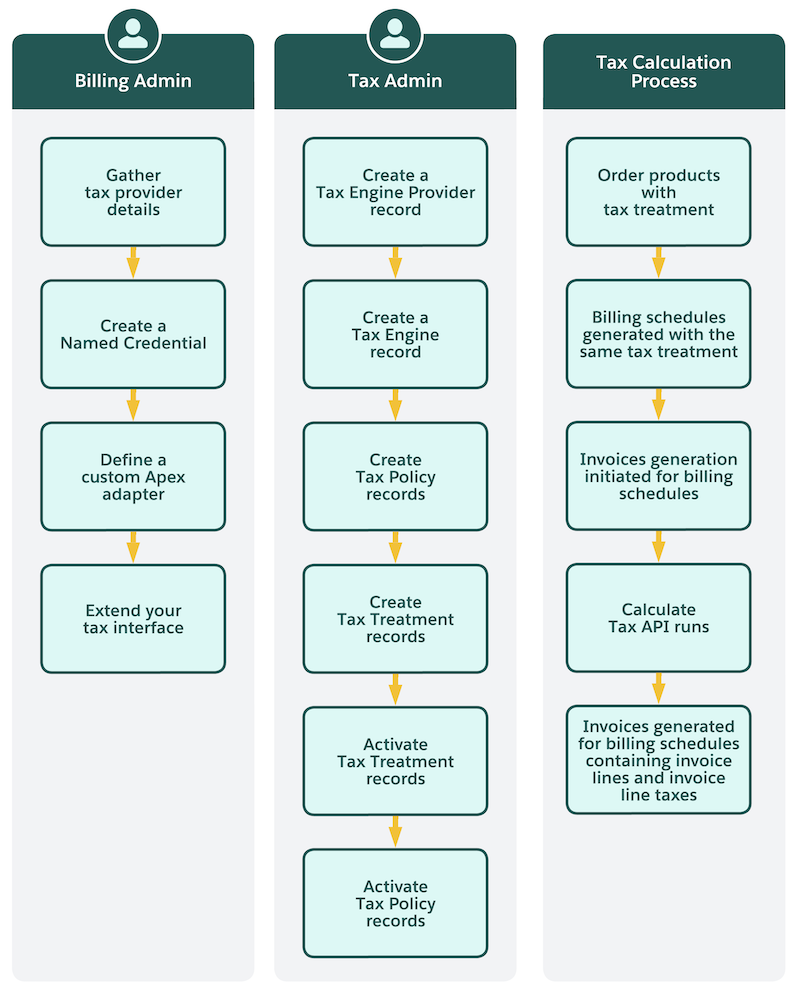
This flowchart shows how users with the Billing Admin and Tax Admin permission sets can configure tax calculation for invoices in Revenue Management.
- Tax Setup Prerequisites
If you want to calculate standard taxes, calculate taxes by using your own tax engine, or by integrating the Billing TaxEngineAdapter Apex interface with a partner app, complete these prerequisites. - Configure Additional Tax Identification Details
Send additional tax identification details to your external tax engine. Meet regional tax compliance requirements by storing tax identification and exemption information on the Billing Profile and passing it to. - Extend Your Tax Interface
Enhance the existing tax interface by mapping additional fields for tax callouts. Use custom metadata types to send additional data in tax requests and persist more detailed information from tax responses. - Revenue Standard Tax Engine
Organizations often face challenges when managing taxes. Common issues include dependency on external tax vendors for simple scenarios, extra licensing and per-transaction costs, performance overhead from external API calls, and regulatory or data residency constraints. These challenges make tax management more complex and costly than necessary. The revenue standard tax engine addresses these issues by enabling internal tax calculation and storage for predictable tax structures. By handling simple tax scenarios internally, organizations can streamline their Revenue Management processes. - Create Tax Engine Provider and Tax Engine
If you want to use a partner app, your own engine, or calculate standard taxes, create a tax engine provider and a tax engine. - Create Tax Policies and Treatments
Create tax policies and their treatments to define the tax calculation for your invoices. - Customize Addresses on Invoice Line Taxes
When you separately bill certain order products of an account, you can specify different tax addresses on the invoices of those order products. This flexibility ensures accurate tax calculations and compliance with regional tax regulations because the tax address is important for calculating tax. Also, your customers benefit from the enhanced accuracy in their financial documentation. - Tax Calculation Process
Understand the tax calculation process for invoices.
Did this article solve your issue?
Let us know so we can improve!
