
You are here:
Capture Transaction Amounts in Multiple Currencies
Manage multi-currency billing transactions by viewing amounts in transactional currency, functional currency, and corporate currency.
Required Editions
| Available in: Lightning Experience |
| Available in: Enterprise, Unlimited, and Developer Editions with Revenue Management (formerly Revenue Cloud) |
The feature is available for the Invoice and Credit memo records, and their related records with the Revenue Cloud Advanced license or the Revenue Cloud Billing license. This feature is available for the Payment, Refund, and Debit Memo records, and their related records with the Revenue Cloud Billing license. Contact your Salesforce account executive for more information. |
Types of Currencies in Billing
In Salesforce org where multiple currencies are enabled, billing transactions are captured in these currencies.
- Corporate Currency
- The currency in which the organization's corporate headquarters reports revenue. For Salesforce orgs where multiple currencies are enabled, corporate currency serves as the basis for all currency conversion rates. See Manage Information About Your Company, Set Your Corporate Currency, and Edit Conversion Rates.
- Functional Currency
- The currency of the Legal Entity record associated with a transaction record.
- Transaction Currency
- The currency in which the transaction takes place.
Process Overview
After your Billing admin turns on Store Transaction Amounts in Corporate and Functional Currencies, the transaction amounts are automatically captured in corporate and functional currencies. The transaction amounts are converted based on the advanced currency management conversion rate on the day the transaction or one of its related records is posted, or processed.
Users with the Account Receivables Admin permission set can update the corporate and the functional currency conversion rate fields on the billing transaction record. They can also update the Functional Currency ISO Code field to match it with the currency of the transaction's legal entity
Transaction Amount Conversion Details
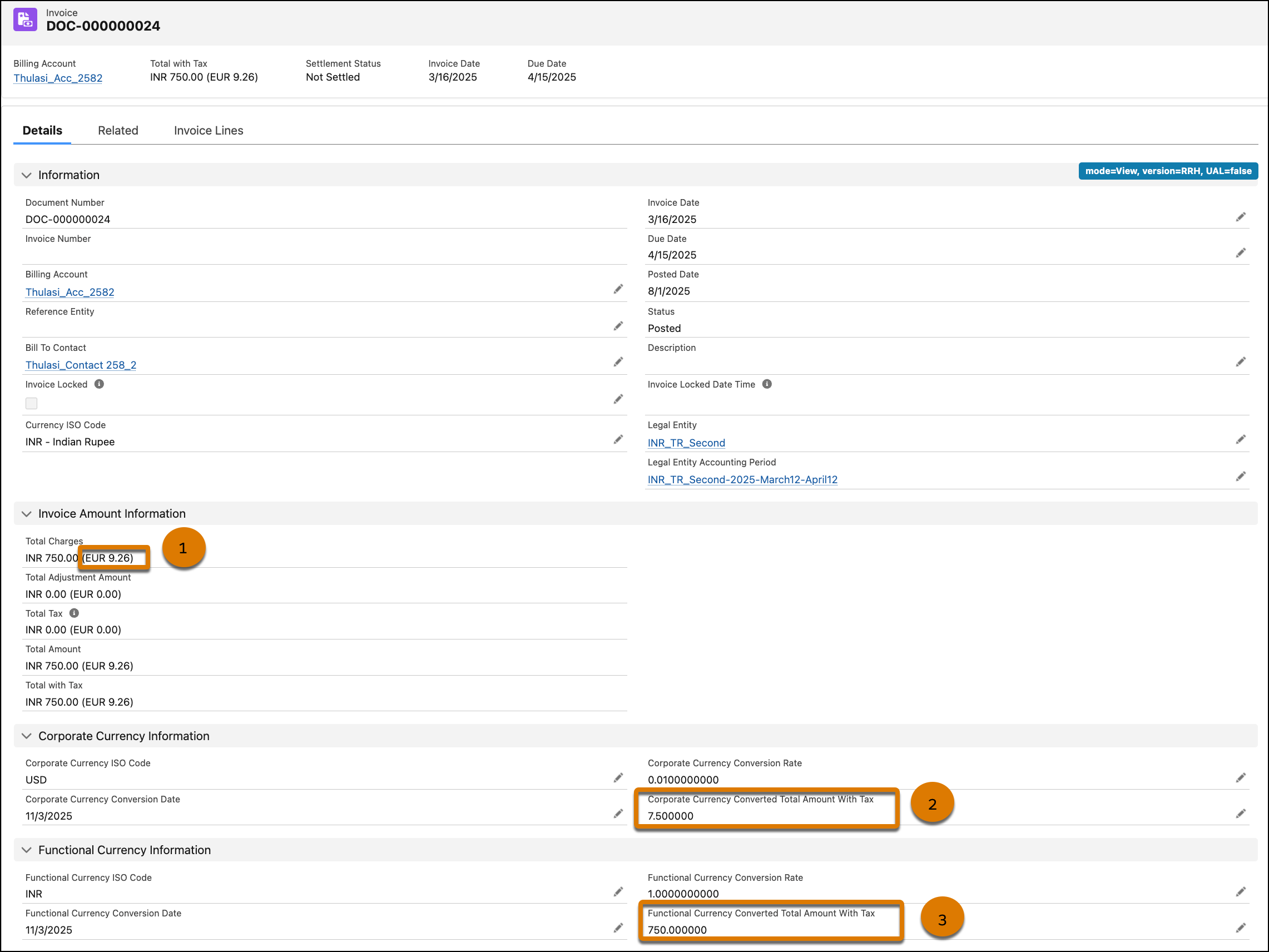
The transaction amounts that appear in brackets (1) are in the user's personal currency. The amount is calculated based on the static conversion rates defined in the Manage Currencies settings in your Salesforce org. If you don't want the transaction amounts in brackets to appear, disable parenthetical currency conversions.
The Corporate Currency Information section provides all the corporate conversion fields and the converted amounts. Similarly, the Functional Currency Information section provides all the functional conversion fields and the corresponding converted amounts, as defined in the Currency Conversion Amount Fields table.
The amounts that appear in the Corporate Currency Information (2) and Functional Currency Information (3) sections are calculated based on the advanced currency management conversion rates valid on the transaction's posted or processed date.
Currency Conversion Amount Fields
The table shows the fields that capture the converted amount for both corporate currency and functional currency.
| Billing Transaction | Transaction Currency Field | Corporate Currency Field | Functional Currency Field |
|---|---|---|---|
| Invoice | Total with Tax | Corporate Currency Converted Total Amount With Tax | Functional Currency Converted Total Amount With Tax |
| Invoice Line | Charge Amount | Corporate Currency Converted Total Charge Amount | Functional Currency Converted Charge Amount |
| Invoice Line | Tax Amount | Corporate Currency Converted Total Tax Amount | Functional Currency Converted Total Tax Amount |
| Invoice Line Tax | Tax Amount | Corporate Currency Converted Tax Amount | Functional Currency Converted Tax Amount |
| Credit Memo | Total with Tax | Corporate Currency Converted Total Amount With Tax | Functional Currency Converted Total Amount With Tax |
| Credit Memo Line | Charge Amount | Corporate Currency Converted Total Charge Amount | Functional Currency Converted Charge Amount |
| Credit Memo Line | Tax Amount | Corporate Currency Converted Total Tax Amount | Functional Currency Converted Total Tax Amount |
| Credit Memo Line Tax | Tax Amount | Corporate Currency Converted Tax Amount | Functional Currency Converted Tax Amount |
| Payment | Amount | Corporate Currency Converted Amount | Functional Currency Converted Amount |
| Refund | Amount | Corporate Currency Converted Amount | Functional Currency Converted Amount |
| Debit Memo | Total Charge Amount | Corporate Currency Converted Total Charge Amount | Functional Currency Converted Total Charge Amount |
| Debit Memo Line | Charge Amount | Corporate Currency Converted Charge Amount | Functional Currency Converted Charge Amount |
| Debit Memo Line Tax | Tax Amount | Corporate Currency Converted Tax Amount | Functional Currency Converted Tax Amount |
