
Key Implementation Considerations
Starting Spring ’22, Consumer Goods (CG) Cloud released a host of new features and enhancements. To support the new features and enhancements, we added new fields in several objects (harmonized objects), created advanced versions of several objects (side-by-side objects), and added several new objects.
Required Editions
| Available in: Enterprise and Unlimited Editions where Consumer Goods Cloud is enabled. |
The image shows some key harmonized objects, side-by-side objects, and new objects.
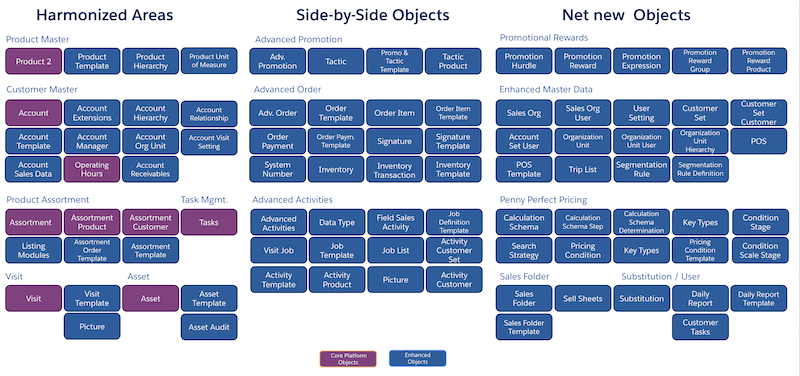
To give you an idea about how the existing and the new features co-exist, we've provided some considerations for implementing and using the Consumer Goods cloud (starting Spring ’22 and onwards) here:
- Multi-Market Enablement and Templates
-
- Use sales org to segregate data and to configure new and advanced business processes.
- Only the advanced business processes from the new model support the multi-market feature out of the box.
- Use templates to create and manage advanced business processes, such as advanced visits, advanced order, advanced promotions, and sales folder. The template settings apply to the business processes that are created using templates. For example, quantity rounding applies only to advanced orders.
- Visits
-
- In addition to standard visits, you can create advanced visits using templates. Advanced visits can handle different visit types. Both these visit options are based on the same Visit object, but they have different business logic and UI layers.
- Plan and create ad hoc advanced visits using the Consumer Goods offline mobile app. Create standard visits in the online system (the Consumer Goods app). You can sync the standard visits to view them in the Consumer Goods offline mobile app.
- Assign action plans only to standard visits.
- Use out-of-the-box GPS tracking only for template-based visits.
- The Canceled visit status is available for advanced visits as Abandoned.
- When an advanced visit is created for an account, only the users assigned to that account can view or execute the visit.
- UI Flows
- The Consumer Goods offline mobile app has these UI flows:
- The existing UI flow, which supports:
- Executing standard visits, which have assessment tasks based on retail stores and accounts.
- Advanced orders.
- The new UI flow, which supports:
- Offline visit planning and visit execution based on accounts.
- All the new features such as sales folder, mobile links, CRM Analytics integration, editable account master data, and advanced orders.
- Adjusting personal settings.
- The existing UI flow, which supports:
- Master Data
- Starting Spring ’22, Consumer Goods cloud uses these advanced capabilities out of the
box to control business processes from the new model, such as order taking:
- Account roles and relationships
- Time-dependent account and product hierarchies
- Flexible product unit of measures
- Authorization lists with listing modules
- Advanced promotions
- Product Assortments
-
- The existing inventory tasks use the assortments that are directly associated with the tasks or the assortments that are in the standard account hierarchy.
- The new processes, such as advanced orders, use the first assortment in the time-dependent account hierarchy.
- Customer Master
-
- In the existing UI flow, you can view customer master data.
- With the new UI flow, you can view and edit customer master data.
- Archive strategy for high volume transactional data
- Consumer Goods Cloud uses standard Salesforce objects (sObjects) to store data in Salesforce. Implement an archiving or data retention strategy to keep the transactional objects below 200 million records.
- Reporting Based on Aggregated Data
- The Consumer Goods Cloud offline mobile app supports live reporting based on offline data to provide visit-related insights and show embedded visualizations based on pre-aggregated data. Set up CRM Analytics if you have sophisticated reporting requirements that don't need live data.
Did this article solve your issue?
Let us know so we can improve!
