
Integrate and Prepare Pricing Conditions
Typically, pricing conditions are stored in an Enterprise Resource Planning (ERP) system in different condition tables, such as Product key Customer key Combination of product, customer, and customer classification keys. Dynamically, for each key type or key combination a table is created. These pricing conditions are integrated from an ERP system to provide the same pricing behavior, to reuse condition data, and to handle complete calculated documents in Salesforce.
Required Editions
Available in: Lightning Experience Available in: Enterprise and Unlimited Editions where Consumer Goods Cloud is enabled |
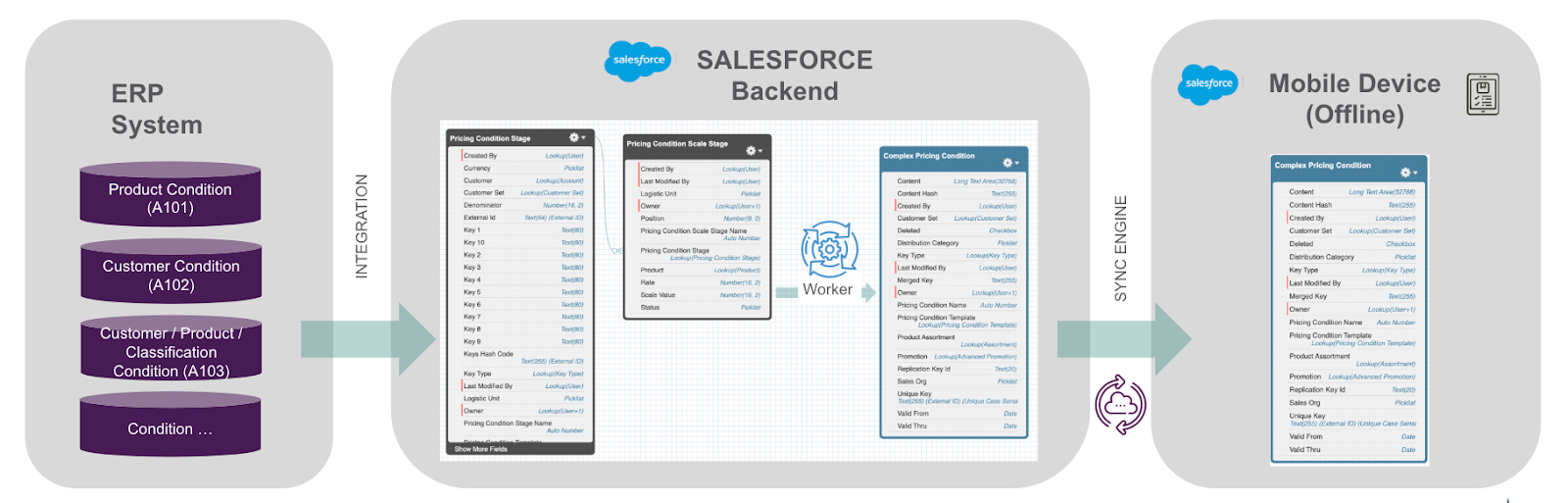
Data Staging
The integration begins with the transfer of pricing conditions into two primary Salesforce staging tables:
- Pricing Condition Stage (Header record): This table captures the basic details of pricing conditions.
- Pricing Condition Scale Stage (Scales + Free items setup): This table includes detailed scales and setups for free items associated with pricing conditions.
Import the pricing stage conditions and pricing scale stage conditions from the ERP system into these tables by using the cgcloud__CP_Pricing_Condition__c and cgcloud__CP_Pricing_Condition_Scale_Stage__c object APIs.
Data Optimization
A dedicated worker process in Processing Services uses the staging table records and prepares the pricing conditions to be accessible on mobile devices in a performant way.
The worker process data optimization involves:
- Creating a Merged Key (customer + Product): This key, which combines customer and product IDs, uniquely identifies each record.
- Consolidating Data: The process eliminates redundant data such as time frames and scales, merging relevant data into a single Content field within the Complex Pricing Conditions table.
- Populating the Replication Key (
Replication_Key_Id__c): Based on the distribution category, this key helps in filtering data that must be synced to mobile devices.
Prepopulation of Key Fields in Complex Pricing Conditions
The Content field in the Complex Pricing Condition table contains the XML and JSON structure populated by the system after the batch process run that combines the pricing condition stage and scale stage records for the same key type. It holds the condition values, scales, time frames, UoM, and currencies for the same key type and key attribute combinations.
Unique Key and Merged Key are generated by the batch process by concatenating a series of attributes from the stage conditions. Unique Key and Merged Key undergo a similar concatenation process, with identical initial concatenated attributes. However, when Unique Key is formed, an additional step of concatenating the Pricing Condition Template ID, Key Type ID, and Sales Org is performed.
Based on the configuration of the key type in the stage condition, additional attributes are included, such as Account ID, Account Set ID, Product ID, and Promotion ID. Key types (1 to 10) from the stage record are also incorporated into the concatenation of Unique Key and Merged Key, with each key type having a maximum length of 80 characters.
Both Unique Key and Merged Key have a character length of 255, and if the resulting concatenation exceeds 255 characters, then the batch process stops in an error state. Unique Key uses 15-character Salesforce IDs, whereas Merge Key uses 18-character Salesforce IDs.

Scheduling and Batch Processing
The optimization is handled through a batch process scheduled by the
ScheduleCGCloudServiceComplexPricing APEX class. This class triggers the
batch process that efficiently processes and combines records, ensuring that the data is
devoid of redundancies.
Mobile Sync
The final step involves synchronizing the optimized data from the Complex Pricing Condition table to the mobile devices. To minimize data volume and enhance performance, the system uses the Distribution Category to filter and sync only the most relevant data. The distribution category can be maintained for a Key type, all, or a customer.

The Content field in the Complex Pricing Condition table contains the XML and JSON structure populated by the system after the batch process run that combines the pricing condition stage and scale stage records for the same key type. It holds condition values, scales, time frames, UoM, and currencies for the same key type and key attribute combinations.
- Remove Pricing Condition Records
Delete old pricing condition records with incorrect IDs from complex pricing condition tables. This step is required only if the you have a trial or an IDO org. - Create Pricing Condition Stage Records
If you aren't importing pricing conditions from an Enterprise Resource Planning (ERP) system, you can manually create the order header and order item condition records in the Pricing Condition Stage table. The pricing worker batch (ScheduleCGCloudServiceComplexPricing) condenses the information from the Pricing Condition Stage and Pricing Condition Scale Stage to arrive at the complex pricing conditions. - Create Pricing Condition Scale Stage Records
Scale conditions represent pricing conditions for various quantities or values of a product. Use the Pricing Condition Scale Stage to define scale conditions that implement pricing conditions for From scale, To scale, Graduated scale, and free items. The pricing worker batch (ScheduleCGCloudServiceComplexPricing) condenses the information from the Pricing Condition Stage and Pricing Condition Scale Stage to arrive at the complex pricing conditions. The system identifies and runs the complex pricing conditions based on the pricing condition template related to the calculation step and arrives at the complex pricing. - Run Complex Pricing Batch Processes
Run the batch processes to flatten the account and org unit hierarchies and populate the complex pricing conditions. Flatten account hierarchy and org unit hierarchy batch is required for searching across all customer hierarchy levels and applying the relevant conditions. Post the completion of the pricing worker batch process, the pricing condition table the correct mapping.
