
Apply Rewards
Based on the achieved hurdles, you can offer rewards for a promotion.
Required Editions
| Available in: Lightning Experience in Professional, Enterprise, and Unlimited Editions that have Consumer Goods Cloud enabled |
Offer rewards for a promotion by using these configurations:
- If Rewards Multiplicity is Up to 1, then you can select a maximum of one reward from the entire reward group.
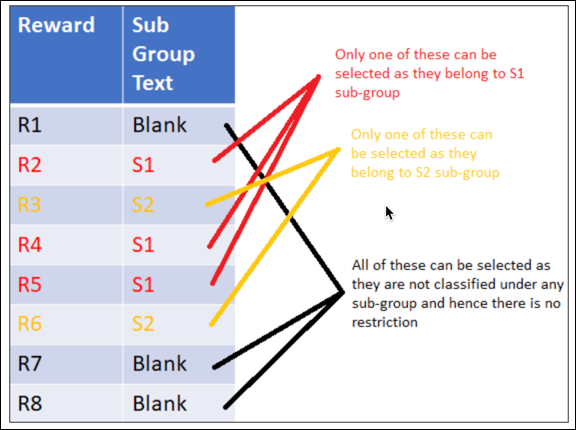
- If Rewards Multiplicity is Zero or more, then you can select:
- A maximum of one reward from a reward subgroup
- Any number of rewards that don’t belong to a subgroup
This image illustrates the rewards that you can select for applying to a promotion if the Reward Multiplicity is Zero or more.
When you select a reward within a promotion for an order, the order calculated is based on these conditions:
- Pricing schema with steps that rely on condition templates for price, percentage discount, amount, and flat rate.
- Search strategy to find the conditions for the reward or a reward and product combination.
When you edit an order, the system automatically applies the rewards and satisfies a reward group. Rewards relevant for auto-granting are determined based on these scenarios:
- If Rewards Multiplicity for the reward group is Up to 1, then the system determines all rewards that are marked as Auto Granted and auto-applies with the highest sort value.
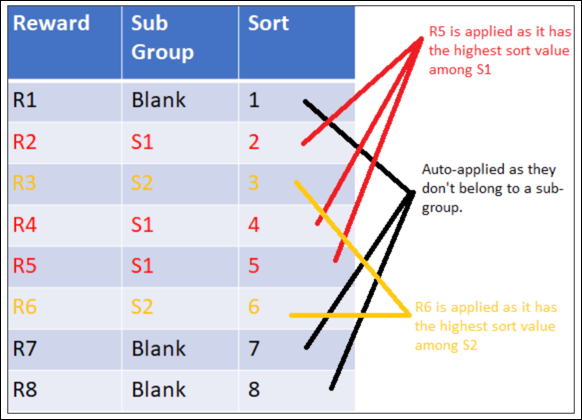
- If Rewards Multiplicity for the reward group is Zero or more, then the system auto-applies:
- The reward that has the highest sort value in the subgroup.
- All rewards that aren’t part of any subgroup and are marked as Auto Granted.
This image illustrates the rewards that the system applies to a promotion if the Reward Multiplicity value is Zero or more and all rewards are auto-granted.
When you either edit or calculate the order that has the Compute Price field selected as Offline in the order template, the system automatically applies rewards to an order. When you've deselected a reward and that results in an unsatisfied reward group, the system automatically removes rewards from the order.
When a user changes the product quantity or reopens a promotional order, the app removes the applied free items. The user must reapply free item rewards manually when they meet the hurdles in the promotional order.
