
Components of Selectable Promotional Order
The components that are involved in a selectable promotion are promotion expressions, hurdles, reward groups, and rewards.
Required Editions
| Available in: Lightning Experience in Professional, Enterprise, and Unlimited Editions that have Consumer Goods Cloud enabled |
This example diagram provides an overview on the execution of a promotional order from a mobile device.
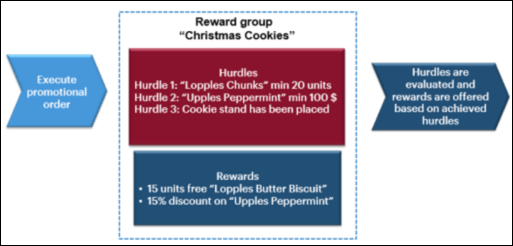
- Promotion Expressions: Defines the evaluation criteria for a hurdle. In general,
expressions are linked to user exits that define these items:
- Attributes to be considered for a selectable promotion
- Relevant product line items and their unit of measure
- Visit job records to be evaluated
The available user exit functions are:
- Sum of Item Values: Evaluates the sum of all product values as determined in the expression value.
- Sum of Item Quantities: Evaluates the sum of all product quantities as determined in the expression value.
- Answered Question: Evaluates the answers that are captured in the visit questionnaire for the job definition template that's defined in the promotion expression.
- Answered Product Survey: Evaluates the answers that are captured in the hurdles for the job definition template that's defined in the promotion expression
- Reward Groups: Contain rewards and hurdles. You can assign various rewards and hurdles to a reward group. If all hurdles within a reward group fulfill the evaluation criteria, then the reward group is a fulfilled reward group. Reward group information is shown even if there are no hurdles assigned. If no hurdles are assigned to a reward group, then the system considers the reward group as a fulfilled reward group.
- Hurdles: Hurdles can be a value within or outside the order. A hurdle consists of hurdle
ID, description, and expression that evaluates the fulfillment of a promotion expression
criteria. Hurdles include these parameters that a promotion expression considers:
- Threshold values for quantities or certain amount
- Operators ( = | <> | < | <+ | > | >= | PER)
- Relevant line items
- Question to answer
- Attribute to consider
Hurdles can be:
- Reward Group Specific: Must be satisfied to mark a reward group as fulfilled.
- Reward Specific: Must be satisfied additionally to make a specific reward eligible to a satisfied reward group.
- Rewards: Defined for a specific reward group of a selectable promotion. You can offer
rewards offered only if all the hurdles assigned to the reward group satisfy the evaluation
criteria. Subgroups help to group rewards. The system groups the rewards that don't have a
subgroup separately.
For a reward group, if the value in the Reward Multiplicity field is Up to 1, then you can select a maximum of one reward. If it’s Zero or More, then you can select more than one reward. You can select Up to 1 reward in a Reward Sub-Group, irrespective of the Reward Multiplicity configuration.
Different types of rewards are:
- Special Base Price
- Percentage Discounts
- Amount per Unit
- Flat Rate
- Free Item
- Special Rewards
Based on the criteria defined in hurdle evaluation, the system identifies a reward group as either satisfied or unsatisfied.
For a selectable promotional order, the system considers only valid reward groups, rewards, and reward products. The reward groups, rewards, and reward products associated with a promotion are considered valid only if the Included option is selected for the reward group, rewards, and reward products. To view the reward groups, rewards, and hurdles associated with the promotion, tap the Rewards button. The Rewards button is visible only if the selected selectable promotion contains at least one valid reward group with or without hurdles. A reward group is shown in this format: (Number of satisfied reward groups) / (Total number of rewards).
