
Setup for Penny Perfect Pricing
A typical flow of pricing configuration involves creating of the key attributes, key types, search strategy, pricing condition template, calculation schema, and schema determination.
Required Editions
Available in: Lightning Experience Available in: Enterprise and Unlimited Editions that have Consumer Goods Cloud enabled |
Here is the pictorial representation of the steps to configure Penny Perfect Pricing.
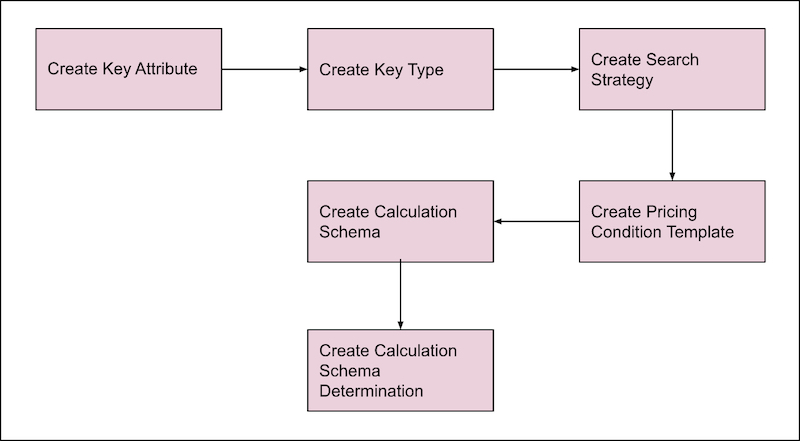
With the setup of Penny Perfect Pricing, you get:
- Pricing rules and calculation schema
- Offline pricing engine with condition search
- Scalable batch and sync process for pricing conditions
- Monitoring and tracking
- Create a Key Attribute
Key attributes are the unique characteristics of an object that represent a part of a more specific or special definition of a search key. Key attributes are used to define a fraction of a key type. Usage of key attributes in a key type is optional when standard keys are used in the key type (such as customer and order IDs). Key attributes are used as a parameters for which the condition values are maintained. Key attributes in a key type determine the search for a condition record. - Create a Key Type
A Key type is a combinations of key attributes that are used to search for specific conditions. Most common keys such as customer, customer set, and product can be directly defined in the key definition section of the key type. More flexible keys (out of customer, product, order entity) can be defined in key attributes (Key Definitions section). A key type can contain up to 10 key attributes. - Create a Search Strategy
Search strategy is a set of key attribute combinations that determine pricing conditions. Depending on the key attribute combination, condition search can be specific or generic. The search strategy assigned to a pricing condition defines how a pricing condition template searches for pricing conditions. Well-designed search strategies can improve search results. - Create a Pricing Condition Template
The Pricing Condition Template defines various conditions, such as discounts or surcharges used in the calculation steps of a calculation schema. - Create a Calculation Schema
A Calculation Schema defines how the price of an order and the order items are calculated. The calculation schema contains a sequence of condition steps (the calculation step is linked with a condition template) and defines the calculation steps to be performed in a particular sequence. - Create a Calculation Schema Determination
Determine the correct calculation schema for an order by using Calculation Schema Determination, which specifies the valid calculation schema for a unique combination of customer price type and order price type. You can have only one calculation schema determination for a unique combination of order price type and customer price type. - Pricing Logs
The pricing engine writes and syncs a pricing log only if the Generate Pricing Log field of the corresponding order template is set to Yes. If the pricing engine skips a calculation step while calculating an order, then the pricing log captures the step's details, such as the field that skipped the step: either User Exit, Calculation Group, or Promotion. To view the pricing log, go to the Pricing Information and Attachments tab of an order. The Pricing Log shows the conditions that aren’t found for the order.
Did this article solve your issue?
Let us know so we can improve!
