
Activity Execution Key Objects
Familiarize yourself with the available objects for enabling activity execution during retail visits.
Required Editions
| Available in: Lightning Experience in Enterprise and Unlimited Editions that have Consumer Goods Cloud enabled |
The image shows the objects that you use for activity execution.
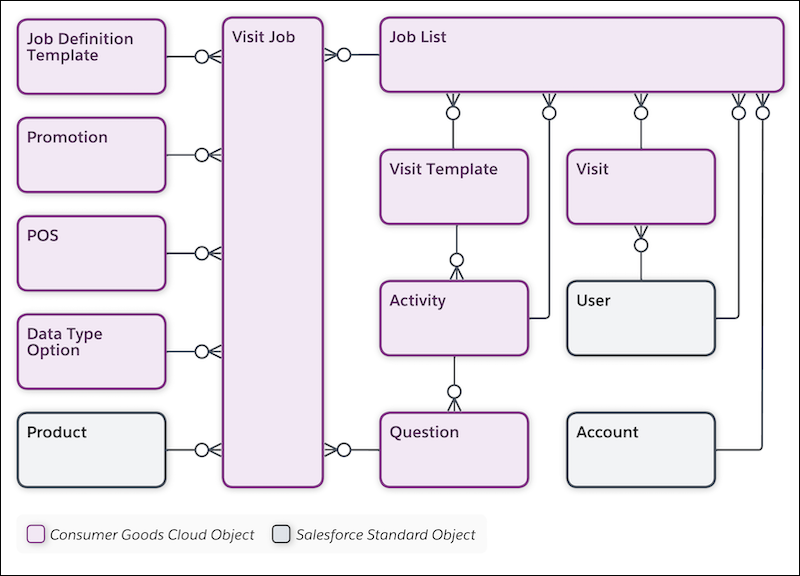
| Object | API Name | Description |
|---|---|---|
| Activity | cgcloud__Job_Definition_List__c | List of questions and surveys to answer during a visit. |
| Account | Account | Information on customers with whom you conduct business. An account can be a retailer, distributor, wholesaler, or consumer. |
| Data Type Option | cgcloud__Data_Type_Option__c | Holds the picklist item of a flexible data type. |
| Job Definition Template | cgcloud__Job_Definition_Template__c | The information that you gather for a store or products, and configure as job definition templates or jobs. Jobs can be a question— to gather store-related information, such as:
Or, jobs can be a survey question— to gather product-related information, such as:
|
| Job List | cgcloud__Job_List__c | Associates an activity with a visit template for a particular customer. You create job lists mainly for event-driven activities and add the lists to the visits. |
| POS | cgcloud__POS__c | Location (other than primary shelf) within the retail store where users place products for promotion or to increase sales. For example: shelf, sales counter, freezer, or vending machine. |
| Product | Product2 | Product details and related information, such as product parts, product conditions, unit of measure, product managers, and warehouses. |
| Promotion | Advanced Promotion | Agreements between a manufacturer and a customer to increase revenue and market share by using temporary price reductions or in-store displays. |
| Question | cgcloud__Job_DL_Job_Definition_Template__c | Helps you gather store-related information, such as:
You can create questions for point-of-sale (POS) or stores. Questions can apply to a store and all points-of-sale of the store, or to a POS type. For an ongoing promotion, questions can help to record temporary observations and ensure success for the promotion. You can use the data from the answers to build a base for customer segmentation processes. |
| User | User | Specific business roles for a sales org. Users conduct retail activities based on the defined role (for example: sales rep or supervisor). |
| Visit | Visit | Information on tasks or operations a field rep carries out during a store visit. A visit can be a standard scheduled visit or an ad-hoc visit. You plan ad-hoc visits for inventory issues, or to promote or upsell a product. |
| Visit Job | cgcloud__Visit_Job__c | Responses to questions or survey questions during visit execution. |
| Visit Template | cgcloud__Visit_Template__c | Template to create customer visit types. For example, sales visit, training, delivery visit, or phone call. |
