
AuthorizationListSetupBatch
Identify and create product authorization lists for stores (accounts with the Store role) based on the account hierarchy and the authorization list for the accounts in the hierarchy. The listed products in the authorization list are crucial for presetting the products in order items list (during orders) and surveys. The batch searches for the authorization list in the account hierarchy from the lowest to the highest. The batch finds and stops at the first hit in the hierarchy level and then considers all listings at that level as authorization lists for the store. The listing classification of an account, in turn, identifies the products for the store listing.
Required Editions
Available in: Lightning Experience Available in: Enterprise and Unlimited Editions where Consumer Goods Cloud is enabled |
Considerations
Keep these considerations in mind during the batch run.
- The batch considers flatten account hierarchy (Flatten_Account_Hierarchy__c) records where Result Level is Store.
- The batch considers only valid accounts with Store role (Current Date is between Store Valid From and Store Valid Thru in Account Extension).
- The batch runs ad-hoc or can be scheduled periodically and Salesforce runs the batch at the given time interval. If the batch is scheduled, it runs with a batch size in the corresponding batch process configuration record. If no batch process configuration record is found, it runs with the default batch size in the class, which is 200. Batch process configuration records are shipped via static resource CSV files during the org setup.

Batch Job Details
During a batch run, the batch query carries out these steps.
- By using the flatten account hierarchy, the batch query fetches all the store IDs and all the accounts above the store in the account hierarchy.
- Finds valid authorization lists for the accounts in the hierarchy. The query retrieves
Product Assortment Customer records when all of these conditions are met.
- Assortment type is Authorization List (Product Assortment Template’s Record Type as Assortment List).
- Store assortment is valid Today (Current Date is between Start Date and End Date in Product Assortment Customer).
- Assortment is valid Today (Current Date is between Valid From and Valid Thru in Assortment).
- Finds existing authorization list records for the stores in the Product Assortment Store
table that the batch added in previous batches and are valid Today. The records are valid
when:
- Assortment type is Authorization List (Product Assortment Template’s Record Type as Assortment List).
- Assortment is valid Today (Current Date is between Valid From and Valid Thru in Assortment).
- Identifies valid authorization lists for the stores Today. The batch process verifies if the Store is related to any list by using the Product Assortment Customer records (data retrieved by the batch in the second step). If any list is found, the batch considers that as the authorization list for the Store. If no list is found, the batch checks the accounts above the store in the account hierarchy, starting from the lowest to the highest. It checks the Product Assortment Customer relationships for each account in the hierarchy. When a list is found, the batch uses the authorization list at that level and stops the search.
- Add new authorization lists for the stores in Product Assortment Store that are valid Today. Keep the valid authorization lists for the stores found in the third step, and remove the invalid lists for the stores.
Post the batch query, the finish method of the batch finds invalid authorization lists for the stores that aren’t found during the query execution and removes the first 10,000 records.

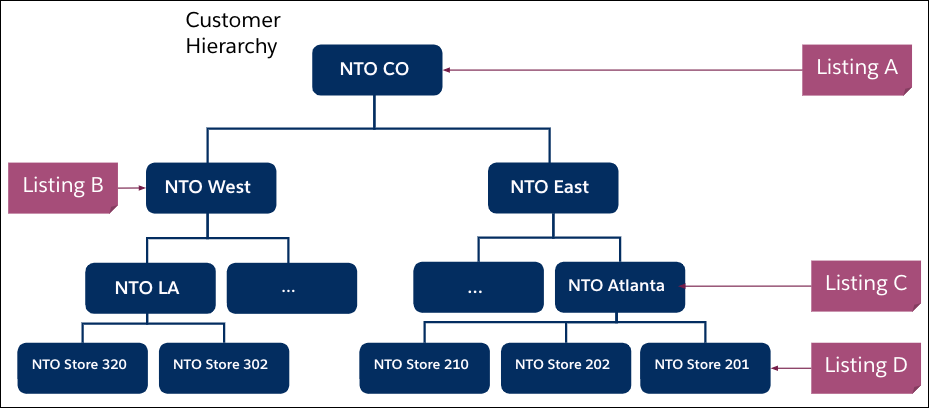
Here’s the account hierarchy for the account NTO CO where only the leaf nodes are the stores.
Here are the valid authorization lists in the org.
| Name | Valid From | Valid Thru | Product Assortment Template |
|---|---|---|---|
| Listing A | 1/1/2000 | 1/1/2099 | Assortment List |
| Listing B | 1/1/2000 | 1/1/2099 | Assortment List |
| Listing C | 1/1/2000 | 1/1/2099 | Assortment List |
| Listing D | 1/1/2000 | 1/1/2099 | Assortment List |
Here are the related authorization lists for various accounts in the hierarchy.
| Assortment | Account | Valid From | Valid Thru |
|---|---|---|---|
| Listing A | NTO CO | 1/1/2000 | 1/1/2099 |
| Listing B | NTO West | 1/1/2000 | 1/1/2099 |
| Listing C | NTO Atlanta | 1/1/2000 | 1/1/2099 |
| Listing D | NTO Store 201 | 1/1/2000 | 1/1/2099 |
During the batch run, these authorization lists are added for the stores in the Product Assortments Store.
Product Assortments Store (Product_Assortment_Store__c)
| Account | Assortment |
|---|---|
| NTO Store 320 | Listing B |
| NTO Store 302 | Listing B |
| NTO Store 210 | Listing C |
| NTO Store 202 | Listing C |
| NTO Store 201 | Listing D |
