CallOrderDistributionReOrgBatch
To show relevant and accurate visits and orders on the Consumer Goods offline mobile app, use the CallOrderDistributionReOrgBatch batch. The batch process identifies all the past visits and orders of accounts that are distribution relevant (Distribution Relevant is true). Only the distribution relevant order and visit records are synced on the mobile app. The batch ignores the visits and orders that have Distribution Relevant as false.
Required Editions
Available in: Lightning Experience Available in: Enterprise and Unlimited Editions where Consumer Goods Cloud is enabled |
Configuration of Distribution Reorganization Settings
Firstly, you must set up the distribution reorganization custom settings (CallDistributionSetting and OrderDistributionSetting) for visits and orders. Use these settings to specify Distribution Relevant Count (number of latest records to show) and Distribution Relevant CutOff Date (number of most recent days to include records from) for both visits and orders. See Configure Distribution Reorganization Settings.
Batch Processing
By default, visits and orders are created with Distribution Relevant as true. During the batch run, based on these conditions, the Distribution Relevant field is updated for the visits and order records of each account.
You can run this batch process manually or run it at a scheduled time. See Batch Processing.
Distribution Relevant is updated from true to false for these visits and orders.
- Visits in the Abandoned status.
- Planned visits with a start date that isn’t between the current date (Today) and Distribution Relevant CutOff Date.
- Completed visits with a start date that isn’t between the current date and Distribution Relevant CutOff Date and the total number of recently completed visits greater than Distribution Relevant Count.
- Orders in the Canceled phase.
- Orders that aren’t in the Ready or Canceled phase with an order date that isn’t between the current date and Distribution Relevant CutOff Date.
- Ready orders with an order date that isn’t between the current date and Distribution Relevant CutOff Date and the total number of recently ready orders greater than Distribution Relevant Count.
Based on the Consumer Goods Cloud managed package that you are using, Distribution Relevant is updated from true to false for these visits and orders as well.
- In Progress visits with a start date that isn’t between any future date and Distribution Relevant CutOff Date (for Spring ’25).
- In Progress visits without a related tour (for Winter ’25).
- In Progress visits with a related tour and with a start date that isn’t between the current date (Today) and Distribution Relevant CutOff Date (for Winter ’25).
- In Progress visits marked with Distribution Relevant as false regardless of the tour assignment (Prior to Winter ’25).

Distribution Relevant remains unchanged as true for these visits and orders.
- In Progress visits or Planned visits having a start date between the current date and Distribution Relevant CutOff Date.
- Completed visits with a start date between the current date and Distribution Relevant CutOff Date.
- Completed visits with a start date that isn’t between the current date and Distribution Relevant CutOff Date and the total number of recently completed visits count less than Distribution Relevant Count.
- Ready orders that have an order date between the current date and Distribution Relevant CutOff Date.
- Ready orders with an order date that isn’t between the current date and Distribution Relevant CutOff Date and the total number of recent ready orders count less than Distribution Relevant Count.
- Orders with a phase other than Ready or Canceled and an order date between the current date and Distribution Relevant CutOff Date.
Considerations
Keep these considerations in mind during the batch run:
- The batch considers only the accounts that have Customer as the record type.
- The batch can update up to 10,000 records in a single transaction, with visits having more preference than orders. Any remaining records are picked up during the next batch process run.
- The batch doesn't consider visits (the visit start date is later than the current date) and orders (the order start date is later than the current date) in the future.

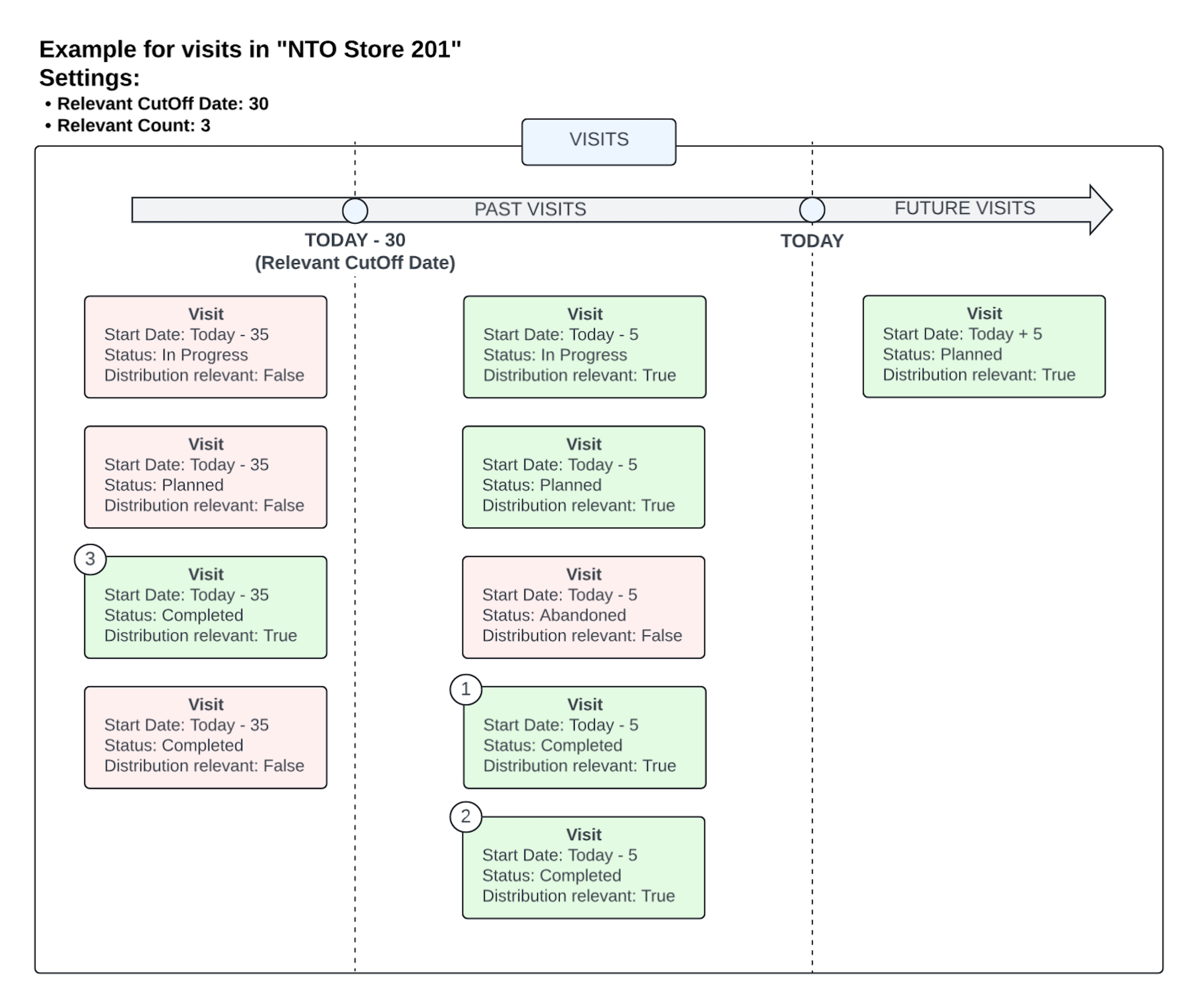
- Distribution Relevant CutOff Date as 30
- Distribution Relevant Count as 3
| Visit Status | Visit Start Date | Distribution Relevant |
|---|---|---|
| Planned | Today + 5 | true |
| Planned | Today - 5 | true |
| In Progress | Today - 5 | true |
| Abandoned | Today - 5 | true |
| Completed | Today - 5 | true |
| Completed | Today - 5 | true |
| Planned | Today - 35 | true |
| In Progress | Today - 35 | true |
| Completed | Today - 35 | true |
| Completed | Today - 35 | true |
Run the CallOrderDistributionReOrgBatch batch. If you're using the Consumer Goods Cloud Managed package from Spring ’25, post the batch run, the Distribution Relevant field for visits is updated as listed.
| Visit Status | Visit Start Date | Distribution Relevant | Reason for distribution relevant |
|---|---|---|---|
| Planned | Today + 5 | true | Future visits aren't considered. |
| Planned | Today - 5 | true | Planned visits are distribution relevant after the cutoff date. |
| In Progress | Today - 5 | true | In Progress visits are distribution relevant after the cutoff date. |
| Abandoned | Today - 5 | false | Abandoned visits aren't distribution relevant. |
| Completed | Today - 5 | true | Completed visits are distribution relevant after the cutoff date (1*) |
| Completed | Today - 5 | true | Completed visits are distribution relevant after the cutoff date (2*) |
| Planned | Today - 35 | false | Planned visits aren't distribution relevant before the cutoff date. |
| In progress | Today - 35 | false | In Progress visits aren’t distribution relevant before the cutoff date. |
| Completed | Today - 35 | true | Completed visits are distribution relevant before the cutoff date if the count (total completed visits) < 3 (3*) |
| Completed | Today - 35 | false | Completed visits aren't distribution relevant before the cutoff date if the count (total completed visits) < 3 (4*) |
Here’s the pictorial representation of visits that are marked as distribution relevant for the NTO Store 201 post the batch run.