
Daily Report Key Objects
Analyze the productive and unproductive hours and monitor the time utilization of a sales team by using the Daily Report objects.
Required Editions
| Available in: Lightning Experience in Enterprise and Unlimited Editions that have Consumer Goods Cloud enabled |
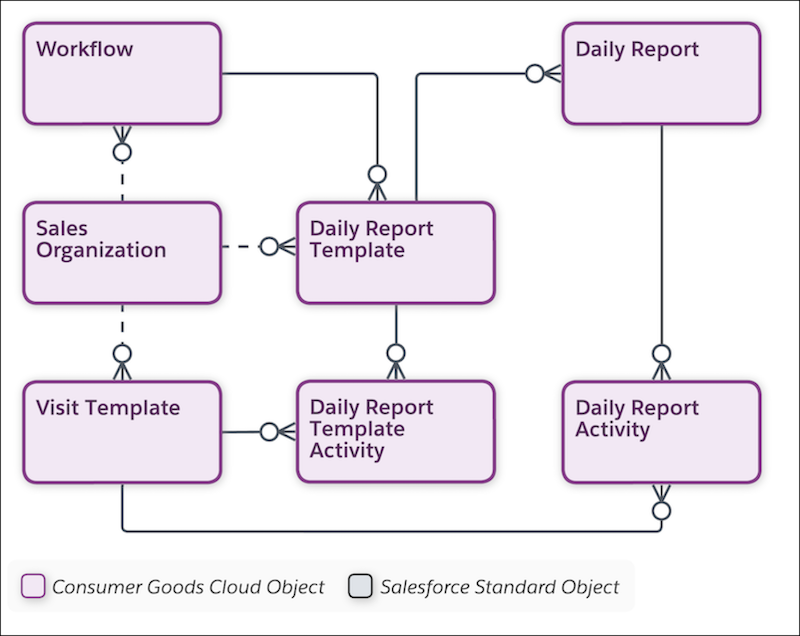
The image shows the objects that are used to manage daily reports.
| Object | API Name | Description |
|---|---|---|
| Daily Report | cgcloud__User_Document__c | Tracks time for the activities done by a sales rep for the day. |
| Daily Report Activity | cgcloud__User_Document_Activity__c | Activities against which the sales rep logs the time, and that are part of the daily report. |
| Daily Report Template | cgcloud__User_Document_Template__c | Template to create daily reports based on configurations such as workflow, creation platform, and maximum permissible duration for an activity. |
| Daily Report Template Activity | cgcloud__User_Document_Template_Activity__c | Template to add activities to a daily report. |
| Sales Organization | cgcloud__Sales_Organization__c | Business segments that you use to structure your data and business processes by your organizational unit. You can base business segmentation on geographical territories, product division, or account team. |
| Visit Template | cgcloud__Visit_Template__c | Template to create customer visit types. For example: sales visit, training, delivery visit, or phone call. |
| Workflow | cgcloud__Workflow__c | Details of a workflow. You can use these details in various business processes such as
You can’t add a single workflow for multiple business processes at the same time. |
Did this article solve your issue?
Let us know so we can improve!
