
Inventory Control and Order Payments Key Objects
Available objects to track and manage your inventory and order payments.
Required Editions
| Available in: Lightning Experience in Enterprise and Unlimited Editions that have Consumer Goods Cloud enabled |
The image shows the objects to manage inventories and order payments.
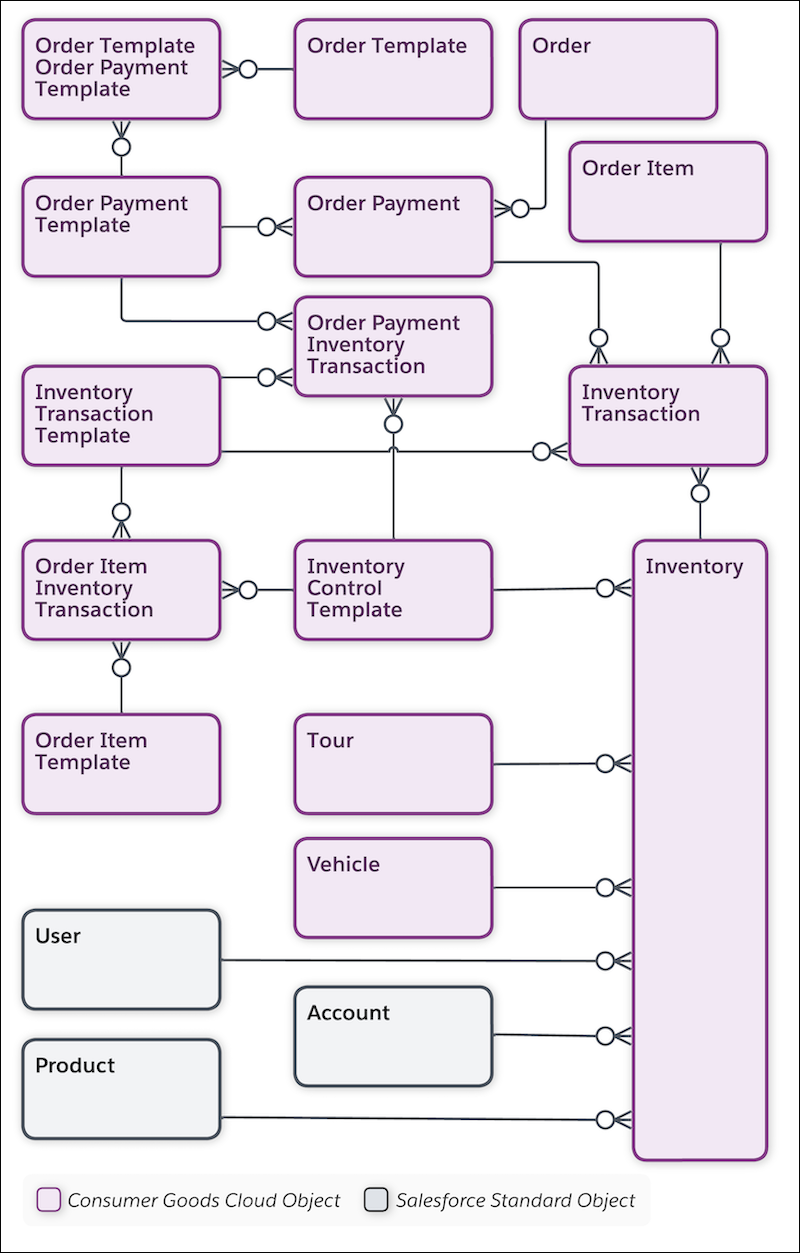
| Object | API Name | Description |
|---|---|---|
| Account | Account | Information on customers with whom you conduct business. An account can be a retailer, distributor, wholesaler, or consumer. |
| Advanced Order | cgcloud__Order__c | Header details of an order that contains references to a visit, customer, order, and delivery date. |
| Inventory | cgcloud__Inventory__c | Track the quantities and flow of goods in real time by using inventory records. Inventory can be product stock, customer quota, or cash flow. You can assign inventory to tour, vehicle, users, accounts, or their combinations. |
| Inventory Control Document | cgcloud__Order__c | Document to support use cases:
|
| Inventory Control Template | cgcloud__Inventory_Control_Template__c | Template to manage inventories for an order. |
| Inventory Transaction | cgcloud__Inventory_Transaction__c | Transaction for every trigger that changes the inventory. Supports accurate tracking of distributed and offline shared inventories. |
| Inventory Transaction Template | cgcloud__Inventory_Transaction_Template__c | Template that defines the transaction type (addition, withdrawal, balance, or void) for an inventory transaction. |
| Order Item | cgcloud__Order_Item__c | Details about an order, such as quantities, unit of measure, promotion, and pricing for products. |
| Order Item Inventory Transaction | cgcloud__Order_Item_Inventory_Transaction__c | Junction object that contains the inventory control template and the inventory transaction template. Admins set up and maintain order item inventory transactions. |
| Order Item Template | cgcloud__Order_Item_Template__c | Template that defines the behavior of an order item. Examples of order item templates are standard, return, or free items. |
| Order Payment | cgcloud__Order_Payment__c | Payment information (gross and net amount) and payment type of an order. |
| Order Payment Inventory Transaction | cgcloud__Order_Payment_Inventory_Transaction__c | Association between order payment template, inventory template, and inventory transaction template. |
| Order Payment Template | cgcloud__Order_Payment_Template__c | Template to define the payment methods for orders. |
| Order Template | cgcloud__Order_Template__c | Predefined templates to create an order:
Order templates specify the basic characteristics of an order that your users create. |
| Order Template Order Payment Template | cgcloud__Order_Template_Order_Payment_Template__c | Association between Order Template and Order Payment Template. Use this object to assign an order payment template to an order template. |
| Product | Product2 | Product details and related information, such as product parts, product conditions, unit of measure, product managers, and warehouses. |
| Tour | cgcloud__Tour__c | Tour details such as the date of the tour, tour notes, vehicle, and route details. You can create a tour from a route (van-sales tour) or independently. |
| User | User | Specific business roles for a sales org. Users conduct retail activities based on the defined role (for example: sales rep or supervisor). |
| Vehicle | cgcloud__Vehicle__c | Details of a vehicle that carries goods from a warehouse to a retail store or a location. |
Did this article solve your issue?
Let us know so we can improve!
