
Route, Tour, and Warehouse Key Objects
Set up route templates and tour templates, create routes with (warehouse, user, and customer) assignments, and create independent tours or tours from routes by using the Route, Tour, and Warehouse objects.
Required Editions
| Available in: Lightning Experience in Enterprise and Unlimited Editions that have Consumer Goods Cloud enabled |
The image shows the objects that are part of the route and tour management.
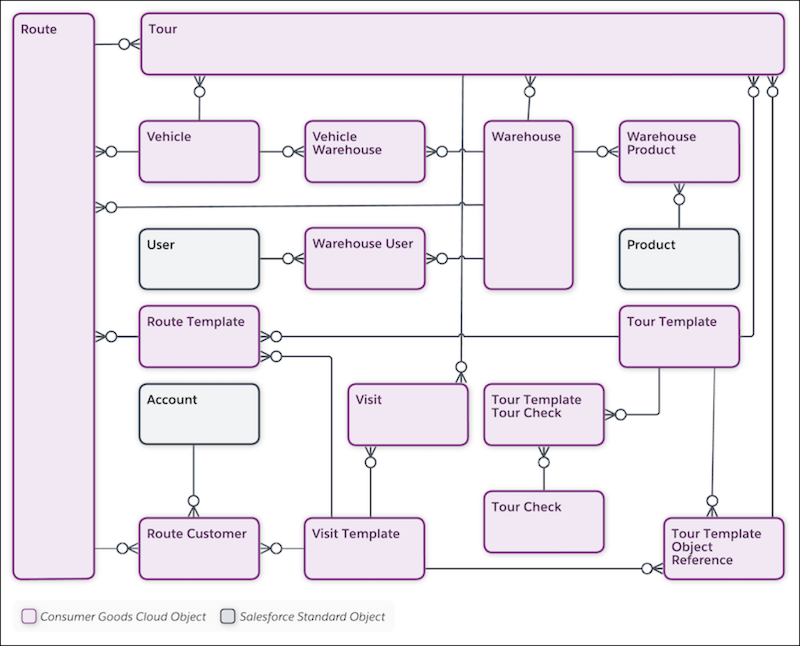
| Object | API Name | Description |
|---|---|---|
| Account | Account | Information on customers with whom you conduct business. An account can be a retailer, distributor, wholesaler, or consumer. |
| Product | Product2 | Product details and related information, such as product parts, product conditions, unit of measure, product managers, and warehouses. |
| Route | cgcloud__Route__c | Defines the key characteristics (example: warehouse, default user & vehicles) for delivery, sales, or merchandising trips. You can assign a list of customer stops in a specific sequence, together with the visit type, to a route. You can create specific executable tours by using routes. |
| Route Customer | cgcloud__Route_Account__c | Association between the Route and the Account objects. Use this object to associate various customers to routes. |
| Route Template | cgcloud__Route_Template__c | Template to set up route types for different markets. |
| Tour | cgcloud__Tour__c | Tour details such as the date of the tour, tour notes, vehicle, and route details. You can create a tour from a route (van-sales tour) or independently. |
| Tour Check | cgcloud__Tour_Check__c | Details of security checks to complete during a tour. Examples:
|
| Tour Template | cgcloud__Tour_Template__c | Template to create tours:
|
| Tour Template Object Reference | cgcloud__Tour_Template_Object_Reference__c | Use this object to add one or more object references to the tour template to add:
|
| Tour Template Tour Check | cgcloud__Tour_Template_Tour_Check__c | The relationship between the tour template and the tour check. The relationship defines the relevant tour checks for a tour. |
| User | User | Specific business roles for a sales org. Users conduct retail activities based on the defined role (for example: sales rep or supervisor). |
| Vehicle | cgcloud__Vehicle__c | Details of a vehicle that carries goods from a warehouse to a retail store or a location. |
| Vehicle Warehouse | cgcloud__Vehicle_Warehouse__c | Association between the Vehicle and Warehouse objects. Use this object to assign a vehicle to a warehouse. |
| Visit | Visit | Information on tasks or operations to carry out during a field rep’s visit to a store. A visit can be a standard scheduled visit or an ad-hoc visit. You plan ad-hoc visits for inventory issues, or to promote or upsell a product. |
| Visit Template | cgcloud__Visit_Template__c | Template to create customer visit types. For example, sales visit, training, delivery visit, or phone call. |
| Warehouse | cgcloud__Warehouse__c | Customer's warehouse details, such as address, location, products, and vehicles. You need warehouse details for the sales and delivery processes. |
| Warehouse Product | cgcloud__Warehouse_Product__c | Products that customer stores in a warehouse. |
| Warehouse User | cgcloud__Warehouse_User__c | Association between the Warehouse and the User objects. To allow users such as drivers to take products out of a warehouse, assign the users to the warehouse. |
Did this article solve your issue?
Let us know so we can improve!
