
Define Company Logo on User Cockpit
Customize the UI, lookup, datasource, and process contracts in Visual Studio (VS) Code based Modeler. Build the contracts and review the customization in the simulator app.
Required Editions
| Available in: Lightning Experience in Enterprise and Unlimited Editions that have Consumer Goods Cloud enabled |
-
To load the sales organization, in VS Code based Modeler, open the
Application_CockpitProcess.processflow.xml contract and add this code.
<Action name="CardUserWelcome_loadData" actionType="LOAD" type="LuCallCountByDate"> <Parameters> <Input name="cardDate" value="ProcessContext::CardDate" /> </Parameters> <Return name="ProcessContext::LuCallCount"/> <TransitionTo action="LoadSalesOrg" /> </Action> <Action name="LoadSalesOrg" actionType="LOAD" type="LuSalesOrg"> <Return name="ProcessContext::SalesOrg" /> <TransitionTo action="LoadTodoCount" /> </Action> <Action name="LoadTodoCount" actionType="LOAD" type="LuTodoCountByDate"/> - Save your changes.
-
To bind the
companyLogoandcompanyLogoFileTypetargets, add this code to theUserWelcomesection in the Application_CockpitUI.userinterface.xml contract.<UserWelcome name="UserWelcomeCardUiPlugin"> <Bindings> <Binding target="userImage" type="Blob" binding="ApplicationContext::User.profilePicture" /> <Binding target="companyLogo" type="Blob" binding="ProcessContext::SalesOrg.mediaPath" /> <Binding target="companyLogoFileType" type="Text" binding="ProcessContext::SalesOrg.fileType" /> <Binding target="userName" type="Text" binding="ApplicationContext::User name" bindingMode="ONE_WAY" /> - Save your changes.
-
To define the simple properties for
mediaPathandfileType, add this code to the LuSalesOrg.lookupobject.xml contract.<SimpleProperty name="legalInformation" type="DomLongDescription" dataSourceProperty="legalInformation" <SimpleProperty name="currency" type="DomCurrency" dataSourceProperty="currency" /> <SimpleProperty name="mediaPath" type="DomBlob" dataSourceProperty="mediaPath" /> <SimpleProperty name="fileType" type="DomFileType" dataSourceProperty="fileType" /> </SimpleProperties> - Save your changes.
-
To link the
Sales_Organization,SF_FileLink, andSF_Fileentities to each other through joins and conditions, add this code to the DsLuSalesOrg_sf.datasource.xml contract.<Attribute name="accountNumber" table="Sales_Organization__c" column="Account_Number__c" /> <Attribute name="legalInformation" table="Sales_Organization__c" column="Legal_Information__c" /> <Attribute name="currency" table="Sales_Organization__c" column="Currency__c" /> <DerivedAttribute name="mediaPath" value="CASE SF_File.Usage__c WHEN 'Icon' THEN SF_File.VersionData ELSE ' ' END" /> <DerivedAttribute name="fileType" value="replace(SF_File.PathOnClient, rtrim(SF_File.PathOnClient, replace(SF_File.PathOnClient, '•', ")), ")"/> </Attributes> <Entities> <Entity name="Sales_Organization alias="" idAttribute="Id" /> <Entity name="SF_FileLink" alias=""> <Join Type="left outer"> <SimpleJoin> <Condition leftSideValue="SF_FileLink.ParentId"comparator="eq" rightSideType="Attribute" rightSideValue="Sales_Organization__c.Id" /> </SimpleJoin> </Join> </Entity> <Entity name="SF_File" alias='> <Join Type="left outer"> <SimpleJoin> <Condition leftSideValue="SF_FileLink.FileId" comparator="eq" rightSideType="Attribute" rightSideValue="SF_File.Id" /> </SimpleJoin> </ Join> </Entity> </Entities> - Save your changes.
-
To retrieve the IDs of files from either sales folder or sales organization and to
label sales organization file IDs as parent ID, add these snippets in the
DsBoSfReplicationCallbacks_sf.datasource.xml contract.
Add this SQL query statement at the highlighted position in the
AllMandatoryAttachmentsForSyncsection.sqlStmt += "UNION "; sqlStmt += "SELECT SF_File.Id FROM SF_File "; sqlStmt += "INNER JOIN SF_FileLink ON SF_FileLink.FileId = SF_File.Id "; sqlStmt += "INNER JOIN Sales_Organization__c ON SF_FileLink.ParentId = Sales_Organization__c.Id ";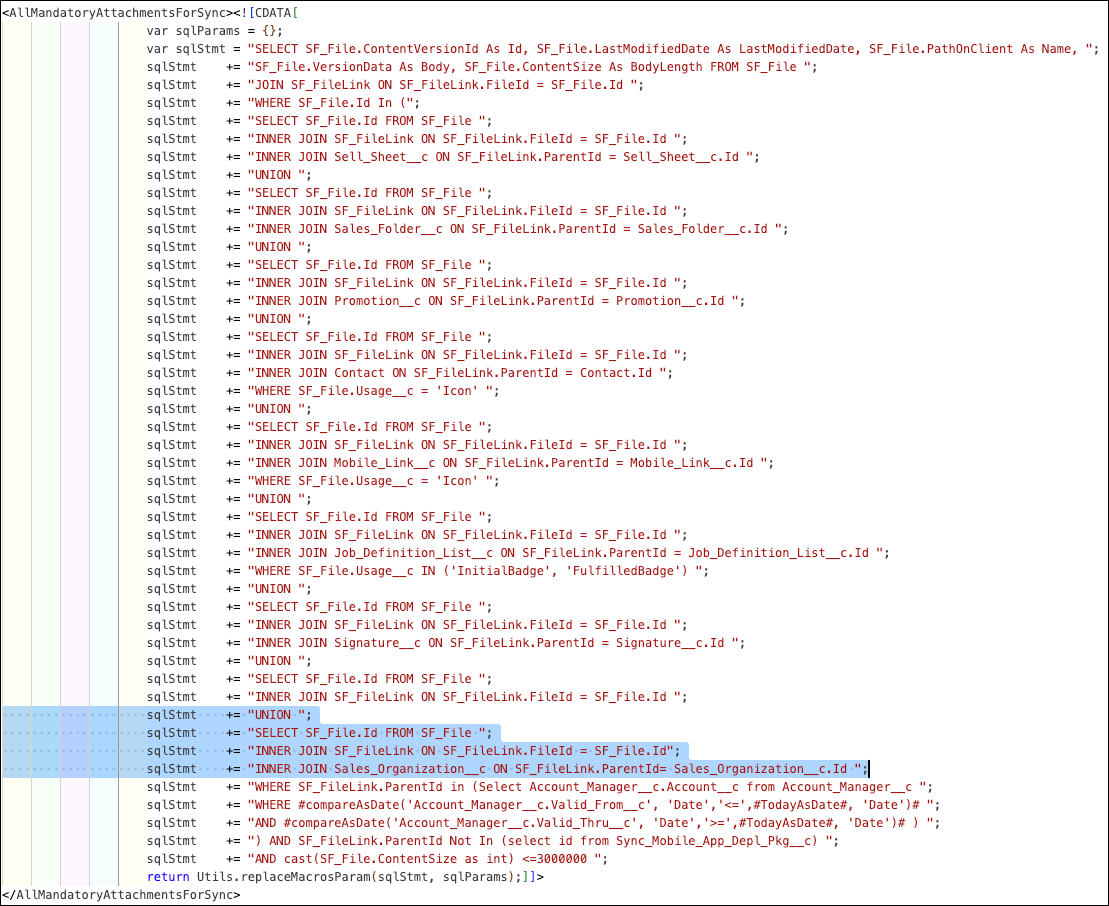
Add this snippet before the
Visitsection in theAllAttachmentssection.//###################################################### //## Sales Org ## //###################################################### sqlStmt += "SELECT Id as parentId FROM Sales_Organization__c "; sqlStmt += "UNION "; //##################################################### //############ //## Visit ## //############ - Save your changes.
-
To check for validation errors, build the modified contracts by running this command in
VS Code based Modeler:
sf modeler workspace
          build
Did this article solve your issue?
Let us know so we can improve!
