Configure Inflight Plan Settings for a Fulfillment Step
As part of creating fulfillment steps, you can configure
inflight plan settings to handle customer requests to add, amend, cancel, or otherwise change
their order before the order is committed by a sales rep.
Required Editions
Available in: Enterprise, Unlimited, and Developer
Editions
User Permissions
Needed
To configure inflight plan settings:
Fulfillment Designer
OR
DRO Admin User
To configure inflight plan settings, first create a fulfillment step using the fulfillment
workspace. For more information, see Define Orchestration Plan Components.
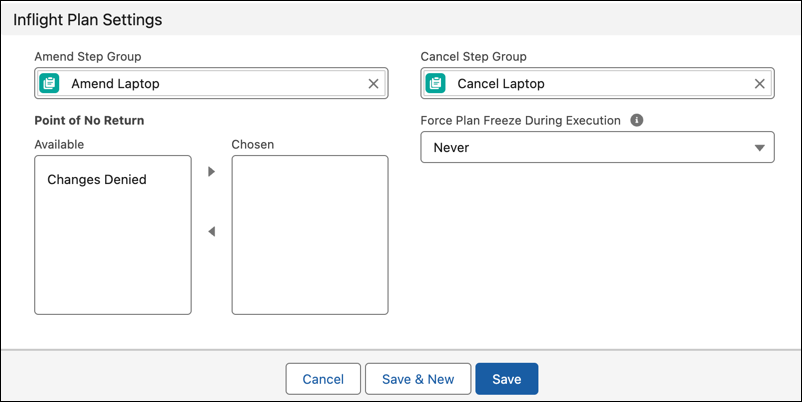
Configure the Point of No Return behavior. In the Available pane, select the type of source
change (Changes Denied) to be applied to the line item, then click to move the source change to the Chosen field. This selection ensures that when the
fulfillment plan reaches this step, no changes to the order items in the bundle are allowed.
Optional: Force Plan Freeze During Execution. Select an option other than the default option
to allow order representatives to forcefully freeze the plan. Specify how to complete
the step before resuming the plan. Choose an action to apply to the In Progress step:
Never: The plan freezes only after the step is completed. Until then, the plan
is in a Freezing state. This is the default option.
Yes But Forcefully Complete the Step: Moves the plan to a Frozen state,
forcefully completes the step, and then resumes the plan if the related line item
is amended or canceled.
Save your work.
Did this article solve your issue?
Let us know so we can improve!
Loading
Salesforce Help | Article
Cookie Consent Manager
Cookie Consent Manager
General Information
Required Cookies
Functional Cookies
Advertising Cookies
General Information
We use three kinds of cookies on our websites: required, functional, and advertising. You can choose whether functional and advertising cookies apply. Click on the different cookie categories to find out more about each category and to change the default settings.
Privacy Statement
Required Cookies
Always Active
Required cookies are necessary for basic website functionality. Some examples include: session cookies needed to transmit the website, authentication cookies, and security cookies.
Functional Cookies
Functional cookies enhance functions, performance, and services on the website. Some examples include: cookies used to analyze site traffic, cookies used for market research, and cookies used to display advertising that is not directed to a particular individual.
Advertising Cookies
Advertising cookies track activity across websites in order to understand a viewer’s interests, and direct them specific marketing. Some examples include: cookies used for remarketing, or interest-based advertising.