
You are here:
In-Flight Order Change Example
To help fulfillment designers understand how in-flight order changes work, refer to this example scenario.
Required Editions
| Available in: Lightning Experience |
| Available in: Enterprise, Unlimited, and Developer Editions of Revenue Management where Dynamic Revenue Orchestrator is enabled |
After in-flight changes are applied and submitted to Dynamic Revenue Orchestrator (DRO), DRO decomposes the supplemental order and generates fulfillment lines.
The fulfillment lines generated from the supplemental order include a supplemental action that records the changes compared to the actions in the fulfillment lines from the original order. The existing fulfillment plan is updated by assessing the impact of the steps that were already in the plan.
You can amend, cancel, or discard these steps, or they can remain unaffected. Additionally, the updated plan can introduce new steps or steps designed to compensate for or roll back the changes made to the amended or canceled steps.

- Smart Front Door Camera
- Wireless Indoor Security Camera (Quantity: 2)
- Motion Sensor (Quantity: 3)
- Cloud Storage for 24/7 Professional Monitoring Service (1 year subscription)
Order Decomposition:
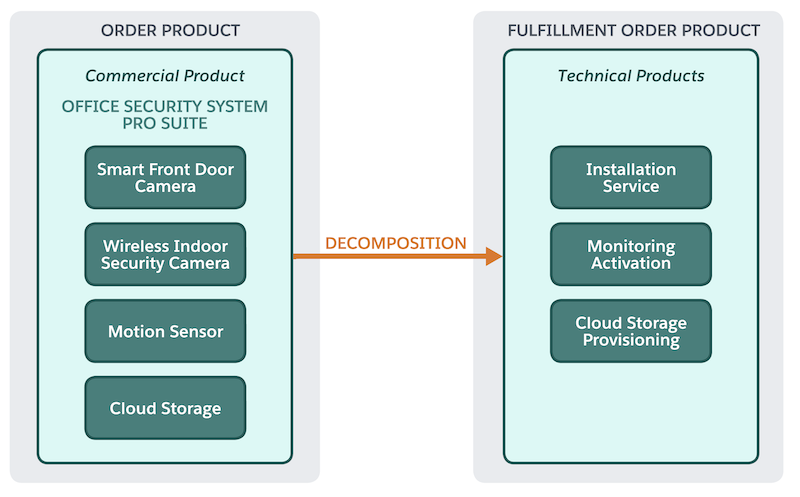
The graphic shows how Sarah's order undergoes initial decomposition. The commercial order, containing child items, is decomposed into technical products, and these technical products can be further decomposed into their own child items.
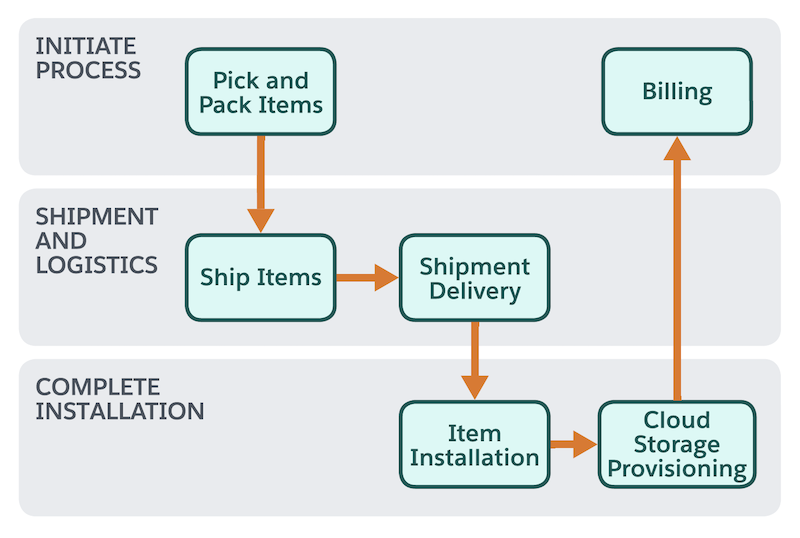
The graphic shows the fulfillment design for Sarah’s order. The Shipment Delivery step is the Point of No Return (PONR). Any changes made after the fulfillment reaches the Shipment Delivery step are rejected.
Changing the In-Flight Order
A few days after placing the order, Sarah wants an additional layer of security for the office backyard. She contacts the security company and requests to change her order.
The amendment involves:
- Adding order line items: Sarah adds an Outdoor Wireless Security Camera and an additional Motion Sensor to her order.
- Modifying attributes of order line items: Sarah decides to upgrade her Cloud Storage for 24/7 Professional Monitoring Service to a 2-year subscription instead of the 1 year subscription. This change modifies the subscription duration attribute of that service.
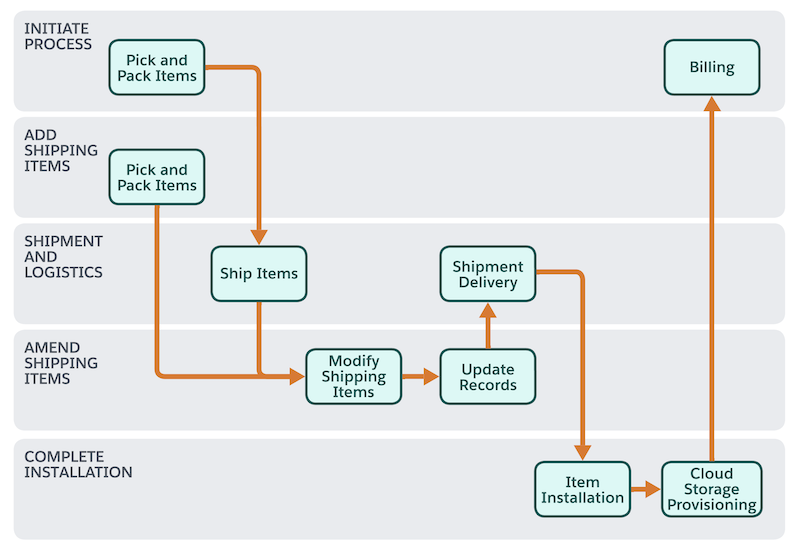
The graphic below shows the fulfillment plan for Sarah’s order. Because the fulfillment
hasn’t reached the PONR  step, the supplemental order accommodates the additional camera and the updated
subscription. Accordingly, the Amend Shipping Items step group is added to the plan.
step, the supplemental order accommodates the additional camera and the updated
subscription. Accordingly, the Amend Shipping Items step group is added to the plan.
Point of No Return Scenario
Let's say that the Smart Front Door Camera has progressed to the Shipment Delivery stage in the fulfillment process. According to the company's policy, after it's delivered, that line item has reached its Point of No Return (PONR). No further changes or cancellations are allowed for that specific item.
Attempting to Amend After PONR
Sarah calls the security company and wants to upgrade the Smart Front-door Camera to its next model.
The DRO representative attempts to process this change in the system. The system identifies that the Smart Front Door Camera has reached the PONR (Shipment Delivery) step. The system rejects the change because of the PONR restriction.
Override PONR Facility
However, the security company has an Override PONR facility for exceptional cases. In this case, the DRO representative, after getting approval from a supervisor, uses the Override PONR functionality that helps the representative bypass the PONR restriction. The system then processes the amended request for the Smart Front Door Camera.
Outcome
Even though the Smart Front Door Camera had reached PONR, the Override PONR facility helped the security company accommodate Sarah's request. DRO updates the fulfillment plan to reflect the cancellation, and any necessary reverse logistics or adjustments are initiated.
