
You are here:
View Preconfigured ARC Relationship Graphs for Financial Services Cloud (Original ARC)
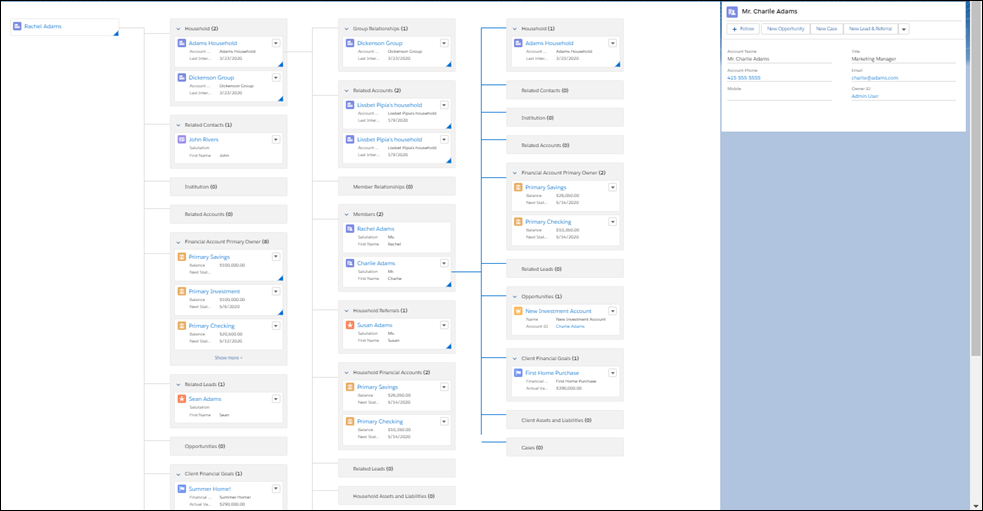
Financial Services Cloud users can use this version of the Actionable Relationship Center (ARC) to view preconfigured relationship graphs. Add the ARC Financial Services Cloud component to record pages to let your users see both Financial Services Cloud relationships and related list relationships in one view on Account records.

Use the view-only version of ARC with the Financial Services Cloud Relationship Map. For a more customizable experience, check out Create and View Custom ARC Relationship Graphs where you can build custom graphs to show client relationships that are most important to your users.
To view the Financial Services Cloud relationship cards on an ARC graph, you must install the Financial Services Cloud Managed Package.
- Verify Read Access to Fields
To view an ARC graph, users must have read access to the fields on the Contact, Account, Reciprocal Role, Account-Contact Relationship, Account-Account Relationship, and Contact-Contact Relationship objects. - Add ARC - Financial Services Cloud Component to Page Layouts
Add the component for Actionable Relationship Center to page layouts where your users need it. - Explore Relationship Groups with ARC
Actionable Relationship Center (ARC) displays different kinds of account and contact relationships in one convenient interface. - View and Manage Related Lists with ARC
Help users manage related records in Actionable Relationship Center (ARC) by configuring the related lists that they see. - Create and Edit Account Relationships with ARC
The Actionable Relationship Center (ARC) interface lets you create, edit, and remove account-account and account-contact relationships. - Considerations and Limitations for Actionable Relationship Center (Original ARC)
Here are some things to keep in mind when you implement Actionable Relationship Center (ARC). - Act on Financial Client Relationships with the Actionable Relationship Center
Financial services industry success is built on developing and maintaining deep and trusted client relationships. The Actionable Relationship Center (ARC) gives you a one-stop visualization of your relevant client relationships so you can act on new information.
