
Business Client Engagement
Use the Onboarding and Know Your Customer data models to bring business clients on board. Drive compliance and efficiency in business client onboarding by capturing details, such as beneficial owners, controlling parties, and business structure.
Required Editions
| Available in: Lightning Experience in Enterprise and Unlimited Editions that have Financial Services Cloud enabled |
Watch this video to understand how Business Client Engagement data model ensures a clear and precise data-driven approach to identifying the key stakeholders in various ownership structures.
If you aren’t able to watch the video in full screen, open the video in a new tab:  Discover Your Business Clients’ Ultimate Beneficial Owners
.
Discover Your Business Clients’ Ultimate Beneficial Owners
.
Information such as ultimate owners, controlling parties, and shareholding distributions help your relationship managers streamline the screening check processes, ultimately saving time and effort. Your relationship managers can view the ownership information and unlock critical insights to build strategic relations with clients by using these prebuilt ARC graph templates:
- B2B Account to Account Relationship
- B2B Applicant to Applicant Relationship
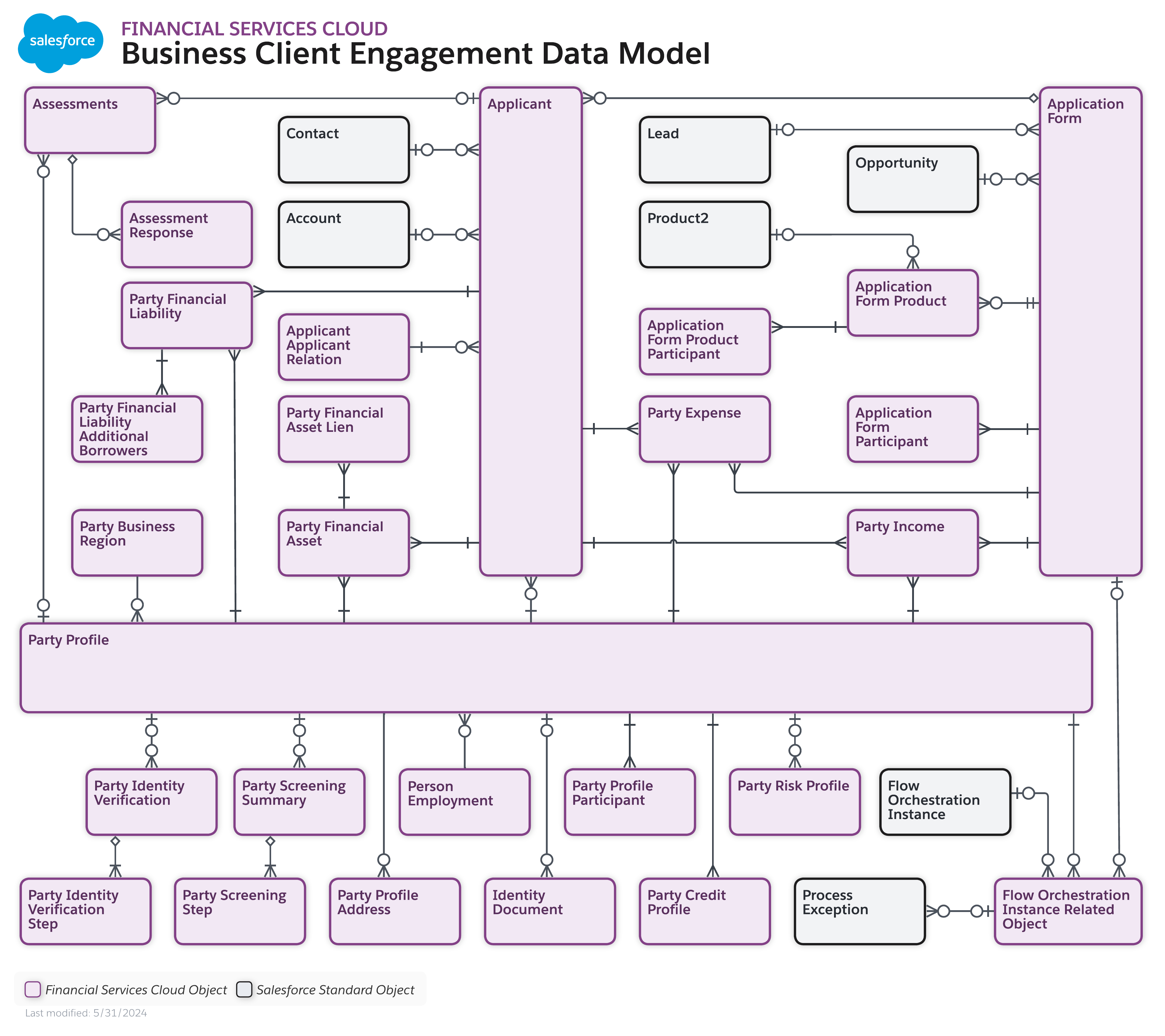
To view a larger version, right-click or Ctrl+click the image and select Open Image in New Tab, or view the Business Client Engagement data model architecture.
The Onboarding and Know Your Customer data models have several purposes. However, in this example, we discuss a use case to onboard a business client.
Alpine Group was incorporated in 2020, with Bob as CEO and John as CFO. Tom is a financial manager who reports directly to John in the company. Tom visits Cumulus Bank to open a checking account for the company. Alpine Group has no prior relationship with the bank. The relationship manager, Tim, classifies the company as a medium-risk client and plans to conduct thorough due diligence as part of the onboarding process.
Tim collects the corporate landscape information of Alpine Group by using the Onboarding and Know Your Customer data models that help him capture details, such as beneficial owners, controlling parties, and business structure. By using Party Profile object, Tim initiates Know Your Business (KYB) procedures for the business entity and conducts the Know Your Customer (KYC) process for all the owners who have more than the specified percentage stake in the company along with controlling parties such as CEO and CFO, and completes the onboarding process.
If one of the beneficial owners of Alpine Group is a beneficial owner of some other company that the bank is onboarding, Tim can choose to reuse the existing Party Profile record of the beneficial owner associated with Alpine group for screening purposes.
Thus, the Onboarding and Know Your Customer data models help Cumulus Bank to drive efficiency and compliance in onboarding tasks and business processes.
- Setup of Business Client Engagement
To set up Business Client Engagement, turn on the prerequisite settings that help you access the objects related to client engagement, such as Account Account Relationship, Account Contact Relationship, Party Profile, and Party Business Region. - Enable Business Client Engagement
To enable the Onboarding and Know Your Customer data models for businesses in your Salesforce org, enable the Business Client Engagement setting. When you enable this setting, you get access to the Applicant-Applicant Relation object and some additional fields in the Account Account Relationship and Account Contact Relationship objects that are essential for onboarding business applicants. - Configure Fields to Store Business Applicant Information
Add fields to Applicant, Account Account Relationship, Account Contact Relationship, and Party Profile objects to help your relationship managers capture details, such as business applicant information, ownership and shareholding details, and overall corporate hierarchy associated with the business entity. - Configure Related Lists for Applicant, Contact, and Party Profile Objects
Modify the record detail pages for Applicant, Contact, and Party Profile objects so that your users have quick access to the information they require to onboard a business client. - Create Actionable Relationship Center Graphs by Using Default Templates for Business Client Engagement
Create relationship graphs of business clients by using the prebuilt B2B Account to Account Relationship and B2B Applicant to Applicant Relationship default templates. - Add ARC Relationship Graph Component to Record Details Page
Add ARC relationship graph components that are created by using default templates to record details pages so that your relationship managers can visualize the ownership structure of their business clients and subsidiaries.
