
Business Relationship Plan
Use Business Relationship Plan to give your relationship team a more efficient, strategic, and collaborative approach to client planning. Business Relationship Plan captures all essential details of the client accounts, providing your relationship team the information needed to strategically prepare objective-driven client plans. With AI-powered summaries, your relationship team can easily understand the current dynamics of client relationships. Effectively manage and improve client relationships by offering customized solutions and implementing proactive engagement strategies.
Required Editions
| Available in: Lightning Experience in Enterprise and Unlimited Editions with Financial Services Cloud |
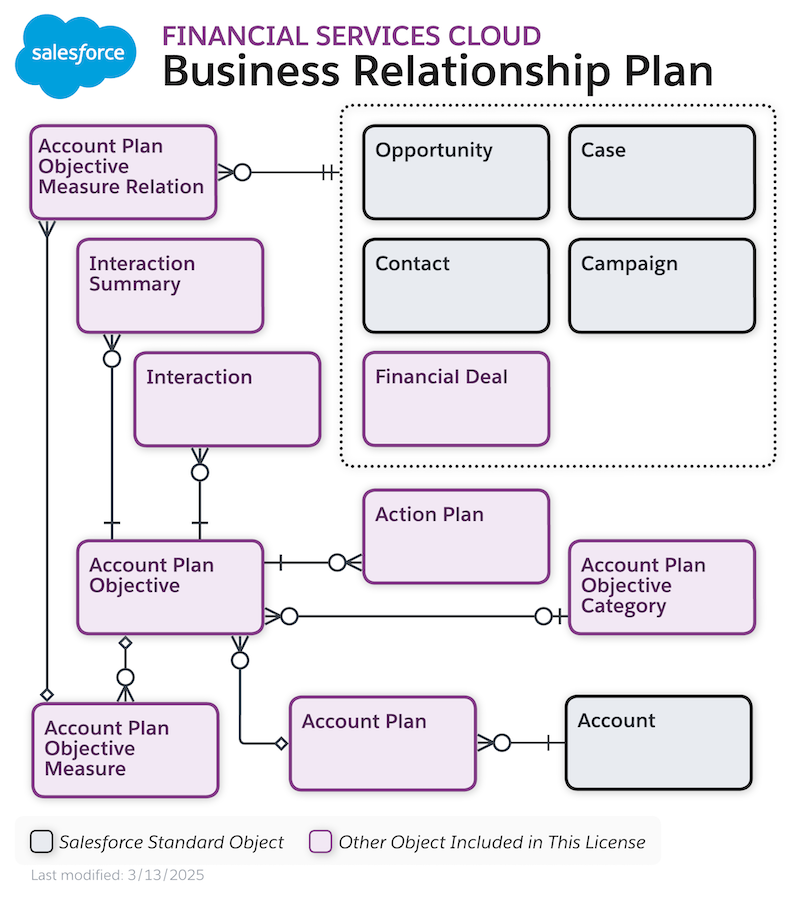
To view a larger version, right-click or Ctrl+click the image and select Open Image in New Tab.
Business Relationship Plans and Account Plans
Business Relationship Plans extend Salesforce Platform's Account Plan feature to meet the needs of the account planning process in Financial Services Cloud.
See Account Plans in the Sales Cloud.
Here are the unique capabilities of the Business Relationship Plan feature.
| Business requirement | Capabilities |
|---|---|
| Users can select a Business Relationship Plan template based on their data requirements. For example, when you do account planning for a manufacturing customer, you must capture data such as inventory turnover ratio, average payment collection period, and capex budget. | Flexcard Template Selector Configure the Flexcard Template Selector component on the Account Plan record page and apply the relevant template to fetch information with a single click. |
| Capture deviations at the account plan level as well as at the objective level to promptly address discrepancies. | Objectives Component At the broader level, view the total number of objectives, measures with no updates, and the number of overdue tasks. At the granular level, see the count of completed measures, completed tasks, inactive measures, and overdue tasks associated with a specific objective. |
| Improve customer understanding by quickly summarizing relationships for the accounts your users manage. | Einstein Relationship Summary Use Einstein generative AI for getting comprehensive insights into the account dynamics of your business customers. Get a structured summary of won or lost opportunities, key factors behind their successes and failures, and current open opportunities and cases in the pipeline. |
| Automatically capture interaction details, such as the total number of interactions with the customer, last and next meeting dates, most frequently met stakeholders, and AI-powered summary notes for the recent five interactions held in the context of account plan objectives. | Einstein Interaction Summary Activate Omnistudio and configure Interaction Summary Flexcard to use on-demand summary refresh support and get notifications to update the summary when underlying data changes. |
| Create action plans to complete the tasks that are required for business processes associated with objectives and objective measures. Visually monitor progress on these tasks for better accountability and execution. | Track Objective Progress Use action plan templates and action plans to quickly act on your goals both at the objective level and at the objective measure level. Visualize progress by using progress donut charts and aggregated count of overdue and completed tasks that are associated directly with objectives or through action plans. |
| Create measures in the context of an objective and associate related records to each measure by using a single guided flow. | Objective Measure Guided Path Use a guided flow to create the measures for an objective at once, maintaining context throughout. Associate the relevant opportunities and cases as related records with the measures for the objectives that you own. |
- Enable Business Relationship Plan
To help your relationship team manage and grow business relationships all in one place, enable the Business Relationship Plan setting. When you enable this setting, you get access to the Account Plan Objective Category object and some additional fields in the Account Plan and Account Plan Objective objects that are specific to Financial Services Cloud. - Set up Business Relationship Plan
Review the steps for setting up Business Relationship Plan for Financial Services Cloud. - Work with Business Relationship Plan
Your relationship managers can efficiently create business relationship plans by using the account plan related lists on the Account record page. From the Objectives tab on the account plan record page, relationship managers can create goals and easily track them by defining measures from the Account Plan Objective record page. Additionally, your relationship team can use the prebuilt Account Plan Lightning page in the Commercial Banking app to create relationship plans for corporate clients. - Einstein Summaries for Business Relationship Plan
Enhance the efficiency of your relationship managers in their regular activities with AI-powered relationship summaries and client meeting summaries. The Summarize a Relationship prompt template fetches the relevant account plan data and generates structured insights on win-loss trends, open opportunities, and unresolved cases. Relationship managers can use these insights to create strategic business relationship plans for their clients. Relationship managers can use the Summarize an Interaction prompt template to easily get meeting minutes to understand the ongoing discussion about an account plan objective. Use the default prompt templates or customize them to suit your business needs. - Measure Creation Omniscript Components for Account Plan Objectives
Customize the Measure Creation Omniscript for account plan objectives to suit your business needs. - Example: Strategic Partnership and Expansion for Acme Inc. with Business Relationship Plan
Acme Inc., a mid-sized company specializing in automotive parts, has partnered with Cumulus Bank for over 5 years. They rely on various banking products such as business accounts and loans. With a new CEO at the helm, Acme is gearing up for expansion and seeks advice from Cumulus Bank to align with their new business goals.
