
Set Up Integrations with Mastercom® for Second Presentment
Transaction Dispute Management uses integration definitions to specify the details of how Salesforce integrates with Mastercom to address the second presentment received in response to a chargeback. Create integration definitions to call the Mastercom APIs.
Required Editions
| Available in: Lightning Experience |
| Available in: Professional, Enterprise, and Unlimited Editions |
| User Permissions Needed | |
|---|---|
| To create integration definitions: | Customize Application AND Financial Services Cloud Standard OR Financial Services Cloud Extension OR FSC Service |
Integration with Mastercom APIs helps acquirers dispute a chargeback by providing detailed evidence.
-
To retrieve a list of claims from a queue within a date interval, create an integration
definition.
- Select Java Defined as the type.
-
Enter a name and developer name for the integration definition.
Note the developer name and use it when you create a stage management plan for initiating chargeback.
- Search for and select disputemanagement.ThirdPartyMastercomQueue_V1 as the java class.
- Enter the name of the named credential that you created for Mastercom.
-
Enter the Mastercom consumer key.
You can retrieve the Mastercom consumer key from the Mastercard developer portal.
- Enter the certificate name containing the Mastercom consumer secret.
- For the Dispute Item Second Presentment Status Value attribute, enter Second Presentment Received as the attribute value.
- For the Dispute Item Closed Status Value attribute, enter Closed as the attribute value.
- For the Dispute Item Rejected Status Value attribute, enter Rejected as the attribute value.
- For the Dispute Item Sender Case Filing Status Value attribute, enter Review Pre-Arbitration as the attribute value.
- For the Dispute Item Pending Documentation Status Value attribute, enter Submitted as the attribute value.
Here’s a sample integration definition to retrieve a list of claims from a queue within a date interval.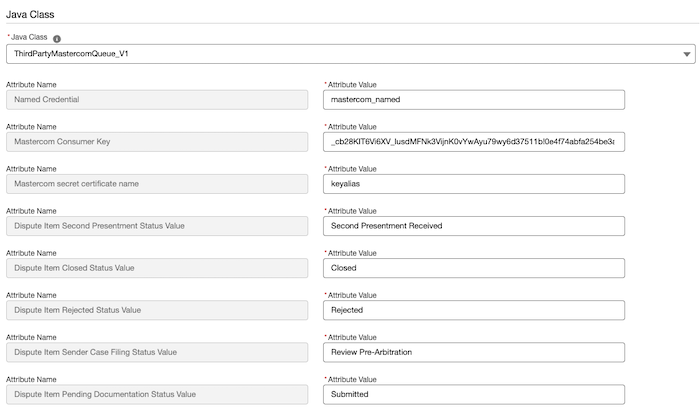
-
Create a Mastercom queue polling job.
Mastercom pushes the updates related to chargeback and second presentment to multiple queues. Poll the concerned queues to retrieve the information and take appropriate actions. The job runs at scheduled intervals and uses an integration definition to poll the Mastercom queues to retrieve a list of claims from a particular queue.
- From Setup, in the Quick Find box, enter transaction dispute management, and then select Transaction Dispute Management Job Schedule.
- Click Schedule a Job.
- Select how frequently you want this job to poll the Mastercom queues.
- Select a start date and start time for the job.
- Enter the developer name of the integration definition that you created to retrieve a list of claims from a Mastercom queue.
- Click Schedule.
-
To retrieve the details of a claim, create another integration definition.
- Select Apex Defined as the type.
-
Enter a name and developer name for the integration definition.
Note the developer name and use it when you create a stage management plan for initiating chargeback.
- Search for and select disputemanagement.ThirdPartyMastercomGetClaim_V1 as the apex class.
- Enter the name of the named credential that you created for Mastercom.
-
Enter the Mastercom consumer key.
You can retrieve the Mastercom consumer key from the Mastercard developer portal.
- Enter the certificate name containing the Mastercom consumer secret.
Here’s a sample integration definition to retrieve the details of a claim.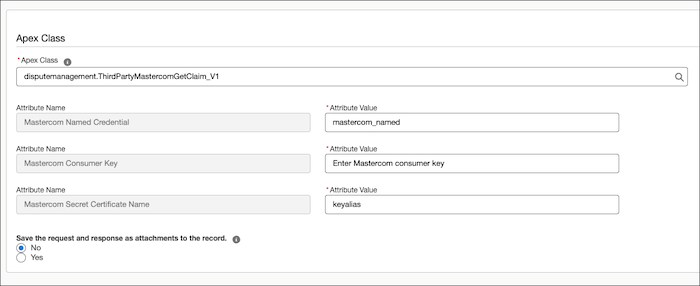
-
To retrieve the documents that are associated with any type of chargeback, create another
integration definition.
- Select Apex Defined as the type.
-
Enter a name and developer name for the integration definition.
Note the developer name and use it when you create a stage management plan for initiating chargeback.
- Search for and select disputemanagement.ThirdPartyMastercomGetChargebackDoc_V1 as the apex class.
- Enter the name of the named credential that you created for Mastercom.
-
Enter the Mastercom consumer key.
You can retrieve the Mastercom consumer key from the Mastercard developer portal.
- Enter the certificate name containing the Mastercom consumer secret.
Here’s a sample integration definition to retrieve the documents that are associated with any type of chargeback.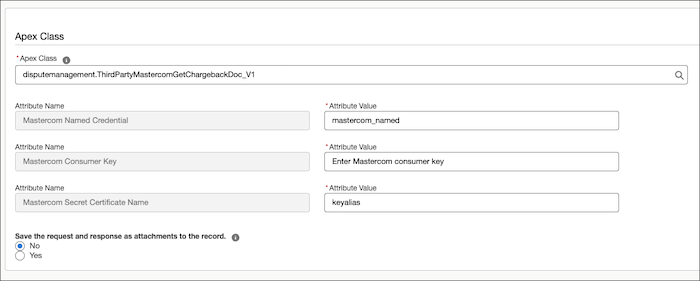
-
To acknowledge the second presentment raised by an acquirer for a chargeback, create
another integration definition.
When a second presentment is acknowledged, the claim moves from the IssuerRepresentmentUnworked queue to the IssuerWorked queue.
- Select Apex Defined as the type.
-
Enter a name and developer name for the integration definition.
Note the developer name and use it when you create a stage management plan for initiating chargeback.
- Search for and select disputemanagement.ThirdPartyMastercomAcknowledgeChgbk_V1 as the apex class.
- Enter the name of the named credential that you created for Mastercom.
-
Enter the Mastercom consumer key.
You can retrieve the Mastercom consumer key from the Mastercard developer portal.
- Enter the certificate name containing the Mastercom consumer secret.
Here’s a sample integration definition to acknowledge the second presentment raised by an acquirer for a chargeback.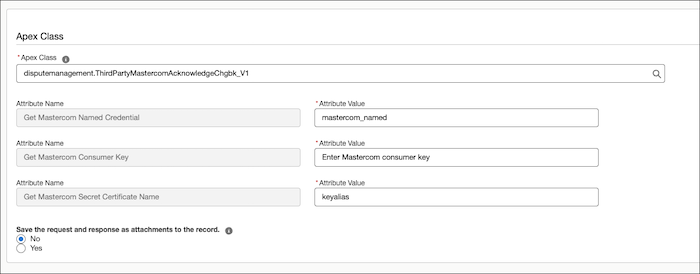
- Activate the integration definitions.
Did this article solve your issue?
Let us know so we can improve!
