
Set Up Integrations with Mastercom® for Chargebacks
Use integration definitions to specify the details of how Salesforce integrates with Mastercom to initiate chargebacks for transaction disputes. Create integration definitions to call the Mastercom APIs.
Required Editions
| Available in: Lightning Experience |
| Available in: Professional, Enterprise, and Unlimited Editions |
| User Permissions Needed | |
|---|---|
| To create integration definitions: | Customize Application AND Financial Services Cloud Standard OR Financial Services Cloud Extension OR FSC Service |
Integrate with Mastercom APIs to ensure that chargebacks are initiated and processed promptly, which is essential for meeting regulatory and card scheme guidelines. This integration reduces any swivel chair typically associated with the chargeback process. The APIs provide real-time access to transaction and dispute data so that issuers and acquirers can receive instant notifications about chargeback statuses and required actions.
-
To search for and retrieve the information about a disputed transaction from the
Mastercom system, create an integration definition.
- Select Apex Defined as the type.
-
Enter a name and developer name for the integration definition.
Note the developer name and use it when you create a stage management plan for initiating chargeback.
- Search for and select disputemanagement.ThirdPartyMastercomSearchTransaction_V1 as the apex class.
- Enter the name of the named credential that you created for Mastercom.
-
Enter the Mastercom consumer key.
You can retrieve the Mastercom consumer key from the Mastercard developer portal.
- Enter the certificate name containing the Mastercom consumer secret.
- Search for and select FSCTxnDisputeMgmt_ThirdPartyMastercomTrxnSearchInputProcessor as the input integration procedure name.
- Search for and select FSCTxnDisputeMgmt_ThirdPartyMastercomTrxnSearchOutputProcessor as the output integration procedure name.
-
Enter comma-separated dispute item status values.
For example, Closed,Aborted. If the status of the dispute item is either Closed or Aborted, this integration definition prevents the API call to Mastercom.
Here’s a sample integration definition to search and retrieve the information about a disputed transaction from the Mastercom system.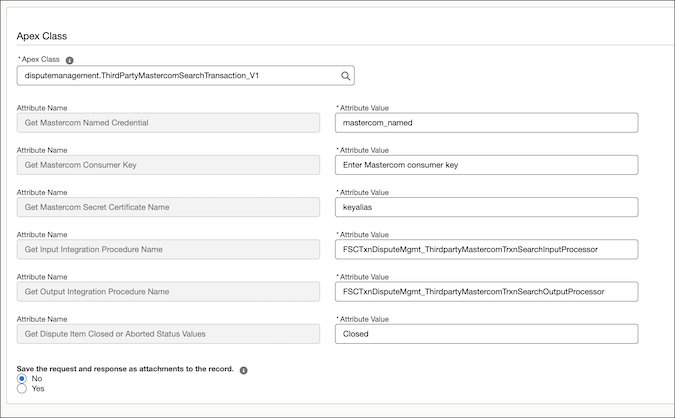
-
To create a claim for the disputed transaction, create another integration
definition.
- Select Apex Defined as the type.
-
Enter a name and developer name for the integration definition.
Note the developer name and use it when you create a stage management plan for initiating chargeback.
- Search for and select disputemanagement.ThirdPartyMastercomCreateClaim_V1 as the apex class.
- Enter the name of the named credential that you created for Mastercom.
-
Enter the Mastercom consumer key.
You can retrieve the Mastercom consumer key from the Mastercard developer portal.
- Enter the certificate name containing the Mastercom consumer secret.
- Search for and select FSCTxnDisputeMgmt_ThirdPartyMastercomCreateClaimInputProcessor as the input integration procedure name.
-
Enter comma-separated dispute item status values.
For example, Closed,Aborted. If the status of the dispute item is either Closed or Aborted, this integration definition prevents the API call to Mastercom.
Here’s a sample integration definition to create a claim for the disputed transaction.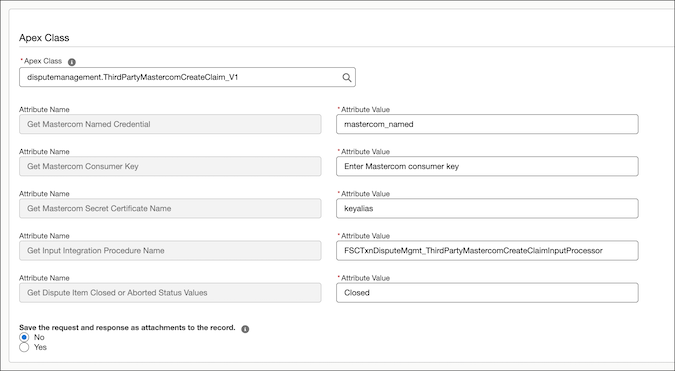
-
To retrieve the clearing details of the disputed transaction that’s associated with the
claim, create another integration definition.
- Select Apex Defined as the type.
-
Enter a name and developer name for the integration definition.
Note the developer name and use it when you create a stage management plan for initiating chargeback.
- Search for and select disputemanagement.ThirdPartyMastercomTrxnClearing_V1 as the apex class.
- Enter the name of the named credential that you created for Mastercom.
-
Enter the Mastercom consumer key.
You can retrieve the Mastercom consumer key from the Mastercard developer portal.
- Enter the certificate name containing the Mastercom consumer secret.
- Search for and select FSCTxnDisputeMgmt_ThirdPartyMastercomTrxnClearingOutputProcessor as the output integration procedure name.
-
Enter comma-separated dispute item status values.
For example, Closed,Aborted. If the status of the dispute item is either Closed or Aborted, this integration definition prevents the API call to Mastercom.
Here’s a sample integration definition to retrieve the clearing details of the disputed transaction that’s associated with the claim.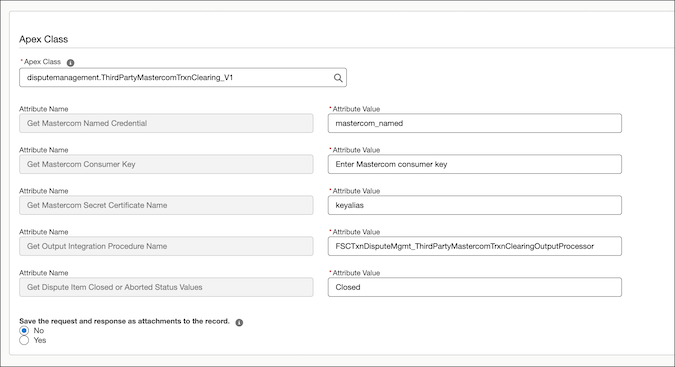
-
To retrieve the authorization details of the disputed transaction that’s associated
with the claim, create another integration definition.
- Select Apex Defined as the type.
-
Enter a name and developer name for the integration definition.
Note the developer name and use it when you create a stage management plan for initiating chargeback.
- Search for and select disputemanagement.ThirdPartyMastercomTrxnAuthorization_V1 as the apex class.
- Enter the name of the named credential that you created for Mastercom.
-
Enter the Mastercom consumer key.
You can retrieve the Mastercom consumer key from the Mastercard developer portal.
- Enter the certificate name containing the Mastercom consumer secret.
- Search for and select FSCTxnDisputeMgmt_ThirdPartyMastercomTrxnAuthOutputProcessor as the output integration procedure name.
-
Enter comma-separated dispute item status values.
For example, Closed,Aborted. If the status of the dispute item is either Closed or Aborted, this integration definition prevents the API call to Mastercom.
Here’s a sample integration definition to retrieve the authorization details of the disputed transaction that’s associated with the claim.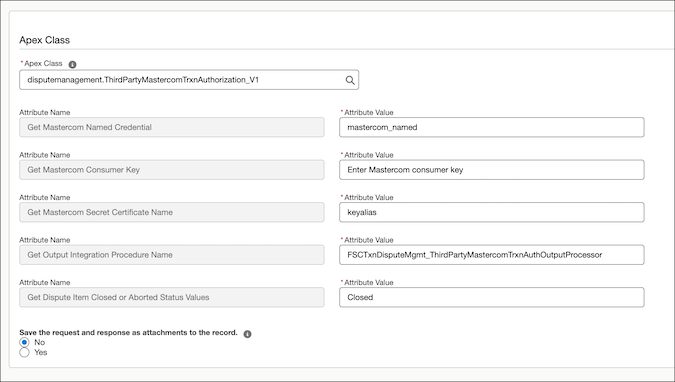
-
To create a chargeback for the disputed transaction that’s associated with the claim,
create another integration definition with these details.
- Select Apex Defined as the type.
-
Enter a name and developer name for the integration definition.
Note the developer name and use it when you create a stage management plan for initiating chargeback.
- Search for and select disputemanagement.ThirdPartyMastercomCreateChargeback_V1 as the apex class.
- Enter the name of the named credential that you created for Mastercom.
-
Enter the Mastercom consumer key.
You can retrieve the Mastercom consumer key from the Mastercard developer portal.
- Enter the certificate name containing the Mastercom consumer secret.
- Search for and select FSCTxnDisputeMgmt_ThirdPartyMastercomCreateChargebackInputProcessor as the input integration procedure name.
-
Enter comma-separated dispute item status values.
For example, Closed,Aborted. If the status of the dispute item is either Closed or Aborted, this integration definition prevents the API call to Mastercom.
Here’s a sample integration definition to create a chargeback for the disputed transaction that’s associated with the claim.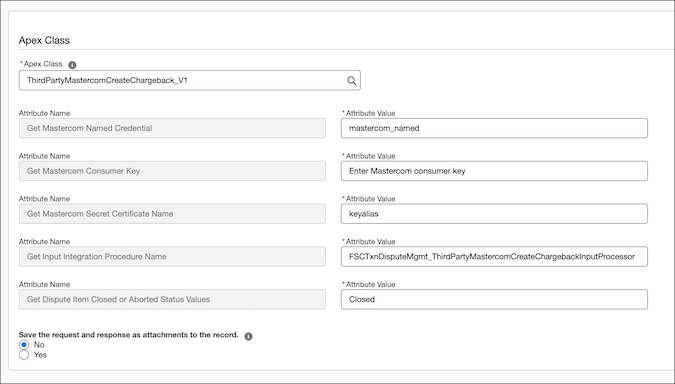
- Save your changes and activate the integration definitions.
