Loading
Feature degradation | Gmail Email delivery failureRead More
Table of Contents
Select Filters

          No results
          No results
          Here are some search tips

          Check the spelling of your keywords.
          Use more general search terms.
          Select fewer filters to broaden your search.

          Search all of Salesforce Help
          Define Rollup Settings for Objects (Managed Package)

          Define Rollup Settings for Objects (Managed Package)

          For faster record rollups at the household level when performing rollups in batches, use the Record Rollup Configuration custom setting to configure various rollup settings for each object individually. For example, you can define a batch size to limit the number of records in each batch. When you run the batch job to roll up records, these settings help improve the performance of the batch job.

          Required Editions

          Managed Package Icon This is a Financial Services Cloud managed package feature.

          Available in: Lightning Experience
          Available in: Professional, Enterprise, and Unlimited Editions
          1. From Setup, in the Quick Find box, enter Custom Settings, and then select Custom Settings.
          2. Click Manage next to Record Rollup Configuration.
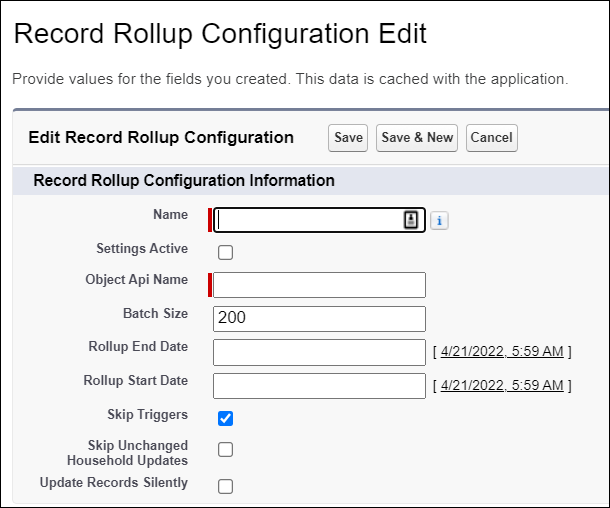
          3. Click New to add an object and define rollup settings for the object.
          4. If you have triggers that don't depend on the Household field, the Skip Triggers can improve rollup performance.
            Important
            Important Rollup by Lookup, depends on the Household field. If you use Rollup by Lookup, don’t select Skip Triggers.
          5. To update records without updating the Last Modified By and Last Modified Date fields, select Update Records Silently.
            Record Rollup Configuration Edit
          6. Save your changes.

          Repeat the steps to add the objects that you want to define these settings.

           
          Loading
          Salesforce Help | Article