
You are here:
Add Data Use Purposes for Consent and Disclosures
Define the business and legal reasons why authorizations and consent are required.
Before creating authorization forms and generating authorization requests, define the purposes for collecting the information. Data use purposes can optionally link to data use legal basis records, which identify specific legal regulations.
To create a data use purpose record that links to a data use legal basis:
-
Create a Data Use Legal Basis record.
- From the Apps menu, enter data in the search field, then select Data Use Legal Basis.
-
On the Data Use Legal Basis list page, click New.
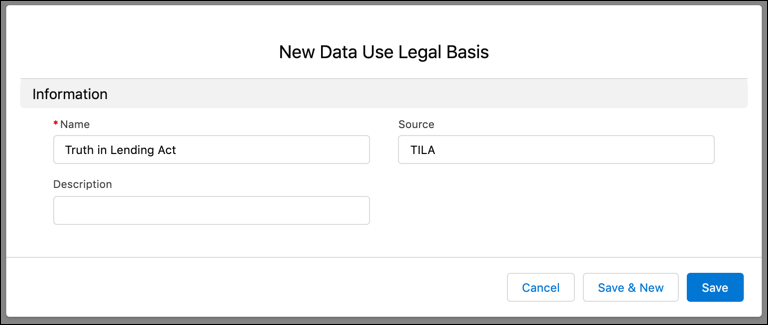
- On the New Data Use Legal Basis page, enter a descriptive Name.
- (Optional) In the Source field, enter a value that helps identify the regulation.
- (Optional) Enter a description to provide more details.
- Save your work.
-
Create a Data Use Purpose record.
- From the Apps menu, enter data in the search field, then select Data Use Purposes.
-
On the Data Use Purposes list page, click New.
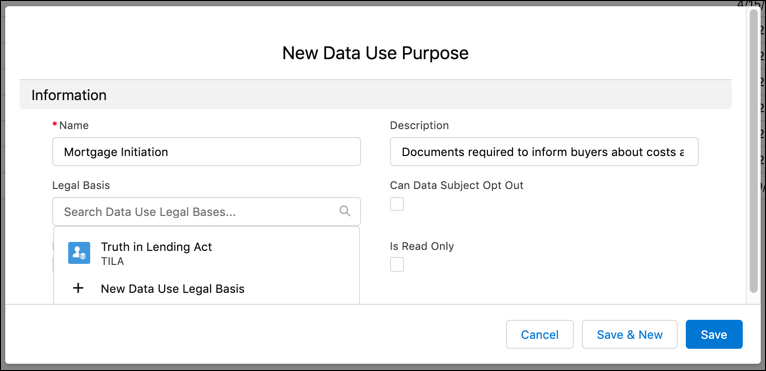
- On the Data Use Purposes page, enter a descriptive Name.
- (Optional) Enter a description to provide more details.
- From the Legal Basis dropdown, select the Data Use Legal Basis record created in Step 1.
- (Optional) If you’re ready to create authorization forms for this data use purpose, click Is Active. An authorization form can only be created for an active data use purpose.
- Skip the Is Read Only checkbox. It updates automatically when this record is activated.
- Save your work.
Did this article solve your issue?
Let us know so we can improve!
