You are here:
Generate Consent Authorization Requests
Manage consent and disclosure authorizations from customers alongside the accounts, financial accounts, and other records they pertain to. Generate multiple authorization form requests for a data use purpose.
Generate consent and disclosure forms for users to sign by creating an authorization request for a specific data use purpose. A single authorization request produces one or more authorization form requests for a customer, based on the data uses.
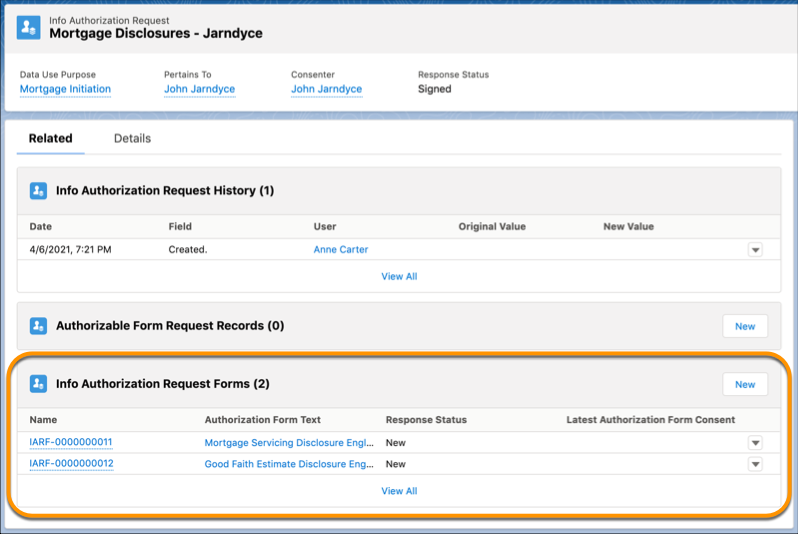
For example, during a mortgage loan initiation process a loan officer can create a Mortgage Disclosures authorization request. The Mortgage Initiation data use purpose listed two distinct uses, relating to two authorization forms. The request then generates multiple authorization request forms for the borrower to sign, including a Mortgage Servicing Disclosure form and a Good Faith Estimate Disclosure form.
To create an Info Authorization Request record:
- From the Apps menu, enter info in the search field, then select Info Authorization Request.
-
Click New.
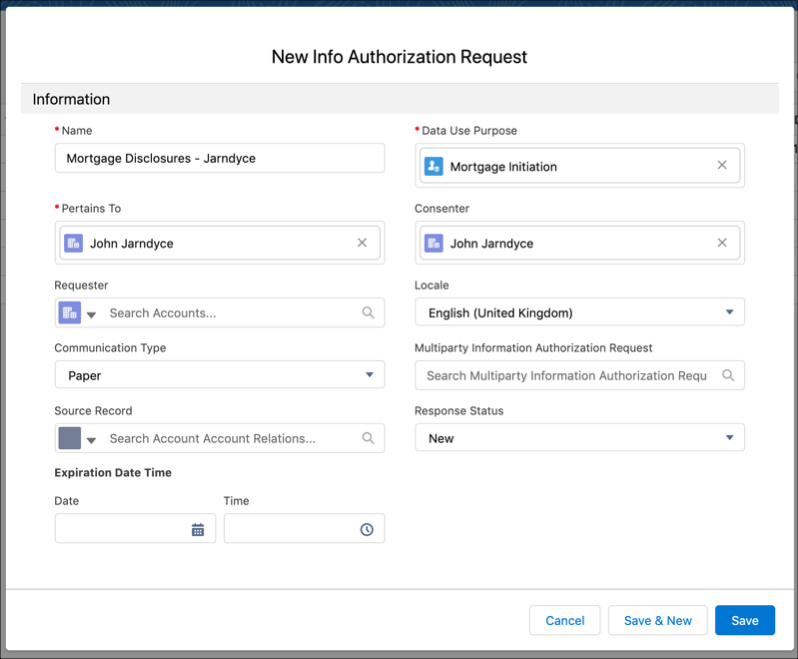
- On the New Info Authorization Request page, enter a descriptive Name.
- From the Data Use Purpose dropdown, select a data use purpose.
- From the Pertains To dropdown, select the account that is the subject of the authorization.
- From the Consenter dropdown, select the account provides the consent response.
- (Optional) From the Requester dropdown, select the account, contact, or person who requested that authorization.
- (Optional) From the Locale dropdown, select the most appropriate locale for the consenter.
- (Optional) From the Communication Type dropdown, select the way to notify the consenter about the request.
-
(Optional) If the request is to be seen and authorized by more than one consenter, add a
Multiparty Information Authorization Request.
- Click the search box that says Search Multiparty Information Authorization Requests....
- Select an existing request or click + New Multiparty Information Authorization Request to create one.
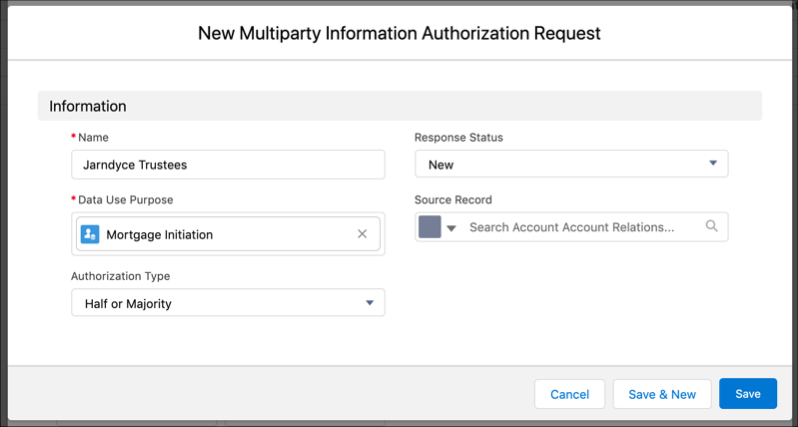
- Enter a descriptive name for the multiparty request.
- Click the Data Use Purpose field and select the same data use purpose that’s specified in the related Info Authorization Request.
-
Select an authorization type from the Authorization Type dropdown.
The authorization type determines how many consenters must sign for the Info Authorization
Request to be approved.
The possible authorization type values are:
- All: Every person approves the request.
- Any: At least one person approves.
- Half or Majority: Half or more of the people approve.
- Majority: More than half the people must approve.
-
Save your work.
- For a new Information Authorization Request, leave the Response Status dropdown set to New.
- In the Requested Date Time section, set the Date and Time fields to the time when the request was made.
- In the Expiration Date Time section, set the Date and Time fields to the time when the request becomes invalid.
- Save your work.
-
On the Info Authorization Request detail page, click the Related
tab. The Info Authorization Request Forms related list displays one or
more records generated for this request. A record is generated for each active authorization
form that’s related to the data use purpose specified in the Info Authorization Request.