
Example: Configure Eligibility Rules and User Access Control for Service Processes
List service processes as service process products and how to configure eligibility rules for these service process products. Your customers and users see only the service process products that they’re qualified for in the Action Launcher on a record details page of a Person Account. You can verify if the eligibility rules work as expected.
Required Editions
| Available in: Lightning Experience |
| Available in: Enterprise and Unlimited Editions with the required licenses |
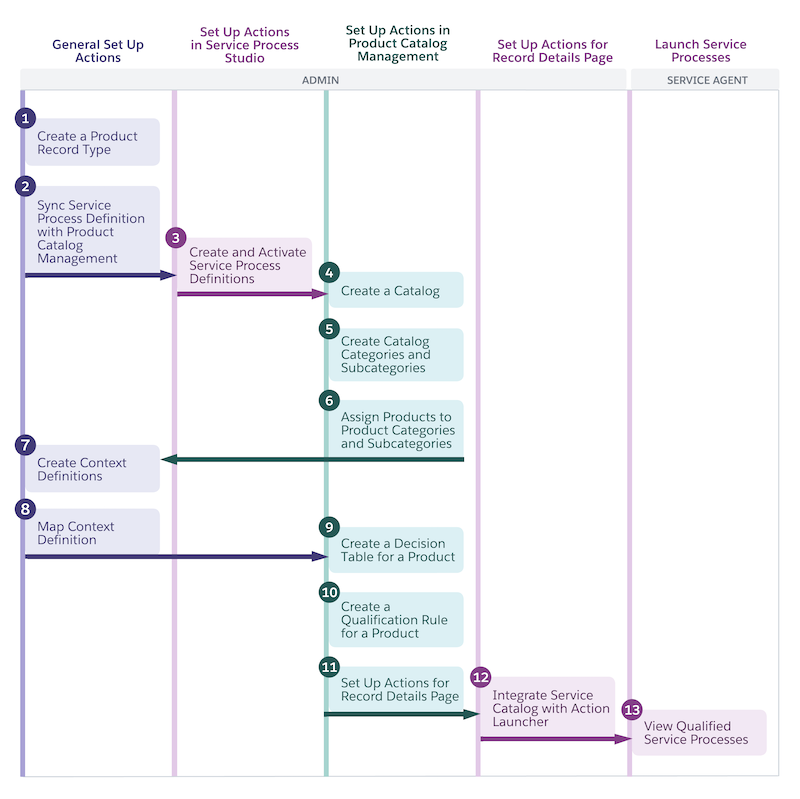
Consider that you offer service processes, such as Fee Reversal, Temporary Credit Limit Increase, Manage Standing Instructions, and Update Profile. The Fee Reversal and Temporary Credit Limit Increase service processes are relevant to the retail banking line of business. The Manage Standing Instruction service process is relevant to the wealth management line of business, and the Update Profile service process is relevant to both the retail banking and wealth management lines of business.
| Service Process | Line of Business |
|---|---|
| Fee Reversal | Retail banking |
| Temporary Credit Limit Increase | Retail banking |
| Manage Standing Instructions | Wealth management |
| Update Profile | Retail banking and wealth management |
Consider a scenario where you want to restrict the visibility of the service processes based on the department that your service agents are assigned to and also based on your customer’s rating.
| Service Process | Qualification Rule to Show Service Process | Customer Eligibility | Agent Eligibility |
|---|---|---|---|
| Fee Reversal | Agent’s department is retail banking dept | Visible to all customers | Visible only to the service agents assigned to the retail banking dept |
| Temporary Credit Limit Increase | Customer’s rating is Gold and Agent’s department is retail banking dept | Visible only to the customers with Gold rating | |
| Manage Standing Instructions | Customer’s rating is Silver and Agent’s department is wealth management dept | Visible only to the customers with Silver rating | Visible only to the service agents assigned to the wealth management dept |
| Update Profile | Agent’s department is either the retail banking dept or the wealth management dept | Visible to all customers | Visible to the service agents assigned to either retail banking dept or wealth management dept |
After you configure the eligibility rules, the Fee Reversal and Temporary Credit Limit Increase service processes are qualified only for the service agents who are assigned to the retail banking department. The Manage Standing Instructions service process is qualified only for the service agents who are assigned to the wealth management department. The Update Profile service process is qualified for the service agents who are assigned either to the retail banking department or the wealth management department. Additionally, the Temporary Credit Limit Increase service process is qualified only for the customers whose rating is Gold, and the Manage Standing Instructions service process is qualified only for the customers whose rating is Silver.
- Create a Record Type for Service Processes
To distinguish service process products from other types of products in Product Catalog Management, create a Product2 record type for service processes. - Create and Activate Service Process Definitions
Create service process definitions in Service Process Studio for the service processes that you want to configure eligibility rules for. After you create the definitions, the service processes are listed as products in Product Catalog Management so that you can define the eligibility rules to determine how and for whom the service processes are visible. - Create a Catalog for Service Processes
Add service process products to a service catalog. - Create Catalog Categories for Service Processes
Group the service process products in your service catalog. Create catalog categories for service process products based on the line of business that they’re relevant for. - Assign Service Processes to Catalog Categories
Organize your service processes by assigning them to catalog categories. - Create a Context Definition to Define the Context for Service Process Product Eligibility
Define the context structure or scenario in which you want to determine the service process product eligibility. The context definition has the complete set of information to build and run the qualification rules procedure to evaluate the eligibility of a service process product. - Map the Context Definition to Data Sources and Activate the Definition
After you create the context definition, map the definition’s nodes and attributes to objects and their fields. The mapping feeds data into the definition and this data is used by the expression set to evaluate the qualification of service process products. - Create a Service Process Eligibility Decision Table
Use a decision table and a rule object that contains the rules that the decision table uses to determine the service process products qualification. - Create Qualification Rules for Service Processes
Control the visibility of service processes to your customers and users by creating qualification rules. To create a qualification rule, enter values for the input criteria that the service process product must meet to be qualified. Customers and users can see service process products when the service process products meet the qualification criteria. - Create a Qualification Rules Procedure for Service Processes
A qualification rules procedure uses an expression set and a context definition to evaluate the qualification of a service process product. In the expression set version, use the decision table created for determining the service process product eligibility and the context definition’s tags as list variables in the expression’s steps. - Add the Catalog and Qualification Rule Procedure Names in Action Launcher Properties
To make the qualified service process products visible to your users and customers on the Action Launcher component, add the names of the service catalog and expression set in the properties of the Action Launcher. Your service agents can search for and invoke the service process products that are defined using Service Process Studio and cataloged using Product Catalog Management. - Verify the Configured Eligibility Rules for Service Processes
Verify if the eligibility rules that you set for qualifying the service process products for your users and customers work as expected.
