
Loading
Feature Disruption - Service Cloud VoiceRead More
Feature degradation | Gmail Email delivery failureRead More
Table of Contents
Select Filters

          No results
          No results
          Here are some search tips

          Check the spelling of your keywords.
          Use more general search terms.
          Select fewer filters to broaden your search.

          Search all of Salesforce Help
          Advanced Loan Repayment Schedules with Loan Calculator

          Advanced Loan Repayment Schedules with Loan Calculator

          Calculate the overall financial contribution to a loan by using the enhanced digital lending calculator with diverse repayment options. Relationship managers, brokers, and self-serve applicants can customize values in the loan calculator for Amortization, Step-Up, Step-Down, Bullet, and Balloon repayment structures. They can also calculate additional payments and see the impact on the structures.
          Required Editions

          Available in: Lightning Experience
          Available in: Enterprise and Unlimited editions where Financial Services Cloud and FSC Service Einstein Add-On are enabled

          Repayment Types

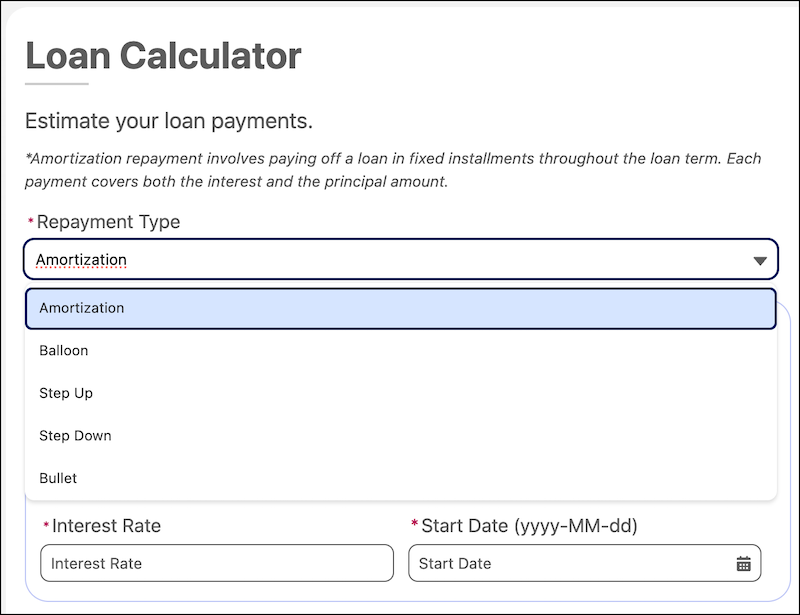
          Users can avail the diverse repayment methods to estimate EMI schedules. They can customize the values in the loan calculator view and compare the total loan amount, principal, and interest paid over the loan term.

          Repayment types dropdown that shows the Amortization, Balloon, Step-Up, Step-Down and Bullet options

          A list of repayment methods in the advanced loan calculator.
          Repayment Type Description
          Amortization Repayment Involves paying off a loan in fixed installments throughout the loan term. Each payment covers both the interest and the principal amount.
          Balloon Repayment Involves making small payments throughout the loan term, followed by a large final payment to cover the remaining principal.
          Step-Up Repayment Involves starting with smaller payments that gradually increase at specified intervals over the loan term.
          Step-Down Repayment Involves starting with higher payments that gradually decrease at specified intervals over the loan term.
          Bullet Repayment Involves paying the interest periodically during the loan term and repaying the full principal amount as one large payment at the end.

          Additional Payment

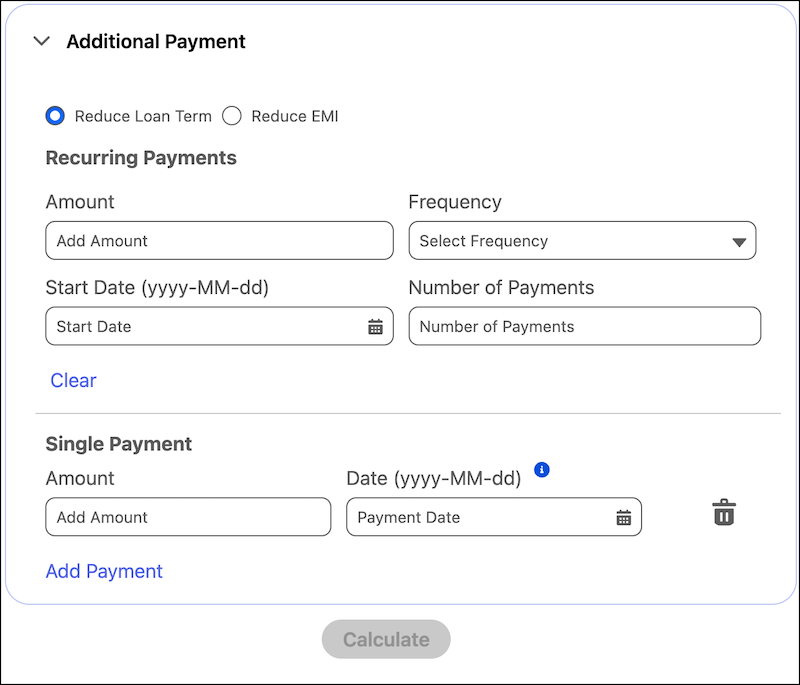
          Users can enter values for recurring payments or for a single additional payment under the Amortization, Step-Up, and Step-Down repayment options. Calculate the impact of additional payments on the loan term or EMI that's payable by the customer. Click Calculate and view the calculated savings and tenure estimates.

          Additional Payment UI screen.

           
          Loading
          Salesforce Help | Article