
Integrated Onboarding: See the Big Picture
Visualize how the prebuilt sample app for Integrated Onboarding streamlines the customer onboarding process.
Required Editions
| Available in: Lightning Experience |
| Available in: Professional, Enterprise, and Unlimited Editions where Financial Services Cloud is enabled |
Convert Lead to Opportunity
To initiate the onboarding process, create a lead record for an applicant, and then convert the lead to an opportunity.
Required Editions
| Available in: Lightning Experience |
| Available in: Professional, Enterprise, and Unlimited Editions where Financial Services Cloud is enabled |
-
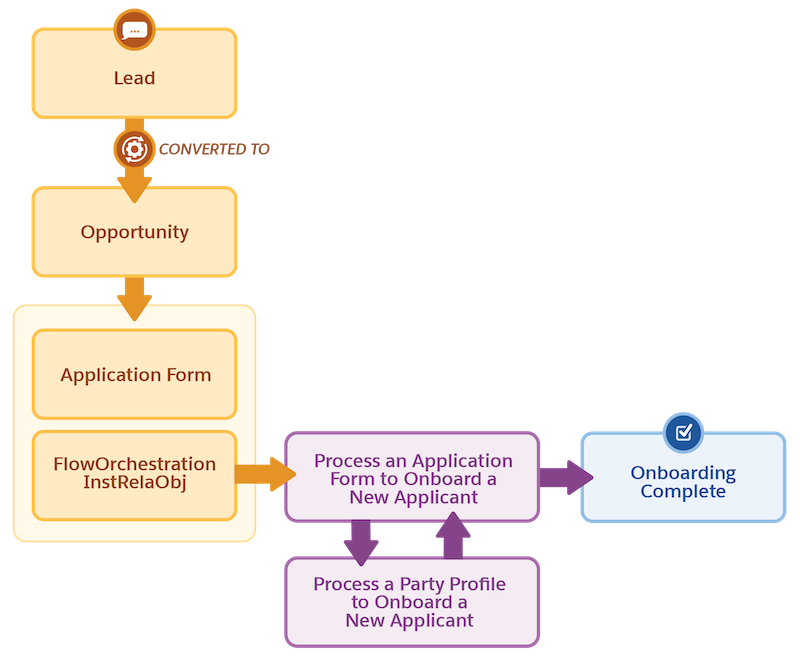
When you convert a lead to an opportunity, the app triggers a Flow that creates two
records:
- Application Form: This record stores the submitted application details, including information from the lead.
- FlowOrchestrationInstaRelaObj: This record tracks the orchestration process and the application form involved.
- The Process an Application Form to Onboard a New Applicant Flow Orchestration starts, using the application form as a reference.
-
The Process an Application Form to Onboard a New Applicant Flow Orchestration creates three
new records:
- Applicant: Holds information about the individual being onboarded.
- Party Profile: Stores applicant details for identity checks, risk assessment, and so on.
- Assessment: Captures the assessment results.
-
Wait for Party Profile Processing
The onboarding Flow Orchestration, Process an Application Form to Onboard a New Applicant pauses, waiting for the party profile record to be processed.
- When a Party Profile record is created, another FlowOrchestrationInstaRelaObj record that references the party profile record is also created. Creating the FlowOrchestrationInstaRelaObj record for the party profile, triggers the Process a Party Profile to Onboard a New Applicant Flow Orchestration.
- The Process a Party Profile to Onboard a New Applicant Flow Orchestration performs identity verification, risk assessment, and screening checks.
-
Further Steps
The process continues based on the verification and checks results.
Did this article solve your issue?
Let us know so we can improve!
