
Rollup By Lookup Configuration and Criteria Fields (Managed Package)
Use Rollup By Lookup Configuration and Rollup By Lookup Criteria fields to control when RBL rules are triggered.
Required Editions
| Available in: Lightning Experience |
| Available in: Professional, Enterprise, and Unlimited Editions |
 This is a Financial Services Cloud managed package feature.
Changes in records don’t always trigger active RBLs rules. Three general conditions are evaluated.
- Are the Enable Group Record Rollups and Enable Rollup Summary Wealth Management Config custom settings selected for the user who made the change?
- Is the record type ID for the affected record included in the RBL?
- If there’s a Where Clause, does it evaluate to true?
When all three conditions are true, either the appropriate RBL rules are triggered to run or an Apex job that will trigger the appropriate rules is queued.
RBL rules are made up of two Financial Services Cloud objects: Rollup By Lookup Configuration and Rollup By Lookup Filter Criteria. Rollup By Lookup Configurations define rules for calculating rollup fields. Rollup By Lookup Filter Criteria define criteria for calculating rollups.
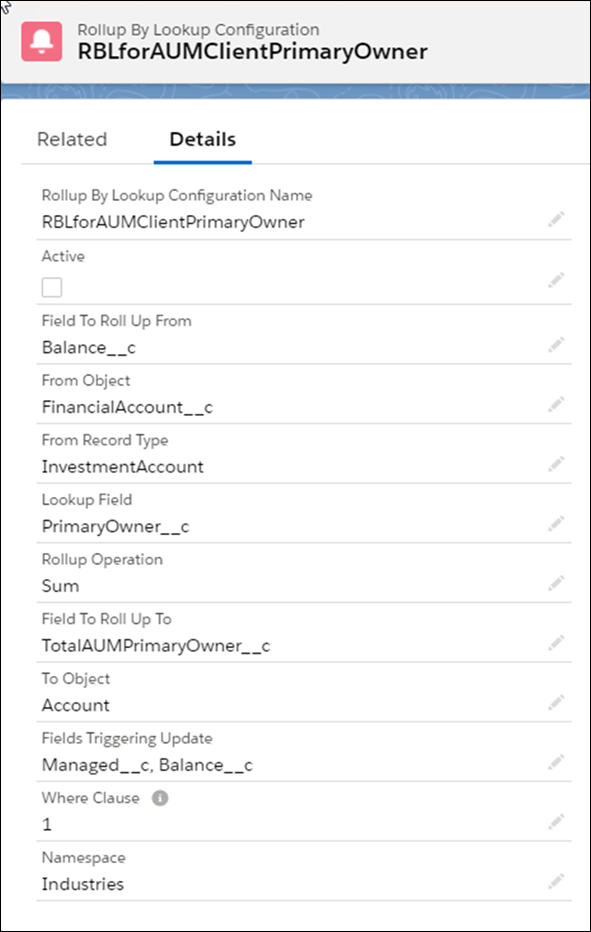
| Name | Description | Example |
|---|---|---|
| Active | Indicates whether the rule is active. | When the rule is active and all conditions are true, the rule is triggered to run or will queue an Apex job. |
| Field to Rollup From | The field to aggregate. | RBLforAUMClientPrimaryOwner can be triggered when a change is made to either the Managed__c or the Balance__c fields on a financial account, RBLforAUMClientPrimaryOwner rolls up the Balance__c on all related financial accounts with a record type of InvestmentAccount. It does this for the primary owner, and writes the result to the TotalAUMPrimaryOwner__c field of the primary owner’s account record  Note RBLforAUMClientPrimaryOwner, RBLforAUMHH, and RBLForFARforAUMClientPrimaryOwner all
roll up to the TotalAUMPrimaryOwner__c field on the Account object so activate only one of
the three rules. |
| From Object | The source object that provides the Lookup Field and, for all objects except Financial Account Role, the Field to Rollup From. For Financial Account Role objects, the Field to Rollup From is on the financial account records related to the financial account role record. | |
| From Record Type | The specific source object record types to aggregate (if specified). | |
| Lookup Field | The type of rollup to do. Rollup types include:
|
|
| Rollup Operation | Specifies the type of operation for the aggregation. Valid operations are:.
|
|
| Field to Roll Up To | The target object field to update with the aggregated information. | |
| To Object | The target object for the aggregated information. All packaged RBLs update a field on the Account object. | |
| Fields Triggering Update | The fields on the source object that can trigger an update. When left blank, any edit on the source object can invoke a rollup recalculation. | |
| Where Clause | The filter criteria clause. The clause can also be a logic statement with two or more filter criteria. When left blank, any changes to the source object or the specified triggering fields can invoke a rollup recalculation. | RBLforAUMClientPrimaryOwner has one filter criteria that’s defined in the A-05 rollup by lookup filter criteria record. |
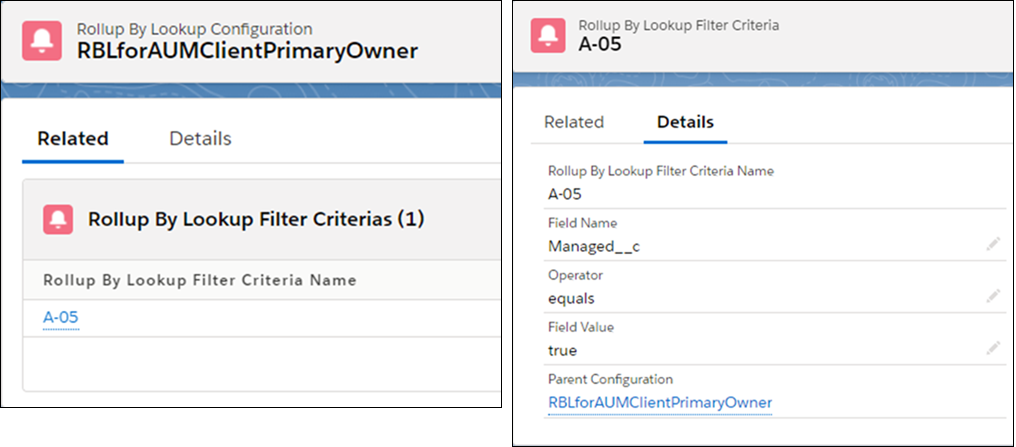
| Name | Description | Example |
|---|---|---|
| Field Name | The field to evaluate. | In Financial Services Cloud, the Managed__c indicates whether a financial account is managed. RBLforAUMClientPrimaryOwner can only be triggered for managed financial accounts. In this case RBLforAUMClientPrimaryOwner is only triggered when Managed__c must equals true |
| Operator | The operation for the criteria. | |
| Field Value | The value used to evaluate the criteria. | |
| Parent Configuration | The Rollup By Lookup Configuration that the filter criteria applies to. |
