
Loading
Salesforce now sends email only from verified domains. Read More
Table of Contents
Select Filters

          No results
          No results
          Here are some search tips

          Check the spelling of your keywords.
          Use more general search terms.
          Select fewer filters to broaden your search.

          Search all of Salesforce Help
          Customize Financial Account Cards Using OmniStudio FlexCard Components

          Customize Financial Account Cards Using OmniStudio FlexCard Components

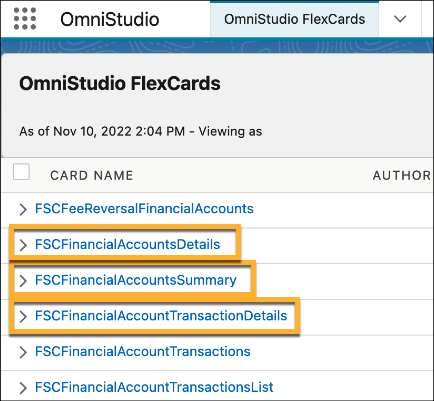
          In OmniStudio, customize the FSCFinancialAccountsSummary, FSCFinancialAccountDetails and FSCFinancialAccountTransactionDetails components to show information that is most relevant to users. This optional step configures the components to show information with clickable actions that change based on the information they contain. Customize the components that make up the FlexCard component before adding it to record pages.
          Required Editions

          Available in: Lightning Experience

          Available in: Professional, Enterprise, and Unlimited Editions

          User Permissions Needed
          To use Get Financial Account Details and Get Financial Account Transactions:

          Financial Services Cloud Extension OR Financial Services Cloud Foundations OR FSC Sales OR FSC Service

          To assign permissions: Customize Application

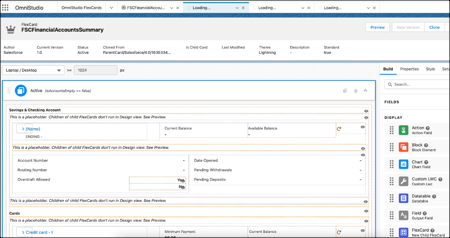
          The FlexCard Designer is a declarative tool that makes it easy to build Lightning web components without code. Build a FlexCard by dragging elements onto its canvas. Creating UI components with FlexCards is all about sourcing the data and displaying and organizing the returned information in a meaningful way.

          FSC OmniStudio FlexCard
          1. From the App Launcher, fine and select OmniStudio.
          2. In the OmniStudio app, from the navigation bar, select OmniStudio FlexCards.
          3. To customize a component, click it and edit the properties.
            FSC FlexCard Omnistudio Edit
          4. Save your changes.
           
          Loading
          Salesforce Help | Article
