
Customize Lightning Pages to View Financial Accounts and Transactions
Stay on top of your client’s financial account details and transaction details by adding three components to record pages.
Required Editions
Available in: Lightning Experience Available in: Professional, Enterprise, and Unlimited Editions |
| User Permissions Needed | |
|---|---|
| To use FSCFinancialAccountsSummary, OmniScript,Omnistudio Data Mappers, FlexCards, and Integration Procedures: | Financial Services Cloud Extension OR Financial Services Cloud Foundations OR FSC Service AND OmniStudio User OR OmniStudio Admin permissions set |
- Add the FSCFinancialAccountsSummary component to the Account record page.
- Add the FSCFinancialAccountDetails component to the Financial Account record page.
- Add the FSCFinancialAccountTransactionDetails component to the Financial Account record page.
-
To add the FSCFinancialAccountsSummary component to the Account record page:
- On the Account record page, go to Lightning App Builder.
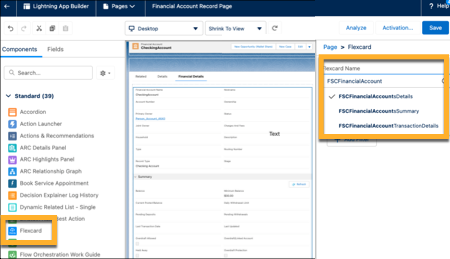
- Drag Flexcard component from the Components panel to the Lightning page canvas location where you want to position the component on the record page.
-
In the Properties pane, select FSCFinancialAccountsSummary
component in the Flexcard Name field.
- Save your changes.
- If your page is new, activate the page.
-
To add the FSCFinancialAccountDetails and FSCFinancialAccountTransactionDetails components
to the Financial Account record page:
- On the Financial Account record page, go to Lightning App Builder.
- Drag Flexcard component from the Components panel to the Lightning page canvas location where you want to position the component on the record page.
- In the Properties pane, select FSCFinancialAccountDetails component in the Flexcard Name field.
- Drag Flexcard component from the Components panel to the Lightning page canvas location where you want to position the component on the record page.
- In the Properties pane, select FSCFinancialAccountTransactionsDetails component in the Flexcard Name field.
- Save your changes.
- If your page is new, activate the page.
Did this article solve your issue?
Let us know so we can improve!
