
You are here:
Set Up and Manage Insurance
Insurance for Financial Services Cloud includes a new data model for insurance, new Lightning components, and a tailored Lightning console app: Insurance Agent Console. Insurance Agent Console helps agents and service reps track their performance and stay focused on their goals. With the new distributor performance dashboard, reports, and performance metrics, sales managers can view a consolidated performance summary for all their distributors or monitor their individual performances. Use the Insurance Agent Portal template to create a portal that gives independent insurance agents access to the insurance features and components and lets them manage and grow their books of business.
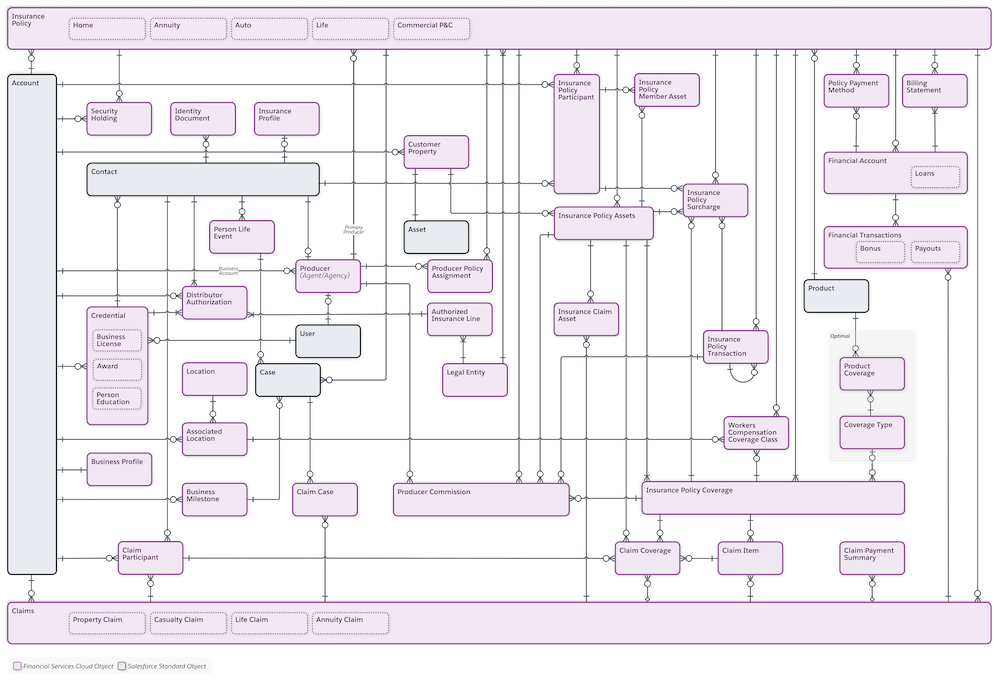
When you add the Policy and Events or Milestones components to the account record page, agents have a consolidated view of their customers’ life events or business milestones, insurance policies, claims, and other related details. The Policy component on the household page gives agents a consolidated view of household policies and claims. The Events or Milestones component on the contact record page gives sales managers an at-a-glance view of producers’ life events. Producer relationship cards give sales managers easy access to key information about their producers.
- Set Up Insurance for Financial Services Cloud
To enable Insurance for Financial Services Cloud, clone an Account record page or create one, and add the Policy and Events and Milestones components to the page. Then activate the page and assign it to the Insurance Agent Console app, appropriate account and person account record types, and appropriate user profiles. Add the Insurance Agent Action Items component to the Insurance Agent Console Home page. Then give users access to the Insurance Agent Console app. - Work with Insurance for Financial Services Cloud
Discover the information you need and the customizations you can do to fine-tune the Insurance features to best suit the needs of your agents and service reps.
