
You are here:
Interaction Summaries
Capture and share interaction summaries.
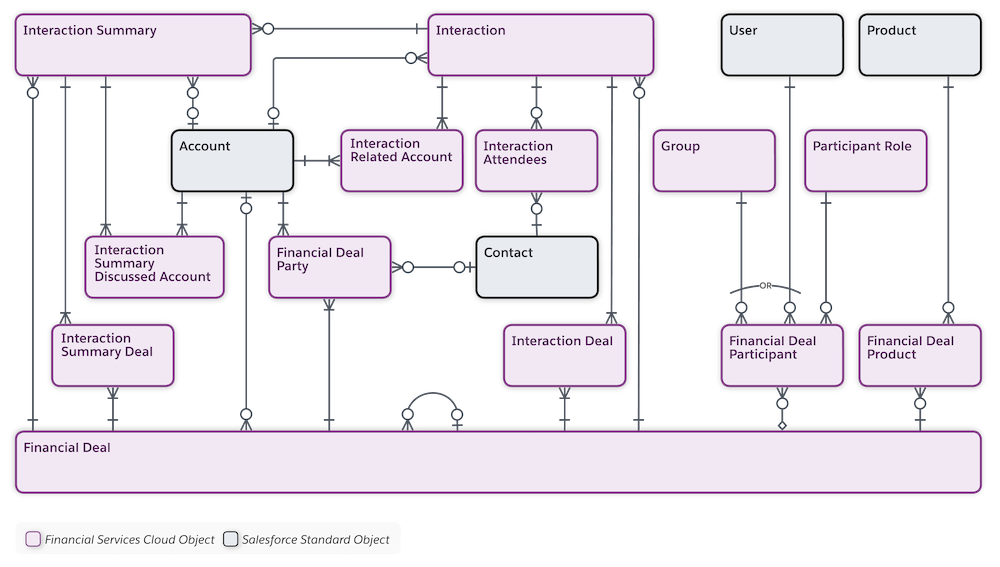
Help bankers and financial advisors build and deepen customer relationships with the interaction summaries data model and Lightning components. Your users can manage every aspect of client and partner interactions and take advantage of structured note-taking and compliant, role-based data sharing options. When you add the Interaction Summaries component to the home or account page, your users can create interaction summaries linked with interactions. And by adding the Interaction Attendees component to the interaction summary or interaction page, they can easily view and add attendees.
Explore and Learn
Watch this video to learn about Interaction Sumaries and its various components.
If you aren’t able to watch the video in full screen, open the
video on a new tab:  Take a Tour of Interaction Summaries
for Financial Services Cloud .
Take a Tour of Interaction Summaries
for Financial Services Cloud .
- Enable and Configure Interaction Summaries
To enable the Interaction Summaries feature in your Salesforce org, enable the Interaction Summary setting. Add the Interaction Summaries Lightning component to the home or account page. On the account page, the Interaction Summaries component shows all interaction summaries for that account. On the Home page, it shows interaction summaries for all accounts that the banker has access to. Next, add the Interaction Attendees Lightning component to the interaction summary or interaction page. - Configure Sharing Settings for Interaction and Interaction Summaries
Give your users access to interaction and interaction summaries using existing Salesforce data sharing features such as organization-wide defaults, role hierarchy, and sharing rules. Like all other standard objects, by default, the Grant Access Using Hierarchies option is enabled for the Interaction and Interaction Summary objects. And you can’t disable this option from the Organization-Wide Defaults list on the Sharing Settings page. As a result, the users in a role hierarchy have access to interaction and interaction summaries for all users that are below them in the role hierarchy. To prevent users from gaining automatic access to interaction and interaction summaries owned by or shared with their subordinates in the hierarchy, disable the Role-Hierarchy-Based Sharing for Interaction Summaries setting. This action disables the Grant Access Using Hierarchies option for the Interaction and Interaction Summary objects. To configure advanced, compliant data sharing rules for interaction and interaction summaries, enable compliant data sharing for the Interaction and Interaction Summary objects respectively. - Work with Interaction Summaries
When creating an interaction summary, bankers and financial advisors can take detailed meeting notes, specify the confidentiality level of the notes, and add action items or next steps. They can share notes that contain confidential information only with relevant stakeholders to maintain compliance. Before their next meeting, they can quickly search or filter interaction summaries to find and review past interaction summaries and be better prepared for the meeting. They can also take advantage of the support for Interaction Summaries component on mobile devices to create, update, or search interaction summaries on the go. - Sync Interactions with Einstein Activity Capture
Keep interactions data in Salesforce up to date, and prioritize interactions that drive deal flow. By using Einstein Activity Capture for Financial Services Cloud, you can automatically sync events from connected email and calendar applications to Salesforce as interaction and interaction attendee records.
