
Update the Address Update OmniScript
Update the name of the Service Process in the cloned version of the FSCAddressUpdate/CreateRequest OmniScript to your Service Process Definition API Name.
Required Editions
| Available in: Lightning Experience |
| Available in: Professional, Enterprise, and Unlimited Editions |
| User Permissions Needed | |
|---|---|
| To set up Address Update service process: | Industries Service Process, Industry Service Excellence, OmniStudio, Document Checklist, Business Rules Engine Case, Service Catalog Request, and Document Checklist Items objects Read, Create, Edit, Delete, View All Records Decision Matrix, Decision Matrix Columns, Decision Matrix Rows, Decision Matrix Versions, Expression Set, Expression Set Object Aliases, Expression Set Step Relationships, Expression Set Versions objects Read, Create, Edit, Delete, View All Records AND Financial Services Cloud Extension OR FSC Service OR Financial Services Cloud Basic OR Financial Services Cloud Standard |
| To use Address Update service process: | Industries Service Process, Industry Service Excellence, OmniStudio, Document Checklist, and Business Rules Engine Case, Service Catalog Request, and Document Checklist Items objects: Read, Create, Edit, Delete Decision Matrix, Decision Matrix Columns, Decision Matrix Rows, Decision Matrix Versions, Expression Set, Expression Set Object Aliases, Expression Set Step Relationships, Expression Set Versions objects: Read, View All Records AND Financial Services Cloud Extension OR Financial Services Cloud Basic OR Financial Services Cloud Standard |
- Enable the OmniStudio Metadata setting. For more information, see Enable OmniStudio Metadata API Support.
- Disable the OmniStudio Managed Package Runtime setting. For more information, see Disable Managed Package Runtime.
- From the App Launcher, find and select OmniStudio.
- In the OmniStudio app, from the navigation bar, select OmniScripts.
- Select FSCAddressUpdate/CreateRequest OmniScript.
-
Click Deactivate.
You can make changes only when an OmniScript is deactivated.
-
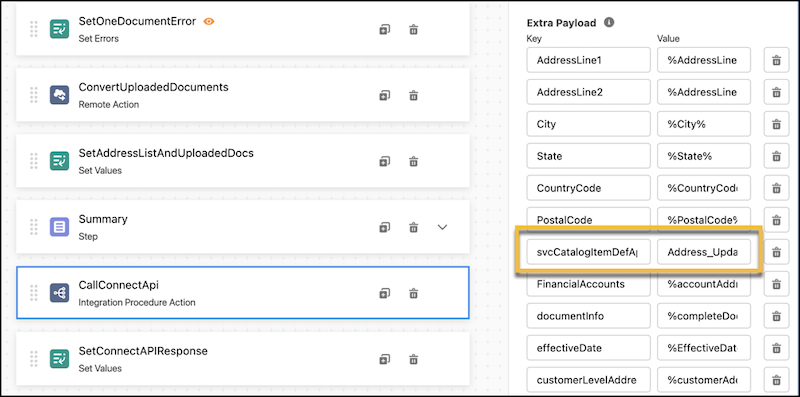
Click CallConnectAPI - Integration Procedures Action.
- In the pane, expand Remote Properties.
-
In Extra Payload, update the svcCatalogItemDefApiName value to your Service Process
Definition API Name from the Create an Address Update Service Process.
-
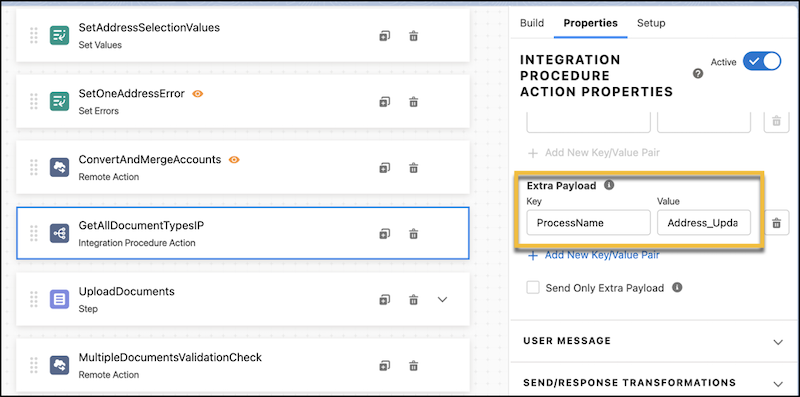
Click GetAllDocuemntTypesIP Integration Procedure Action.
- In the pane, expand Remote Properties.
-
In Extra Payload, update the ProcessName value to your Service Process Definition API
Name from the Create an Address Update Service Process.
- To save your changes, click Activate Version.
