
Assign Fee Reversal Service Process Permissions to Users
To configure the Fee Reversal service process, assign permissions.
Required Editions
| User Permissions Needed | |
|---|---|
| To set up Fee Reversal service process: | Industries Service Process, Industry Service Excellence, and OmniStudio Case and Service Catalog Request objects Read, Create, Edit, Delete, View All Records AND Financial Services Cloud Extension OR Financial Services Cloud Basic OR Financial Services Cloud Standard |
| To use Fee Reversal service process: | Industries Service Process, Industry Service Excellence, and OmniStudio Case, and Service Catalog Request Items objects: Read, Create, Edit, Delete AND Financial Services Cloud Extension OR Financial Services Cloud Basic OR Financial Services Cloud Standard |

Note Configure your OmniStudio permissions for users.
-
Assign permission set licenses.
- In Setup, in the Quick Find box, enter Users, then click Users.
- Click a user.
- In Permission Set License Assignments, click Edit Assignments.
- Select Industry Service Process, Industry Service Excellence, and OmniStudio, and Financial Services Cloud Extension, or Financial Services Cloud Basic, or Financial Services Cloud Standard.
-
Save your changes.
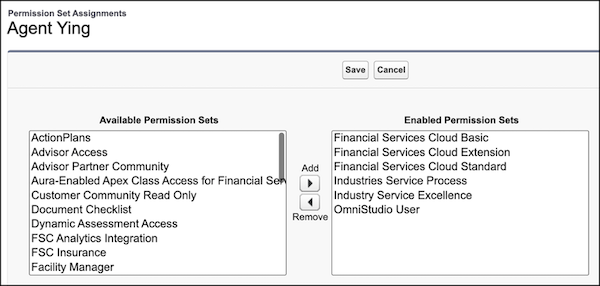
-
Update field level security.
- In Setup, in the Quick Find box, enter Profiles, then click Profiles.
- Click a profile.
- In Field-Level Security, click View for the Case object.
- Click Edit.
- Select Read Access and Edit Access for Account Name.
-
Save your changes.
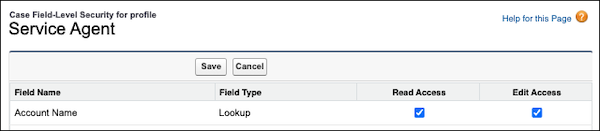
- Similarly, update the field-level security for the Case Source field on the Case object. For the profiles using the Fee Reversal Service Process, select Visible and deselect Read-Only.
-
Update object permissions.
- In Setup, in the Quick Find box, enter Profiles, and then select Profiles.
- Click Edit for a profile.
- In Standard Object Permissions, select Read, Create, and Edit for Case object.
- Save your changes.
- Complete these steps for Service Catalog Requests, Service Catalog Item Dependencies, and Service Catalog Request Related Items objects.
Did this article solve your issue?
Let us know so we can improve!
