
Clone and Activate the Fee Reversal Salesforce Flow
Use the Fee Reversal Salesforce Flow Orchestration to show your users step-by-step instructions to submit a fee reversal for a client. You can customize the flow to meet your business needs.
Required Editions
| User Permissions Needed | |
|---|---|
| To set up Fee Reversal service process: | Industries Service Process, Industry Service Excellence, and OmniStudio Case and Service Catalog Request objects Read, Create, Edit, Delete, View All Records AND Financial Services Cloud Extension OR Financial Services Cloud Basic OR Financial Services Cloud Standard |
| To use Fee Reversal service process: | Industries Service Process, Industry Service Excellence, and OmniStudio Case, and Service Catalog Request Items objects: Read, Create, Edit, Delete AND Financial Services Cloud Extension OR Financial Services Cloud Basic OR Financial Services Cloud Standard |
Clone the Fee Orchestrate template and activate a new version in Salesforce. The orchestration provides a declarative process automation that contains a sequence of stages and steps. A stage contains interactive and background steps. Interactive steps have an assigned user and execute a designated screen flow. Background steps execute an autolaunched flow that’s executed by the system and requires no user interaction. The interactive and background steps are required to fulfill the request to reverse a fee.
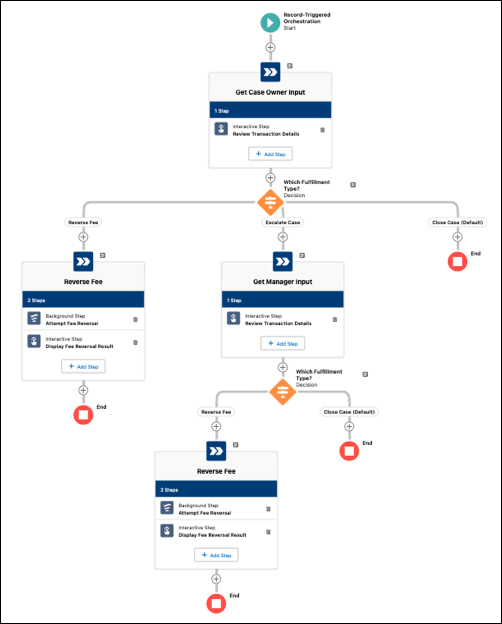
The Fee Reversal Flow Orchestrator allows users to process a fee reversal request with input from the case owner or a manager:
- Review Fee Reversal: Allows a case owner or manager to review and override transaction details for the fee reversal request associated with the service catalog request ID passed into the flow. The case owner reviews the transaction details and reversal percentage for the fee reversal request. The case owner can either submit the reversal request for processing or escalate to their manager, for example, if the customer requests a higher reversal percentage. When escalated, manager can override the fee reversal percentage.
- Attempt Fee Reversal: Calls an asynchronous action to process a fee reversal request in the core banking system through an API call to MuleSoft.
- Confirm Fee Reversal: Closes the case passed into the flow when a previous call to the Industries Apex Asynchronous Request action is successful and displays a success or failure message to the flow user.
- In Setup, in the Quick Find box, enter Flow, and then click Flow.
- Click New Flow.
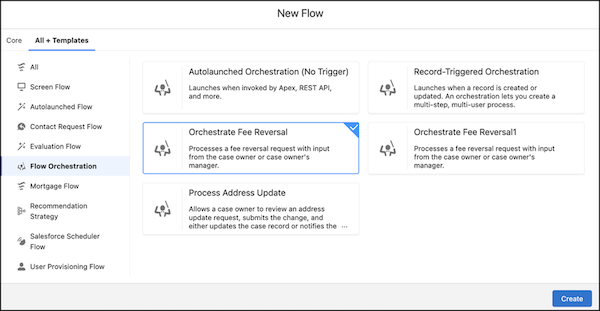
- Click All + Templates and select Flow Orchestration.
-
Select Orchestrate Fee Reversal and click
Create.
-
Click Save.
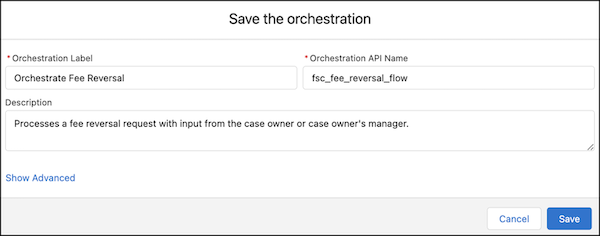
- Enter an Orchestration Label and Description.
- Enter the Orchestration API Name: fsc_fee_reversal_flow.
-
Click Save.
-
Assign a case owner.
- On the fsc_fee_reversal_flow orchestration screen, under Get Case Owner Input, select Review Transaction Details.
-
Under Select Someone to Complete the Action, for
Asignee Type, select User, and for
User Resource, select a user who has the necessary permissions to
complete the flow.
You can also assign the step to a queue whose members have the necessary permissions to complete the flow. For Asignee Type, select Queue, and for Queue, select an appropriate queue.
- Save your changes.
- Under Get Manager Input, select Review Transaction Details and assign a user or a queue who has the necessary permissions to complete the flow.
- Save your changes.
- Under Reverse Fee, select Display Fee Reversal Result and assign a user or a queue who has the necessary permissions to complete the flow.
- Save your changes.
- Save and activate the Fee Reversal Flow Orchestration.
