
Create Integration Definitions for Fee Reversal Service Process
The Fee Reversal service process uses two integration definitions, fee_reversal_integration_definition and FSC_GetTransaction.
Required Editions
| User Permissions Needed | |
|---|---|
| To set up Fee Reversal service process: | Industries Service Process, Industry Service Excellence, and OmniStudio Case and Service Catalog Request objects Read, Create, Edit, Delete, View All Records AND Financial Services Cloud Extension OR Financial Services Cloud Basic OR Financial Services Cloud Standard |
| To use Fee Reversal service process: | Industries Service Process, Industry Service Excellence, and OmniStudio Case, and Service Catalog Request Items objects: Read, Create, Edit, Delete AND Financial Services Cloud Extension OR Financial Services Cloud Basic OR Financial Services Cloud Standard |
The fee_reversal_integration_defintion integration definition stores these two values:
- Named credential: The external endpoint where fee reversal API is implemented (example MuleSoft).
- Apex provider: It handles the logic of calling the endpoint and updating the SvcCatalogReqExtdAttrVal records for the Fee Reversal response attributes with the API response.
The FSC_GetTransaction integration definition calls the API to get the Financial Account Transactions from the MuleSoft endpoint where the external banking systems have been deployed.

- In Setup, in the Quick Find box, enter Integrations Definitions, and then select Integrations Definitions.
- Click + New.
-
Create an Integration Definition with these settings:
- For Type, select Apex Defined.
-
For Name and Developer Name, enter
fee_reversal_integration_definition.
 Warning The Developer Name must be exactly fee_reversal_integration_definition. This name is referenced by the Fee Reversal Salesforce Flow and is required for the Install from Template process to work correctly.
 - Click Next.
- For Apex Class, select auto_fsc_common_service_processes.FeeReversalProcessBaseIntegrationProvider.
-
For Attribute Value, select the new named credential that you create.
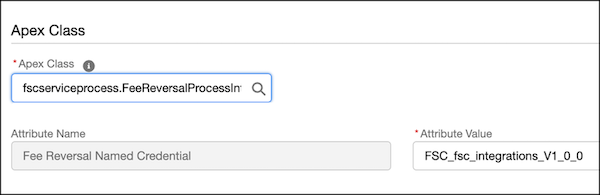
- Save the definition and then click Activate.
-
Create a second Integration Definition with these settings:
- For Type, select Apex Defined.
- For Name and Developer Name, enter FSC_GetTransaction.
- Click Next.
- For Apex Class, select auto_fsc_common_service_processes.TransactionServiceBaseIntegrationProvider.
- Save the definition and click Activate.
