
Review and Complete a Fee Reversal Request
Review a request to reverse a fee on a client’s account. To complete the request, select a fulfillment type and reversal reason.
Required Editions
| Available in: Lightning Experience |
| Available in: Professional, Enterprise, and Unlimited Editions where Financial Services Cloud is enabled |
| User Permissions Needed | |
|---|---|
| To set up Fee Reversal service process: | Industries Service Process, Industry Service Excellence, and OmniStudio Case and Service Catalog Request objects Read, Create, Edit, Delete, View All Records AND Financial Services Cloud Extension OR Financial Services Cloud Basic OR Financial Services Cloud Standard |
| To use Fee Reversal service process: | Industries Service Process, Industry Service Excellence, and OmniStudio Case, and Service Catalog Request Items objects: Read, Create, Edit, Delete AND Financial Services Cloud Extension OR Financial Services Cloud Basic OR Financial Services Cloud Standard |
-
On the Cases list view, select the case number for a new fee reversal service
request.
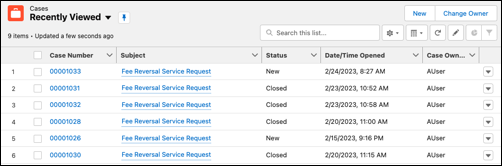
-
Review and select a fulfillment type for the fee reversal service request.
- Click the Service Request tab.
- Review the service request details.
-
Select a Fulfillment Type.
- Reverse Fee: Reverse the fee and close the case.
- Escalate Case: Escalate the case to a manager.
- Close Case: Close the case without reversing the fee.
- Select a Reversal Reason.
-
Click Next.
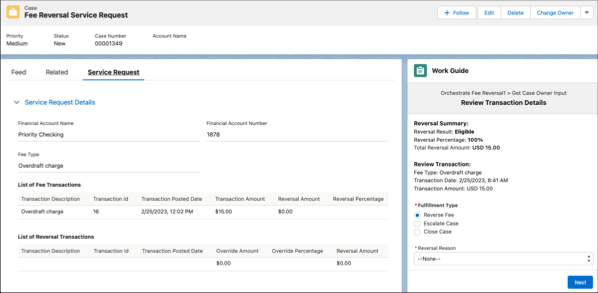
Fee Reversal Service Request ScreenField Label Description Financial Account Name The name of the financial account. Financial Account Number ID that uniquely identifies the financial account in an external data source. Fee Type The fee type of the transaction. Transaction Description The description of the original transaction. Transaction ID The ID of the original transaction. Transaction Posted Date The posted date and time of the original transaction. Transaction Amount The original transaction amount that was charged to the customer. Reversal Amount The amount that is eligible to be reversed. Reversal Percentage The percentage of the original amount that is eligible to be reversed. Override Amount The overridden reversal amount. Override Percentage The percentage of the original amount that is overridden. Reversal Result The result of the fee reversal. Total Reversal Result The amount that is reversed. Fulfillment Type The next step for the fee reversal request. Reversal Reason The reason to reverse the fee.
Did this article solve your issue?
Let us know so we can improve!
