
Create an Integration Definition for Address Update Service Process
The Address Update Service Process uses address_update_integration_definition integration definition. It calls the API to update the client’s address and the financial accounts in the core banking system. You can use this integration definition, or create your own.
Required Editions
| Available in: Lightning Experience |
| Available in: Professional, Enterprise, and Unlimited Editions |
| User Permissions Needed | |
|---|---|
| To set up Address Update service process: | Industries Service Process, Industry Service Excellence, OmniStudio, Document Checklist, Business Rules Engine Case, Service Catalog Request, and Document Checklist Items objects Read, Create, Edit, Delete, View All Records Decision Matrix, Decision Matrix Columns, Decision Matrix Rows, Decision Matrix Versions, Expression Set, Expression Set Object Aliases, Expression Set Step Relationships, Expression Set Versions objects Read, Create, Edit, Delete, View All Records AND Financial Services Cloud Extension OR FSC Sales OR Financial Services Cloud Basic OR Financial Services Cloud Standard |
| To use Address Update service process: | Industries Service Process, Industry Service Excellence, OmniStudio, Document Checklist, and Business Rules Engine Case, Service Catalog Request, and Document Checklist Items objects: Read, Create, Edit, Delete Decision Matrix, Decision Matrix Columns, Decision Matrix Rows, Decision Matrix Versions, Expression Set, Expression Set Object Aliases, Expression Set Step Relationships, Expression Set Versions objects: Read, View All Records AND Financial Services Cloud Extension OR Financial Services Cloud Basic OR Financial Services Cloud Standard |

- In Setup, in the Quick Find box, enter Integrations Definitions, and then select Integrations Definitions.
- Click + New.
-
Create an Integration Definition with these settings:
- For Type, select Apex Defined.
-
For Name and Developer name, enter
address_update_integration_definition.
 Warning The Developer name must be exactly address_update_integration_definition. This name is referenced by the Address Update Salesforce Flow and is required for the Install from Template process to work correctly.
 - Click Next.
- For Apex Class, select auto_fsc_common_service_processes.AddressUpdateProcessBaseIntegrationProvider.
-
For Attribute Value, select the new named credential that you create.
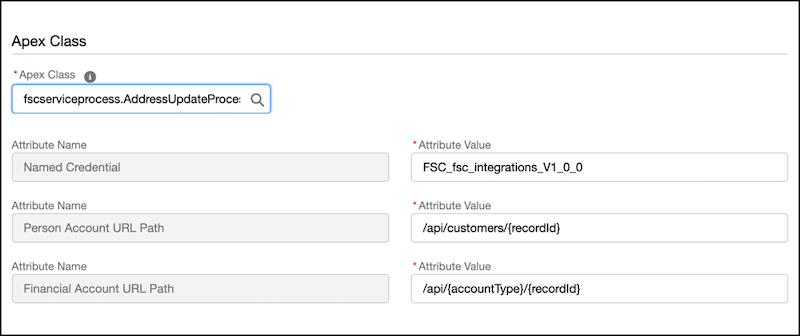
- Save the definition and then click Activate.
