
Assign Address Update Service Process Permissions to Users
To configure the Address Update Service Process, assign permissions.
Required Editions
| Available in: Lightning Experience |
| Available in: Professional, Enterprise, and Unlimited Editions |
| User Permissions Needed | |
|---|---|
| To set up Address Update service process: | Industries Service Process, Industry Service Excellence, OmniStudio, Document Checklist, Business Rules Engine Case, Service Catalog Request, and Document Checklist Items objects Read, Create, Edit, Delete, View All Records Decision Matrix, Decision Matrix Columns, Decision Matrix Rows, Decision Matrix Versions, Expression Set, Expression Set Object Aliases, Expression Set Step Relationships, Expression Set Versions objects Read, Create, Edit, Delete, View All Records AND Financial Services Cloud Extension OR FSC Sales OR Financial Services Cloud Basic OR Financial Services Cloud Standard |
| To use Address Update service process: | Industries Service Process, Industry Service Excellence, OmniStudio, Document Checklist, and Business Rules Engine Case, Service Catalog Request, and Document Checklist Items objects: Read, Create, Edit, Delete Decision Matrix, Decision Matrix Columns, Decision Matrix Rows, Decision Matrix Versions, Expression Set, Expression Set Object Aliases, Expression Set Step Relationships, Expression Set Versions objects: Read, View All Records AND Financial Services Cloud Extension OR Financial Services Cloud Basic OR Financial Services Cloud Standard |
-
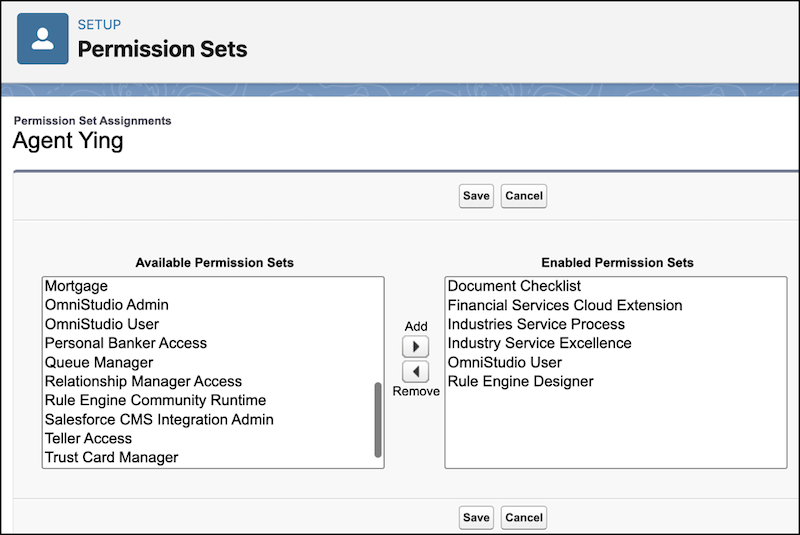
Assign permission set licenses.
- In Setup, in the Quick Find box, enter Users, then click Users.
- Click a user.
- In Permission Set License Assignments, click Edit Assignments.
- Select Industry Service Process, Industry Service Excellence, OmniStudio, Document Checklist, Rule Engine Runtime, and Financial Services Cloud Extension, or Financial Services Cloud Basic, or Financial Services Cloud Standard.
-
Save your changes.
-
Update field level security.
- In Setup, click Object Manager.
- In the Quick Find box, enter Case, then click Case.
- Click Fields & Relationships.
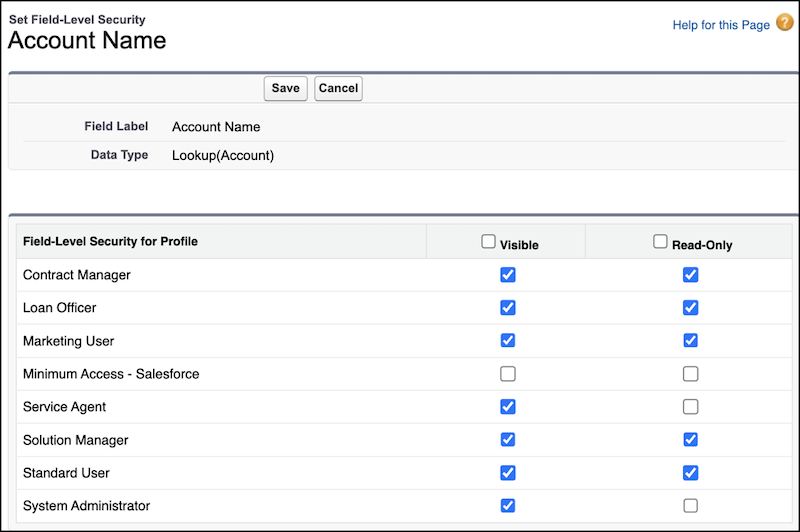
- Click Account Name.
- Click Set Field-Level Security.
- Select Visible for the profiles using Address Update Service Process.
- Deselect Read-Only for the profiles using Address Update Service Process.
-
Save your changes.
- Similarly, update the field-level security for the Case Source field on the Case object. For the profiles using the Address Update Service Process, select Visible and deselect Read-Only.
-
Update object permissions.
- In Setup, in the Quick Find box, enter Profiles, and then select Profiles.
- Click Edit.
- In Standard Object Permissions, select Read, Create, Edit, Delete, and View All Records for Document Checklist Items object.
-
Save your changes.

- Complete these steps for Cases, Service Catalog Requests, Service Catalog Item Dependencies, Service Catalog Request Related Items, Expression Set, Expression Set Object Aliases, Expression Set Step Relationships, Expression Set Versions, Decision Matrix, Decision Matrix Columns, Decision Matrix Rows, and Decision Matrix Versions objects.
