
You are here:
Use Consumer Banking Starter Analytics (Managed Package)
The Consumer Banking Starter Analytics gets you started with a dashboard personal bankers can use to move clients up the value chain.

Note Consumer Banking Starter Analytics is included with CRM Analytics for Financial Services,
which is available at an extra charge for customers with Financial Services Cloud Basic or
Standard licenses and the FSCAnalyticsPlus (CRM Analytics for Financial Services) license. See
Deploy CRM Analytics for Financial Services for
complete deployment instructions.
The Consumer Banking Starter Analytics app helps personal bankers grow assets under management (AUM) and cross-sell financial services products. Visualizations include client AUM, held away, and market share. You also get insight into referrals and opportunities to help start new relationships.
-
From the app picker
 , select Analytics
Studio to open the CRM Analytics home page.
, select Analytics
Studio to open the CRM Analytics home page.
- Under Browse in the left column, select All Items.
- Select the Apps tab, then click Consumer Banking Starter Analytics. If you can’t immediately find it, consult your Salesforce administrator to find out the name they gave it when creating the app.
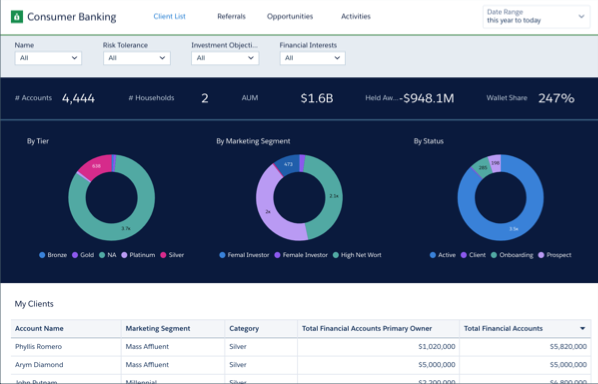
The app’s Consumer Banking dashboard opens to the Client List page.
View the other pages by clicking the links across the top.
- Client List: Use this page to segment your client list according to key characteristics. View client market segments (high net worth, gender, and so on) and the status of their relationships (active, prospect, dormant, and so on). You can also filter by individual client, their risk tolerance, investment objectives, and financial interests. And view details about each of your clients, including the total value of their financial accounts.
- Referrals: Shows status of referrals over time, including the number created and converted, conversion rate, and the revenue generated. You can also see if referrals have been contacted and if they’re close to converting to client status. Also, view the types of services clients say they’re interested in.
- Opportunities: Use the metrics on this page to see the total pipeline value, closed won and lost business, and win rate. Also, see details for each opportunity, including stage, amount, and forecast category.
- Activities: See breakdowns of your team’s activities. View metrics for activities according to their purpose (client retention, onboarding, and prospecting) and type (such as call, meeting, email). Also see activities for each account.
Did this article solve your issue?
Let us know so we can improve!
