
You are here:
Use the My Households Dashboard (Managed Package)
Identify households for appropriate action based on portfolio value. Start by viewing households by their wallet share and the length of time they’ve worked with you. Dig deeper to view households sorted by their AUM category and size. Not all metrics from accounts roll up to the household level, so the dashboard shows separate pages for top households and demographics.

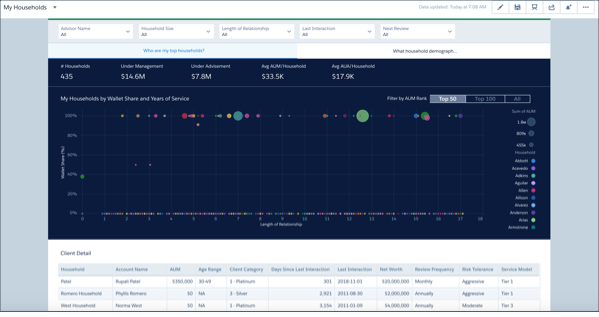
Who Are My Top Households? Page
The dashboard opens to this page, which organizes households based on their wallet share and length of relationship with the company. The visualization helps you prioritize who receives your attention. Select Top 50, Top 100, or All to view clients in those categories. Click a bubble in the chart to see details about the client in the following table.
What Household Demographics Do I Serve? Page
Profiles your households according to their AUM and size. Click a bar to view details about households with that profile in the following table.
