
You are here:
Use the My Clients Dashboard (Managed Package)
Financial advisors can use this dashboard to identify clients for appropriate action based on recency of interactions with them, attrition risk, or portfolio value. Start by viewing client activities that indicate they need attention from you. Then dig deeper to see your top clients, profile your client population, and see if clients are reaching their financial goals.

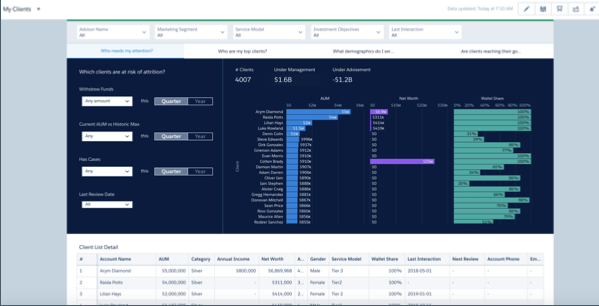
Who Needs My Attention? Page
The dashboard opens to this page, which lets you single out clients at risk of possible attrition or who needs extra attention. Set the filters at left to see clients with large withdrawals or historically low AUM (because of market losses). Also quickly learn about clients who have logged support cases or whose accounts you haven’t reviewed in a while. View the results by quarter or by year.
In the chart on the right, click any bar to view details for a client in the following Client List Detail table.
Who Are My Top Clients? Page
Organizes specific clients based on their wallet share and length of relationship with the company to help you prioritize who receives your attention. Select Top 50, Top 100, or All to change the selection. Click a bubble in the chart to see details about the client in the following table.
What Demographics Do I Serve? Page
Profiles typical clients and high-net-worth clients. Categorizes clients by net worth, length of relationship, geography, and other criteria. In either the top or bottom chart groups, select # to view by number of clients or $ to view by asset totals. Click a chart element (bar, map, circle segment) to view details in the following table.
Are Clients Reaching Their Goals? Page
Identify clients who need help with progressing toward their financial goals. Shows progress toward goals by client type, percent completion of goals, and size of goals. Change Filter by % Complete selection to sort clients according to how far along they are in achieving their goals. Change Years Until Target selection to sort by how long they have until they reach their goals. Click a bar or bubble to view details in the following table.
