Prefill
Health Cloud
Assessment
Questions with Previously Submitted Responses
Save the effort of entering or requesting the same information multiple times. Improve
patient interactions by verifying auto-populated data from previous assessment responses and
focusing more energy on the
patient’s
current concerns.
Required Editions
Available in: Lightning Experience
Available in: Enterprise and Unlimited Editions with Health Cloud
or Life Sciences Cloud
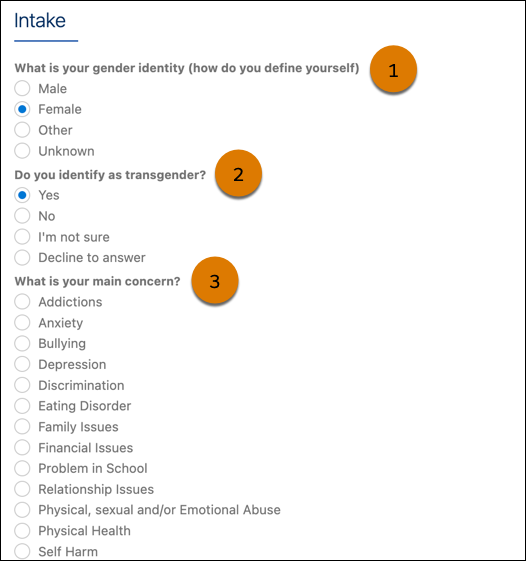
Be selective when you set up questions to prefill. For example, prefill questions with
answers that aren't likely to change (1), (2). Don't prefill questions about current
symptoms. Questions that you don’t set up to prefill appear blank (3).
Enable and configure prefilled questions by using the Discovery Framework data model. To
designate specific questions to prefill, use the prefill assessment question decision table
and the prefill with decision table integration procedure.
Keep
in mind that:
On Experience Cloud sites, assessments show prefilled questions only for authenticated
users, not for guest users.
To
use prefilled questions, community users must have Read access to the
Account, Case, Contact, Saved for Later, Omni Process, and Response Context fields on
the Assessment object. If you don’t want community users to have Read access to these
fields, remove the corresponding filters from the GetAssessmentIdForContext Omnistudio
Data Mapper.
Questions are prefilled only on newly opened assessments. If an assessment is saved as
a draft, its questions aren’t evaluated or prefilled when the user opens it again to
complete
it.
To prefill a question, the prefill with decision table integration procedure
(DiscoveryFramework_PrefillWithDecisionTable) uses the
responses
from the most recently completed assessment. The integration procedure doesn’t use
responses from assessments saved as drafts.
We use three kinds of cookies on our websites: required, functional, and advertising. You can choose whether functional and advertising cookies apply. Click on the different cookie categories to find out more about each category and to change the default settings.
Privacy Statement
Required Cookies
Always Active
Required cookies are necessary for basic website functionality. Some examples include: session cookies needed to transmit the website, authentication cookies, and security cookies.
Functional Cookies
Functional cookies enhance functions, performance, and services on the website. Some examples include: cookies used to analyze site traffic, cookies used for market research, and cookies used to display advertising that is not directed to a particular individual.
Advertising Cookies
Advertising cookies track activity across websites in order to understand a viewer’s interests, and direct them specific marketing. Some examples include: cookies used for remarketing, or interest-based advertising.