Create Sharing Rules for Users to Access Omnistudio Components and Records on Your
Site
Provide authenticated site users with access to Omnistudio components and care
plan-related records. Create criteria-based sharing rules for the Omni Data Transformation, Omni
Process, Omni UI Card objects, and for other objects relevant to care plans.
Required Editions
Available in: Lightning Experience
Available in: Enterprise and Unlimited Editions
User Permissions
Needed
To create sharing rules:
Manage Sharing
From Setup, in the Quick Find box, enter Sharing Settings, then
select Sharing Settings.
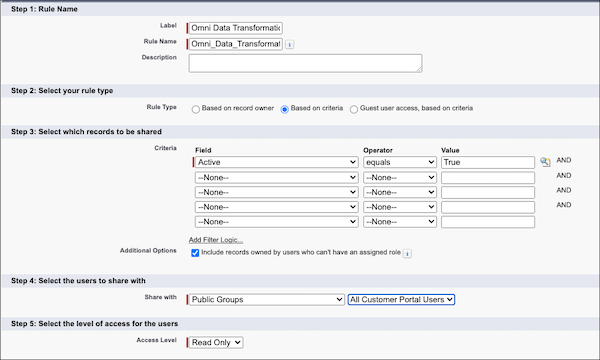
In the Sharing Rules related list for Omni Data Transformation, click
New.
Enter
the label name and rule name.
Note The label name appears on the user interface. The rule name is a unique name used by the
API and managed packages.
If necessary, enter a description of the sharing rule.
For the rule type, select Based on criteria.
Under Select which records to be shared, select Active for
Field, equals for Operator, and enter True
for Value.
Under Select the users to share with, select Public Groups and
All Customer Portal Users.
Save your changes.
Similarly, create sharing rules for the Omni Process, Omni UI Card, and other relevant
objects such as Account, Case, Care Plan Template, Problem Definition, Goal Definition,
Action Plan, Action Plan Template, Assessment, and External Assessment Definition.
We use three kinds of cookies on our websites: required, functional, and advertising. You can choose whether functional and advertising cookies apply. Click on the different cookie categories to find out more about each category and to change the default settings.
Privacy Statement
Required Cookies
Always Active
Required cookies are necessary for basic website functionality. Some examples include: session cookies needed to transmit the website, authentication cookies, and security cookies.
Functional Cookies
Functional cookies enhance functions, performance, and services on the website. Some examples include: cookies used to analyze site traffic, cookies used for market research, and cookies used to display advertising that is not directed to a particular individual.
Advertising Cookies
Advertising cookies track activity across websites in order to understand a viewer’s interests, and direct them specific marketing. Some examples include: cookies used for remarketing, or interest-based advertising.