
You are here:
Learn about the Patient Waitlist Flows
Learn about the flows that help you manage patient waitlists. Configure and activate three of the flows from flow templates. The flows are easy to find in Flow Builder as the name of each flow is prepended by “Patient Waitlist”. The flow templates are only supported in Salesforce Scheduler.
Required Editions
Available in: Lightning Experience Available in: Enterprise and Unlimited Editions with Health Cloud |
Patient Waitlist Flows
This diagram shows when the Patient Waitlist flows launch during Waitlist Management.
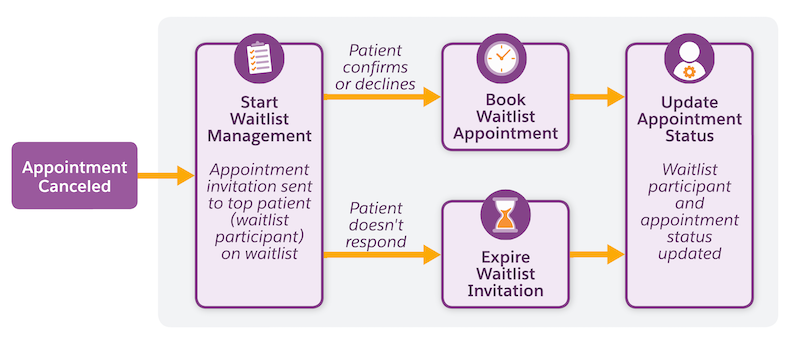
Start Waitlist Management
This record-triggered flow runs immediately when an existing appointment is canceled but is available for a different patient. It doesn't run when you create new shifts or if the appointment is canceled because the practitioner is unavailable.
This flow determines whether the canceled appointment is with a single resource or with multiple resources. If the appointment is with multiple resources, the flow ends. The appointment becomes available to anyone who's searching for an appointment.
If the canceled appointment is a single-resource appointment, the flow checks whether there's enough lead time to offer the appointment to a patient (waitlist participant). The lead time matches the buffer time you configure in the Waitlist Management Settings.
If there’s enough lead time, the flow creates an appointment invitation and sends it via email to the first patient on the waitlist for this appointment. The flow bases the email on the WaitlistAppointmentInvitation email template, which you can access from the Classic Email Templates page in Setup.
If the patient doesn’t have an email, the flow sends an invitation to the next patient on the waitlist for this appointment. If the patient doesn’t respond by a set deadline, the flow sends the invitation to the next patient on the waitlist.

Book Waitlist Appointment
This screen flow guides patients on a waitlist to confirm or reject appointment invitations in the self-scheduling portal.
This flow determines whether the invitation is still valid. If the invitation has expired, the flow shows an expiration message to the user. If the invitation hasn’t expired, the flow shows the appointment details. The patient can confirm or decline the appointment invitation.
Expire Waitlist Appointment Invitations
This record-triggered flow runs at a scheduled time after an appointment invitation record is created. Use the Offset Number and Offset Options in the scheduled path to set the time that elapses before the scheduled flow path runs. For example, set the offset number to 4 and the offset option to Hours After. In this scenario, if the Start Waitlist Management flow creates an appointment invitation record at 9 AM, the Expire Waitlist Appointment Invitations flow won’t trigger until 1 PM.
If a patient doesn’t accept the appointment invitation before it expires, the flow updates the service appointment status to Canceled and updates the service appointment invitation status to Inactive.
Update Appointment Status
This autolaunched flow updates the service appointment status and waitlist participant status based on the patient’s response to a waitlist appointment invitation.
This flow launches from the Book Waitlist Appointment flow if the patient confirms or declines an appointment. The flow launches from the Expire Appointment Invitations flow if the patient doesn’t respond to the invite before it expires.
If the patient declines or doesn’t respond to the appointment invite, the patient remains on the waitlist and is available for future waitlist appointment invitations.
This flow also checks if a patient has scheduled a future appointment before joining the waitlist. The flow cancels the future appointment when the patient accepts an invitation for the same appointment type via the waitlist. However, if the patient declines or doesn’t respond to the invitation, the flow retains the original appointment.
It’s not necessary to configure the Patient Waitlist: Update Appointment Status flow because it’s active by default.
