Understand the Patient’s Story in the Behavioral Health App
Glance through a patient’s profile, insurance plans, and medication statements. View a
timeline of a patient’s key health events.
Required Editions
Available in: Lightning Experience
Available in: Enterprise and Unlimited Editions with Health Cloud
or Life Sciences Cloud
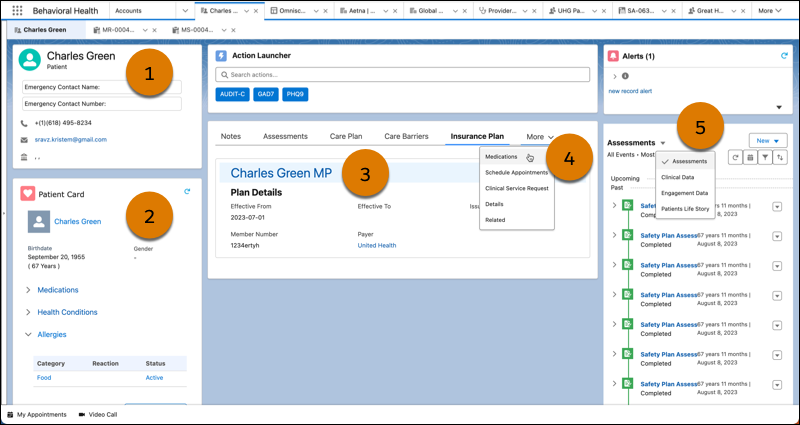
The Behavioral Health app uses these Health Cloud components to support behavioral health
and intake specialists. Keep in mind that your Salesforce admin can customize components
so your app can look different than our example.
Profile
The Profile card (1) includes basic member details, like name, age, and gender. It
also lists the emergency contact and their phone number. To send an email to the
member, click the email address.
Patient Card
The Patient Card (2) shows critical information about the member’s health, including
medications, health conditions, allergies, and immunizations. You can create related
records right from the patient card.
Member Plans
The Member Plan tab (3) provides a list of the member’s insurance plans. View
essential information for each member plan, including start and end date, issuer
number, Payer ID and more. Click the plan name to quickly navigate to the member
plan record.
Patient Medication Manager
On the Medication tab (4), providers and care coordinators perform medication
reconciliation of patients' medication list and detect potential drug-to-drug
interactions. Providers can enter medication requests from the Patient Card and
timeline.
Enhanced Timeline
The Timeline (5) shows a comprehensive, chronological view of assessments, clinical
data, engagement data, a patient’s life story, and other events added by your admin.
Select date ranges to view a specific period in the timeline, and filter the
timeline to view specific types of events.
Did this article solve your issue?
Let us know so we can improve!
Loading
Salesforce Help | Article
Cookie Consent Manager
General Information
Required Cookies
Functional Cookies
Advertising Cookies
General Information
We use three kinds of cookies on our websites: required, functional, and advertising. You can choose whether functional and advertising cookies apply. Click on the different cookie categories to find out more about each category and to change the default settings.
Privacy Statement
Required Cookies
Always Active
Required cookies are necessary for basic website functionality. Some examples include: session cookies needed to transmit the website, authentication cookies, and security cookies.
Functional Cookies
Functional cookies enhance functions, performance, and services on the website. Some examples include: cookies used to analyze site traffic, cookies used for market research, and cookies used to display advertising that is not directed to a particular individual.
Advertising Cookies
Advertising cookies track activity across websites in order to understand a viewer’s interests, and direct them specific marketing. Some examples include: cookies used for remarketing, or interest-based advertising.