Analyze the efficiency of your referral processes. Understand the amount of time it takes
your team to convert referrals to patients, and assess whether you have enough resources to manage
incoming and outgoing referrals.
Required Editions
Available in: Lightning Experience
Available in: Enterprise and Unlimited Editions with Health
Cloud
Keep in mind that your Salesforce admin can customize components so your dashboard can look
different than our example.
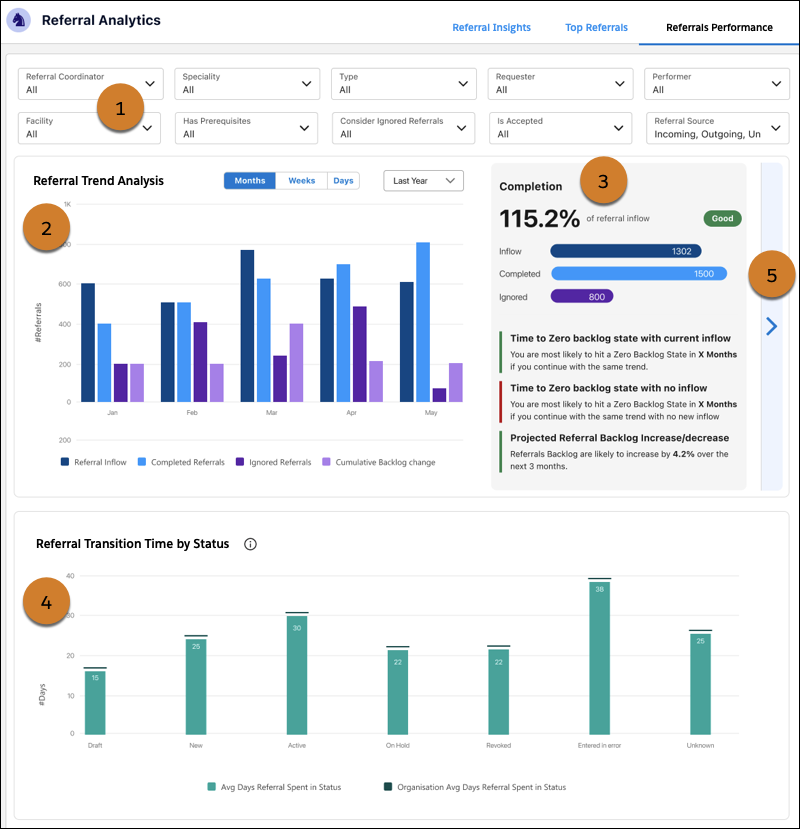
Use filters to narrow in on referrals that most interest you (1).
Compare the referral inflow, completion, and cumulative backlog over months, weeks, or
days (2). Use predictive analytics to assess your team’s capacity to process referrals
(3).
Understand the average number of days referrals remain in a given status. Hover over chart
elements and use heatmaps to view the distribution of referrals across days (4).
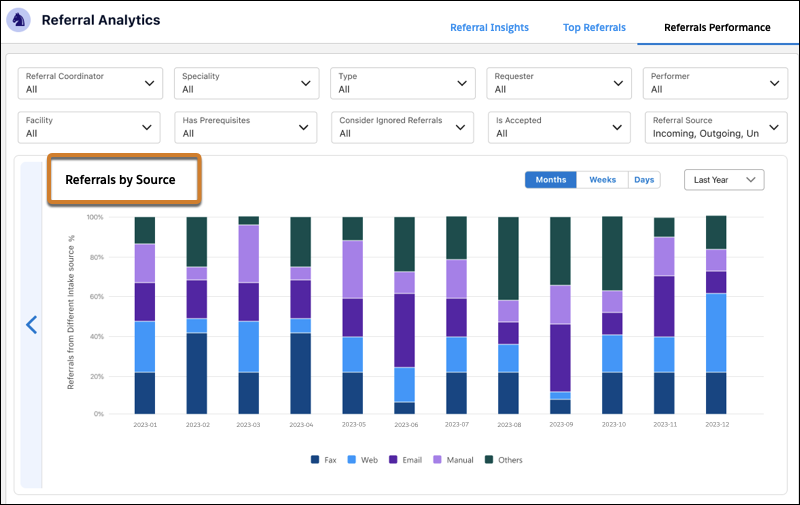
Click > to switch between the backlog visualization and an analysis of referral intake
sources such as faxes, emails, and web forms (5).
The dashboard relies on data from clinical service requests. If information is missing from
clinical service requests, widgets that use that information appear empty.
Did this article solve your issue?
Let us know so we can improve!
Loading
Salesforce Help | Article
Cookie Consent Manager
General Information
Required Cookies
Functional Cookies
Advertising Cookies
General Information
We use three kinds of cookies on our websites: required, functional, and advertising. You can choose whether functional and advertising cookies apply. Click on the different cookie categories to find out more about each category and to change the default settings.
Privacy Statement
Required Cookies
Always Active
Required cookies are necessary for basic website functionality. Some examples include: session cookies needed to transmit the website, authentication cookies, and security cookies.
Functional Cookies
Functional cookies enhance functions, performance, and services on the website. Some examples include: cookies used to analyze site traffic, cookies used for market research, and cookies used to display advertising that is not directed to a particular individual.
Advertising Cookies
Advertising cookies track activity across websites in order to understand a viewer’s interests, and direct them specific marketing. Some examples include: cookies used for remarketing, or interest-based advertising.